Processing Variables (VAR)
What is it?
This page documents each field on the SMAVAR screen within SMA/MANAGER, which controls the maximum number of concurrent OpCon jobs, how WFL and task failures are detected and reported, the frequency of checkpoint file writes, statistics collection, and the family used for MCP Agent temporary files.
- Use this page to tune how the MCP Agent determines job success or failure, including configuring Fail Code immediacy, task-level checking, and Fail Reset messaging to match the site's WFL coding standards.
- Use this page when adjusting the maximum concurrent jobs limit, since that change requires removing checkpoint and tracking files and restarting the MCP Agent before the new value takes effect.
The Processing Variables screen allows you to configure the following:
- Variables that affect the number of permissible concurrent jobs to be monitored
- Variables that alter the default determination of success or failure of a job
- The level of granularity as it pertains to job status reporting
- Whether and how frequently checkpoints are taken
- An alternate family to be used for temporary files created by the MCP Agent
SMA Configuration and Operations Manager: SMAVAR
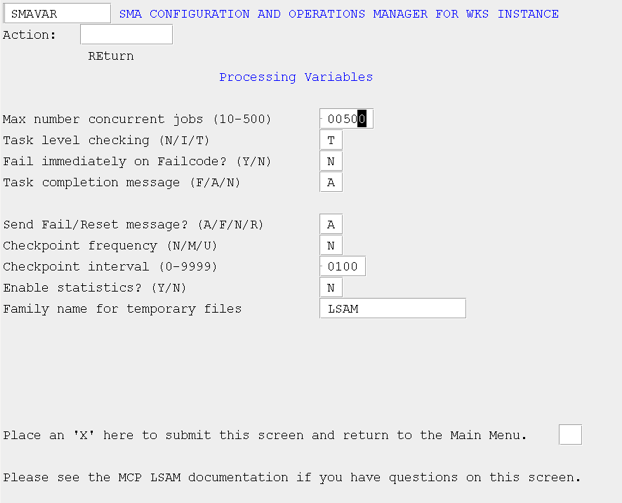
MCP LSAM Configuration Settings: Processing Variables
The following sections describe each field on the SMAVAR screen. A default value is the value the MCP Agent sets when it creates a new configuration file.
Max number concurrent jobs
This field is a numeric value representing the maximum number of jobs initiated by OpCon that should be monitored at any given time. The default value is 10; valid range is 1–500. Tracked Jobs are not included in this number, but the same limit applies. A change to this field requires stopping and restarting the MCP Agent to implement the new value. This is the only field for which this is the case; all other configuration file changes are dynamic and are refreshed when you select this action from the Main Menu.
Task level checking
This field causes a WFL job to be marked failed if any of its subordinate tasks fail. Use it at sites where WFLs are not coded to handle task failure. Valid values are N, I, and T. The default value is N.
Regardless of this setting, a task is always tested for a FailCode/Reset match.
- If N, do not use.
- If I, a job will be marked failed immediately upon the failure of a subordinate task.
- If T, a job will be marked failed upon the failure of any subordinate task only when the job ends (EOJ). A Fail Reset match resets the JOB TO BE FAILED flag to "N".
Fail immediately on FailCode?
This field works in conjunction with the MCP Job Details field, Fail Code. Valid values are N and Y. The default value is N.
- If N, the job will be reported as Failed when the job completes. A Fail Reset match resets the JOB TO BE FAILED flag to "N".
- If Y, the job will be reported as Failed immediately upon the Fail Code condition being met. Further job status information will not be reported.
Task completion message
This field determines if and when the MCP Agent sends a task completion message. Valid values are A, F, and N. The default value is N.
Task-level resource utilization statistics will be returned only if and when a task completion message is sent. For more information on resource utilization statistics, refer to Resource Utilization Statistics.
- If A, all task completion messages will be included as supplemental information in a job status message while the OpCon job is running.
- If F, only task failure messages will be included as supplemental information in a job status message while the OpCon job is running.
- If N, no task failure messages will be included as supplemental information in a job status message while the OpCon job is running.
Send Fail/Reset message?
This field enables or disables messaging during job processing to indicate Fail Code/Fail Reset matches. Valid values are A, F, N, and R. The default value is N.
- If A, any time a Fail Code or Fail Reset message alters the final status of a job, this information will be included as supplemental information in a job status message.
- If F, any time a Fail Code message causes the final status of a job to be reported as failed, this information will be included as supplemental information in a job status message.
- If N, do not send supplemental information regarding Fail Code or Fail Reset messages.
- If R, any time a Fail Reset message causes the final status of the job to be marked as Finished OK, this information will be included as supplemental information in a job status message.
Checkpoint frequency
This field determines the units of a Checkpoint Interval. Valid values are N, M, and U. The default value is N. Refer to User-defined Restart/Recovery Checkpoints for more information on checkpoints.
At regular checkpoints, the MCP Agent saves tracking file and job array information for recovery and restart purposes. The automatic recovery/restart process falls back on the data from the last checkpoint.
- If N, the agent does not create user-defined checkpoints.
- If M, the interval unit is by minute.
- If U, the interval unit is by update to the job array.
Checkpoint interval
This field sets the number of minutes/updates between checkpoints. The value must be greater than 0. The default value is 100.
- If the Checkpoint Frequency is M, then the interval is the number of minutes between checkpoints.
- If the Checkpoint Frequency is U, then the interval is the number of job array updates between checkpoints.
Enable statistics?
This field determines whether to return job statistics appended to job status messages. The default value is N.
- If N, statistics are not returned.
- If Y, statistics are returned.
Family name for temporary files
This field determines where the temporary files created by the MCP Agent will be placed.
- If no family name is entered, the temporary files created by the MCP Agent will be placed on the same family upon which the agent resides.
- If a family name is entered, temporary files created by the MCP Agent will be placed on the specified family.