Tuxedo ART Agent overview
What is it?
The Tuxedo ART Agent is an OpCon agent that allows OpCon to schedule Tuxedo ART Batch jobs within the Tuxedo ART environment. The Tuxedo ART Agent communicates with the Oracle Tuxedo environment to submit jobs and requires that the Tuxedo environment is active to submit jobs.
The current version is 26.0.0.
How it works
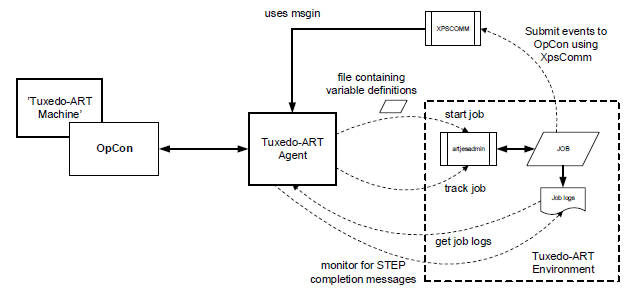
Each Tuxedo ART job runs as part of the Tuxedo ART Agent within a separate thread that ends when the job completes. The Tuxedo ART Agent uses the artjesadmin utility to start and monitor the status of each job. When the agent starts a job, it can pass variables as name=value pairs to the Tuxedo ART environment. The variable definitions are passed to the Tuxedo ART environment in a file. The file is read during the job initiation phase, and the values in the script are substituted. Standard output and error logs are collected and appended to the job output information, which is accessible from OpCon using the JORS capability.
The Tuxedo ART Agent supports submitting events to OpCon using the MSGIN capability. A special script called XPSCOMM can be called from the job script to submit events to OpCon.
The Tuxedo ART Agent also supports agent feedback so that step completion messages can be used to submit information to OpCon to process events. The job log is monitored for step completion messages, and if the step is defined and a matching completion is found, the trigger message is submitted to OpCon.
Implementation overview
FAQs
Can the Tuxedo ART Agent run independently of the Tuxedo environment?
No. The Tuxedo environment must be active for the agent to submit jobs.
Does the Tuxedo ART Agent support multiple Tuxedo applications on a single machine?
A single Tuxedo ART Agent installation is bound to one Tuxedo application through the JesrootDirectory configuration. To support additional Tuxedo applications installed in separate directories, install a separate Tuxedo ART Agent for each application directory and define a separate Tuxedo ART machine in OpCon for each.
How does the agent return job status to OpCon?
The agent uses the artjesadmin utility to track the unique job ID returned at submission and polls for status until the job completes. Job log content and JES log information are appended to OpCon job output and are retrievable through the OpCon Job Output Retrieval System (JORS).
Glossary
- artjesadmin — Tuxedo ART utility used by the agent to start jobs and poll their completion status.
- Agent.config — Configuration file in the agent installation directory that defines runtime parameters for the Tuxedo ART Agent.
- JORS (Job Output Retrieval System) — OpCon component used to retrieve job output information from the agent.
- MSGIN — File-watcher capability that allows the agent to submit events to OpCon by dropping event files in a monitored directory.
- XPSCOMM — Script that can be called from a Tuxedo job script to submit events to OpCon through the MSGIN directory.
- Step feedback — Feature that scans the job log for step completion messages and submits a trigger message to OpCon when a defined step finishes with a matching completion code.