Cegid CBR Connector Overview
What Is It?
The Cegid CBR Connector is a Java program that OpCon uses to schedule and monitor Cegid CBR/Y2 jobs. OpCon submits jobs using the Cegid CBR/Y2 job subtype defined in Enterprise Manager, passing the database name and job ID as arguments to the connector.
- Use this when you need OpCon to automate Cegid CBR/Y2 business process jobs in a Windows environment.
- Use this when you want OpCon job logs to include the full output of CBPEXPORT and CGIMODE execution, including status messages and completion codes.
- Use this when you need centralized monitoring of Cegid CBR/Y2 processing results alongside other OpCon-managed workloads.
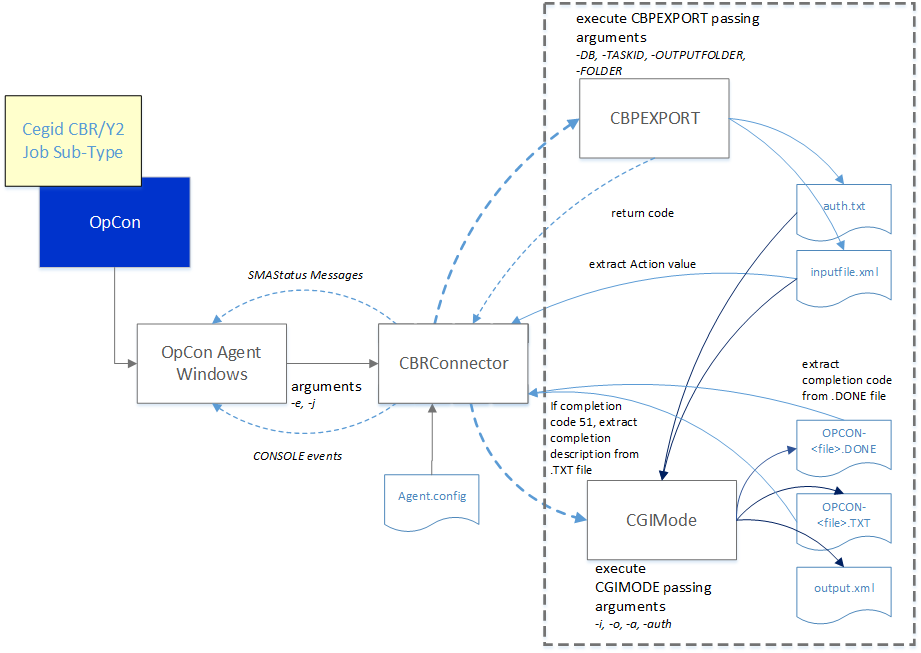
The current connector implementation is a Java program run by the Windows Agent, with an embedded OpenJDK runtime supplied by the installer. Job definitions are entered as Windows jobs using the Cegid CBR/Y2 job subtype. The job definitions consist of the environment and the job ID.
When OpCon schedules a job, the definitions are passed as arguments (-e databasename -j jobid) to the Cegid CBR Connector.
How It Works
The CBR Connector performs the following tasks when a job runs:
- Takes a timestamp for later comparison purposes.
- Creates the required directories if they do not exist, using the root definitions configured in the
Connector.configfile and the database name and job ID arguments (for example,\<root directory\>\<databasename\>\<jobid\>). - Calls the CBPEXPORT program, passing the required arguments (
-DB <databasename>,-TASKID <jobid>,-OUTPUTFOLDER <full path of inputfile.xml>,-FOLDER <databasename>). CBPEXPORT generates theinputfile.xmlandauth.txtfiles and returns a completion code of 0 or 24 on success (depending on the CBR application version). - Reads
inputfile.xmlupon successful completion and extracts the ACTION value. - Calls the CGIMODE program if
inputfile.xmlcontains an ACTION value, passing the required arguments (-i <full path to inputfile.xml>,-o <full path to output.xml>,-a <action value>,-auth <full path to auth.txt>). CGIMODE generates theOPCON-<timestamp>-TACHE-<jobid>.DONEandOPCON-<timestamp>-TACHE-<jobid>.TXTfiles. - Compares date and time values from the
.DONEfile against the initial timestamp. If the values are greater, the connector extracts the completion code. If the code is 51, the connector examines the.TXTfile for a matching text string and converts it to the required completion code. - Appends CBPEXPORT stdout and stderr, CGIMODE stdout and stderr, the
.DONEfile, and the.TXTfile to the OpCon job log. - Submits SmaStatus messages to OpCon during execution when
SmaStatus=Trueis configured, displaying progress information in the Operations views. - Submits
CONSOLE:DISPLAYmessages to OpCon during execution whenConsoleDisplay=Trueis configured.
FAQs
What OpCon components are required to use the Cegid CBR Connector?
The connector requires an OpCon Windows Agent installed on the same Windows server as the Cegid CBR/Y2 application.
What arguments does OpCon pass to the connector?
OpCon passes -e <databasename> and -j <jobid> as arguments when a Cegid CBR/Y2 job runs.
Where can I view connector execution results?
Results appear in the OpCon job log, which includes output from CBPEXPORT, CGIMODE, and the .DONE and .TXT files generated by CGIMODE.
What is the difference between SmaStatus and ConsoleDisplay?
SmaStatus=True sends progress messages that appear in the OpCon Operations views as job status information. ConsoleDisplay=True sends CONSOLE:DISPLAY events that appear in the OpCon log.
Glossary
CBRConnector — The Java program that acts as the integration layer between OpCon and the Cegid CBR/Y2 application. Run by the Windows Agent, using the embedded OpenJDK runtime supplied by the installer.
CBPEXPORT — A Cegid CBR/Y2 program that exports job definitions to inputfile.xml and auth.txt.
CGIMODE — A Cegid CBR/Y2 program that processes the exported job definition and generates the .DONE and .TXT completion files.
Connector.config — The configuration file that stores connector settings, including folder paths, program locations, and runtime options.
Job subtype — An Enterprise Manager plug-in that provides the Cegid CBR/Y2 job definition screen within the OpCon Windows job type.
User Defined RC — A configuration section that maps Cegid CBR/Y2 error description strings to integer completion codes returned to OpCon when the .DONE file contains completion code 51.