JBoss Connector overview
What is it?
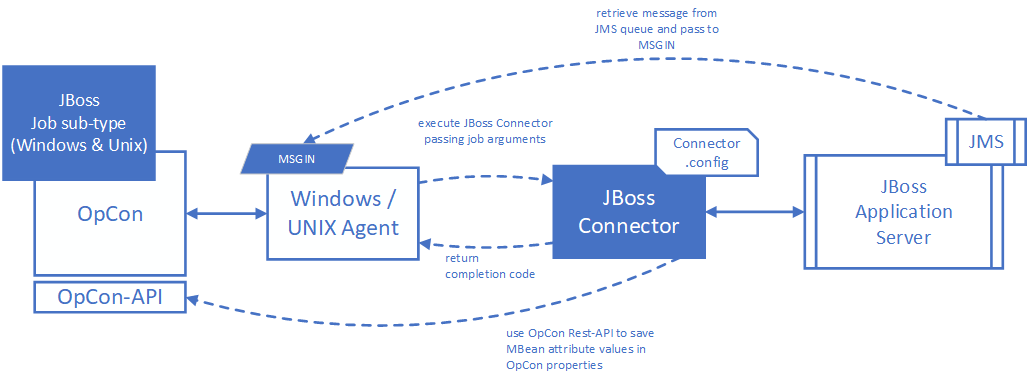
The JBoss Connector is a Java-based component that allows OpCon to interact with JBoss Enterprise Application Platform (EAP) management beans (mbeans) and JMS queues from within an OpCon schedule. The connector runs on Windows or UNIX/Linux agents and receives job definitions as arguments when OpCon submits a job.
- Use the JBoss Connector when you need OpCon to invoke, query, or update JBoss EAP mbean operations as part of an OpCon schedule
- Use the JBoss Connector when you need to send messages to or retrieve messages from JMS queues within JBoss EAP
- Use the JBoss Connector when you need to poll an mbean attribute and wait for a specific value before a downstream job runs
The connector communicates with JBoss EAP using the JMX protocol. When a job runs, the agent passes the job definition to the connector as arguments. The connector performs the requested operation and returns exit code 0 for success or 1 for failure.
Supported operations
The JBoss Connector supports the following operations:
| Operation | Description |
|---|---|
| invoke | Runs a defined operation associated with an mbean |
| polledquery | Retrieves an mbean attribute value repeatedly until it matches an expected value, or until a wait time expires |
| query | Retrieves the value of an mbean attribute once, optionally comparing it to an expected value or saving it to an OpCon property |
| retrievemsg | Retrieves a message from a JMS queue and places it in the MSGIN directory of the associated agent |
| sendmsg | Places a message on a specified JMS queue |
| update | Updates the value of a writable attribute on an mbean |
How it works
Job definitions are created as Windows or UNIX job sub-types using the JBoss job sub-type in Enterprise Manager. When OpCon builds and submits the job, the agent passes the job definition fields to the JBoss Connector as arguments.
The Connector.config file in the root installation directory defines connection settings for the target JBoss environment, including the server address, port numbers for administration and application access, and user credentials.
If the operation retrieves a message from a JMS queue, the retrieved message must be a valid OpCon event definition. The connector writes the event to a file in the MSGIN directory of the associated agent. The OpCon user code and password are read from the agent configuration file and added to the retrieved event before submission.
Related topics:
FAQs
What return codes does the JBoss Connector use?
The connector returns exit code 0 (FINISHED_OK) for successful operations and 1 (FAILED) for errors or unmet conditions. Set the job's Failure Criteria to NE (Not Equal) to 0 to detect failures.
Which operation should I use to wait for a JBoss server state to change? Use the polledquery operation. It retrieves an mbean attribute repeatedly at a configured interval until the value matches the expected value or a maximum wait time expires.
Which operation should I use to read an mbean attribute value once? Use the query operation. You can display the value in the job log, compare it to an expected value, or save it to an OpCon property.
Can the connector work with both Windows and UNIX/Linux agents? Yes. The JBoss Connector is available for both Windows and UNIX/Linux. The Windows installation includes the required Java environment. UNIX/Linux installations require a separately installed Java runtime.
Where do I configure the JBoss server connection?
Connection settings are defined in the Connector.config file located in the root installation directory. See Installation for configuration details.
Glossary
JBoss Enterprise Application Platform (EAP) — A Java-based middleware application server that hosts enterprise applications. The JBoss Connector interacts with its management and messaging interfaces.
JMX (Java Management Extensions) — A Java technology for managing and monitoring applications. The JBoss Connector uses the JMX protocol to communicate with JBoss EAP management interfaces.
JMS (Java Message Service) — A Java API for accessing message-oriented middleware. The JBoss Connector uses JMS to send messages to and retrieve messages from JBoss EAP queues.
Mbean (Management Bean) — A Java object that implements the JMX specification and exposes management operations and attributes for a JBoss EAP component.
JMS Queue — A named message buffer within JBoss EAP that holds messages for asynchronous processing between applications.
MSGIN directory — The directory monitored by an OpCon agent for incoming OpCon event files. The JBoss Connector places retrieved JMS messages in this directory as event files.