Role Users
Theme: Configure
Who Is It For? System Administrator, Automation Engineer
What Is It?
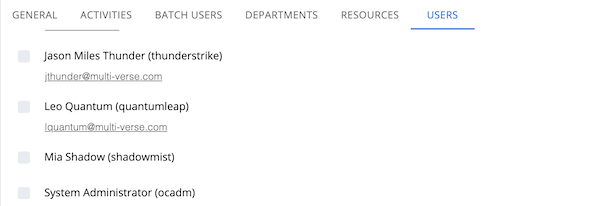
The Roles page is found in Library > Access Management > Roles. The Users tab lists all users assigned to the selected role, displaying each user's Full Name, Login Name, and Email Address. The email address is a clickable link that opens the logged-in user's email client.
To modify the users granted to a role, edit the preferred fields and select Save.
For more information see:
For conceptual help, see:
FAQs
Q: What does Role Users do?
viewport: width=device-width, initial-scale=1.0
Q: Where can you find Role Users in OpCon?
Access Role Users through the appropriate section in the Enterprise Manager or Solution Manager navigation.
Glossary
Enterprise Manager (EM): OpCon's rich client graphical user interface for Windows and Linux, used to define schedules and jobs, manage automation data, and perform operational tasks.
Solution Manager: OpCon's browser-based graphical user interface for managing automation data, performing operational actions, and administering the system.
Resource: A numeric variable in OpCon representing a finite pool. Jobs can be configured to require a set number of resource units to run, limiting concurrent executions and preventing resource contention.
Role: A named security profile in OpCon that groups privileges together. Roles are assigned to user accounts to control which features, schedules, jobs, machines, and administrative functions a user can access.
Privilege: A specific permission granted through an OpCon role that controls access to a feature, function, or object type. Privileges are organized into categories such as Function Privileges, Machine Privileges, Schedule Privileges, and Access Codes.
OpCon: Continuous' workflow automation platform. The OpCon server includes the database, SAM and Supporting Services (SAM-SS), and graphical user interfaces. agents installed on target platforms run jobs and report results.