z/OS Job Details
Theme: Configure
Who Is It For? Automation Engineer
What Is It?
The information in this section applies to defining the z/OS Job Type information. Refer to Customization Process in the z/OS Agent online help for special features to enhance the automation capabilities of OpCon on this platform.
- z/OS Job Type: Defines the z/OS job type. The options are Batch, Started Task, Command, REXX, Tracked, and Queued. The default is a standard Batch Job (submitted from a standard JCL library and run in a JES initiator). Each job type has a different execution profile and method of resolving security and access permissions.
Job Fields
Batch Job Fields
The Batch Job is the primary event type for z/OS scheduling. The JCL for the scheduled job must reside in a library allocated to the OPCONxx agent task for the MachineID on which it is submitted. This is the only event type that may run on a system other than the one on which it is submitted. The following information applies to defining Batch jobs:
- Member Name: This is the name of the library member containing the batch JCL. The member name may contain alphabetic, national (@#$), and numeric characters; however, a name cannot be more than eight characters in length and a name's first character cannot be numeric. If a member name is not provided, the job name is used.
- Temporary Member: The Temporary Member name overrides the Member Name. It can be defined in the Job Master definition, but is primarily intended to be used in the job definition on the daily schedule to load a different JCL member for an instance of the job. Also, if the user edits the JCL and saves it as the member name in the override library, the agent will generate a temporary member name for it, so that it will only be used by this instance.
- Batch User: Defines the z/OS security ID to be assigned to this job, if any. The default is the user ID in the job card or the USERID from XPSPARMS.
- DDNAME: Defines the DD Name in the agent task that points to the library that contains this job's JCL. The default is XPSJCL, or the value of agent the JCLDD parameter in XPSPARMS. The DD Name may contain alphabetic, national, and numeric characters; however, a name cannot be more than eight characters in length and the first character cannot be numeric.
- Override DDNAME: Defines a DD Name in the agent task to search for JCL before the batch DD NAME. The DD Name may contain alphabetic, national, and numeric characters; however, a name cannot be more than eight characters in length and the first character cannot be numeric.
- Sysplex: A coupled group of z/OS systems. When a job is
scheduled on a machine in a sysplex, its pre-runs, or the job
itself, may run on any system in the sysplex. There are two fields
that control that:
- Pre-run System: Allows the user to select one system for pre-runs or ANY system.
- Submit on any system: Determines if the job will be started on the system where the pre-runs were satisfied. If it is not selected, the job will be started on the machine name that was assigned to the job.
- Failure criteria: Defines a range of successful condition codes
for the job. The default is blank, meaning there are no job-level
condition code checks.
- Min CC: The minimum tolerated condition code for the job Any condition code less than this value is considered a failure condition. This value must be set between 0 and 4095.
- Max CC: The maximum tolerated condition code for the job Any condition code greater than this value is considered a failure condition. This value must be set between 0 and 4095.
- JCL/SYSOUT Access: Provides access to z/OS JCL and job output
listings within a dialog. The dialog has the following options:
- Member Name: This is the name of PDS or PDS/E member containing the JCL.
- View JCL DD: This is the DD (file) name of the library containing the JCL member.
- Save JCL DD: This is the name of the library to contain the saved JCL (Override DD). Defaults to TEMPJCL.
- View JCL: This button fetches the JCL from the member identified by the View JCL DD and member name and loads it in a text editor. Clicking OK in the editor loads the edit buffer in storage and enables the Save JCL button.
- Save JCL: This button uploads the JCL from the edit buffer to the host and saves it in the member identified by the Save JCL DD and member name, using the current OpCon User ID for access. If the OpCon user is not known to the security system on the z/OS host, or if the user does not have permission to update the Save JCL library, the upload will fail. If the upload succeeds, the ISPF member statistics will be updated.
- Job Number: This value is set to the Job ID assigned to the job when it was submitted.
- Outlimit: This value specifies the number of output files that will be retrieved. The default, 3, retrieves the first three files, which are the standard JES system files: JESMSGLG, JESJCL, and JESYSMSG. To get more files, set a higher value.
- View Sysout: This button retrieves the job's output files
Setting the Member Name to the JES JobID and the View JCL DD to JESJCLIN allows fetching the JCL from the spool, similar to the SDSF SJ option.
Started Task Control Fields
The Started Task Control Fields are required when Started Task is defined for the z/OS Job Type. Started Task events require no batch JES initiator. Such jobs as CICS or IMS regions are popular uses of this event type. Like Batch Jobs, these events are tracked at the step level of detail. The following information applies to defining Started Task Control.
- Started Task Name: This is the name of the started task defined in a system procedure library. The Name must be defined (as normal with any started task) to the SAF security product.
- Execution Parms: The parms will be appended to the started task name, after a comma, to complete the start command (e.g., TYPE=WARM). It may contain any properties allowed in a Stared Task EXEC parameter.
- Sysplex: A coupled group of z/OS systems. When a job is
scheduled on a machine in a sysplex, its pre-runs, or the job
itself, may run on any system in the sysplex. There are two fields
that control that:
- Pre-run System: Allows the user to select one system for pre-runs or ANY system.
- Submit on any system: Determines if the job will be started on the system where the pre-runs were satisfied. If it is not selected, the job will be started on the machine name that was assigned to the job.
- Failure Criteria: Defines a range of successful condition codes
for the job. The default is blank, meaning there are no job-level
condition code checks.
- Min CC: The minimum tolerated condition code for the job Any condition code less than this value is considered a failure condition. This value must be set between 0 and 4095.
- Max CC: The maximum tolerated condition code for the job Any condition code greater than this value is considered a failure condition. This value must be set between 0 and 4095.
Command Control Fields
The Command Control Fields are required when Console Command Execution is defined for the Event Type. Console Commands can be scheduled to run on the machine defined in the Primary Machine ID entry. Console Command Executions are the only events that have no completion or exit codes available. Each command scheduled is run as-is without verification as to the desired result. The following information applies to defining the Command Control.
A Command job reports only whether the command was issued: the job completes as Command Issued or Command Failed. The command's own response is not captured and is not available in OpCon, so a command that is accepted but then fails, or a DISPLAY command whose returned value you need, cannot be assessed from the job status.
Where the response matters, schedule the command as a REXX job that runs the CMDLIST sample exec instead. CMDLIST activates an extended console, issues the command, and writes the captured response to the job's output, where it is retrievable through JORS. It ships as a sample rather than an installed module, so it must first be copied into a library concatenated to the agent's SYSEXEC DD. Refer to Capturing Operator Command Output with CMDLIST in the z/OS Agent help.
- Host Job Name: The command is issued from a dynamic started task, with the name taken from the job name.
- Operator Command: Defines the text of the command to be run.
- Sysplex:A coupled group of z/OS systems. When a job is scheduled
on a machine in a sysplex, its pre-runs, or the job itself, may run
on any system in the sysplex. There are two fields that control
that:
- Pre-run System: Allows the user to select one system for pre-runs or ANY system.
- Submit on any system: Determines if the job will be started on the system where the pre-runs were satisfied. If it is not selected, the job will be started on the machine name that was assigned to the job.
REXX Control Fields
The REXX Control Fields are required when REXX Event (Dynamic) is defined for the Event Type. REXX procedures require no JCL and can be use for a variety of automation interfaces. The REXX Event functions much like a Console Command. The z/OS Agent dynamically allocates a print file, and runs the program from the designated DD. The following information applies to defining REXX Control:
- Exec Name: The Exec name is taken from the job name
- Execution Parms: Defines any input parameters required for the REXX procedure.
- Submit DDName: Defines the DD Name in the OPCONxx PROC that points to the library containing the REXX program. The default is SYSEXEC. The DD Name may contain alphabetic, national, and numeric characters. A name cannot be more than eight characters in length, and a name's first character cannot be numeric.
- Sysplex: A coupled group of z/OS systems. When a job is
scheduled on a machine in a sysplex, its pre-runs, or the job
itself, may run on any system in the sysplex. There are two fields
that control that:
- Pre-run System: Allows the user to select one system for pre-runs or ANY system.
- Submit on any system: Determines if the job will be started on the system where the pre-runs were satisfied. If it is not selected, the job will be started on the machine name that was assigned to the job.
- Failure Criteria: Defines a range of successful condition codes
for the job. The default is blank, meaning there are no job-level
condition code checks.
- Min CC: The minimum tolerated condition code for the job Any condition code less than this value is considered a failure condition. This value must be set between 0 and 4095.
- Max CC: The maximum tolerated condition code for the job Any condition code greater than this value is considered a failure condition. This value must be set between 0 and 4095.
- JCL/SYSOUT Access: Provides access to z/OS JCL and job output
listings within a dialog. The dialog has the following options:
- Member Name: This is the name of PDS or PDS/E member containing the JCL.
- View JCL DD: This is the DD (file) name of the library containing the JCL member.
- Save JCL DD: This is the name of the library to contain the saved JCL (Override DD). Defaults to TEMPJCL.
- View JCL: This button fetches the JCL from the member identified by the View JCL DD and member name and loads it in a text editor. Clicking OK in the editor loads the edit buffer in storage and enables the Save JCL button.
- Save JCL: This button uploads the JCL from the edit buffer to the host and saves it in the member identified by the Save JCL DD and member name, using the current OpCon User ID for access. If the OpCon user is not known to the security system on the z/OS host, or if the user does not have permission to update the Save JCL library, the upload will fail. If the upload succeeds, the ISPF member statistics will be updated.
- Job Number: This value is set to the Job ID assigned to the job when it was submitted.
- Outlimit: This value specifies the number of output files that will be retrieved. The default, 3, retrieves the first three files, which are the standard JES system files: JESMSGLG, JESJCL, and JESYSMSG. To get more files, set a higher value.
- View Sysout: This button retrieves the job's output files
Tracked Job or Queued Job Control Fields
As far as job definition and scheduling are concerned, Tracked and Queued jobs are identical. Choosing either Tracked or Queued in the z/OS Job Type documents how the user expects the job to be submitted, and it does not change how the job is scheduled or how it runs.
- The Tracked Job indicates a Batch Job profile, but the JCL is submitted to the JES queue from an external source and is tracked dynamically by the agent. This job should be defined on an OpCon Schedule with no dependencies.
- The Queued Job indicates a Batch Job profile but the JCL is submitted to the JES queue from an external source and is tracked dynamically by the agent. These jobs may have dependencies on other jobs or pre-runs and must arrive in a JES "held" queue or as a TYPRUN=HOLD job.
- Tracked Jobs should not be restarted from OpCon. Attempting to restart a Tracked Job will only result in the original completion status being reported. To restart a Tracked or Queued job, re-submit it from the original source.
The following information applies to defining Tracked Job and Queued Job Controls:
- Sysplex: A coupled group of z/OS systems. When a job is
scheduled on a machine in a sysplex, its pre-runs, or the job
itself, may run on any system in the sysplex. There are two fields
that control that:
- Pre-run System: Allows the user to select one system for pre-runs or ANY system.
- Submit on any system: Determines if the job will be started on the system where the pre-runs were satisfied. If it is not selected, the job will be started on the machine name that was assigned to the job.
- Failure Criteria: Defines a range of successful condition codes
for the job. The default is blank, meaning there are no job-level
condition code checks.
- Min CC: The minimum tolerated condition code for the job Any condition code less than this value is considered a failure condition. This value must be set between 0 and 4095.
- Max CC: The maximum tolerated condition code for the job Any condition code greater than this value is considered a failure condition. This value must be set between 0 and 4095.
Step Control
Step Control allows the definition of up to 80 step condition codes or step condition code ranges. Special schedule or execution handling can be defined depending on the condition code at step completion, or step control definitions can be used to override Job Minimum and Maximum condition codes. Only the first matching Step Control definition will be used at the end of each step, so they should be defined in order of priority. Step Control is not available when the Event Type defined is Console Command or REXX Event.
The following information applies to defining Step Control:
- Step Name: Defines the fully qualified step name in the format:
JOBSTEP or JOBSTEP.PROCSTEP. JOBSTEP identifies the name on a
job-level EXEC statement. PROCSTEP identifies the name on the EXEC
PGM statement in a JCL procedure.
- If the JOBSTEP invokes a JCL procedure, entering the JOBSTEP alone will allow the entry to match any step in the procedure. To match a specific step, include the PROCSTEP.
- Beginning with version 19.02, the step names support wild-card matching for each name. A'?' character will match any single non-blank character in the step name and a '*' character at the end of the string will match all remaining characters or blank spaces in the step name.
- Min CC and Max CC: Defines the minimum to maximum range of return codes this step control definition checks. Both the minimum and maximum values need to between 0 and 4095.
- Step Action: Defines the action to be taken when the defined
step's return code falls in the Step CC range. Options include:
- Abend Job At Step Termination: Tells OpCon that this job is to be immediately terminated. All remaining steps are flushed but COND=EVEN/ONLY steps will be allowed to run. OpCon will show the job as Failed.
- Send Job Completed To SAM: Tells OpCon that, no matter how many steps are left to run, OpCon is to consider this job complete, with its success or failure determined by the steps up to and including this one.
- Send Trigger Message To SAM: Tells OpCon that the only action is to send the Trigger Message.
- Post Error, But Allow Job To Continue: Tells OpCon that a job failure condition is to be posted. Subsequent steps in this job run, but job dependencies are not resolved.
- OK To Continue: Tells OpCon that despite the Min and Max Job CC, this step is OK with this return code range. In other words, it provides step level exceptions to the job level failure criteria.
- Set Restart Step: Tells OpCon to
override the automatic restart step assignment when a job fails.
By default, the restart step is set to the step that fails.
- In the Step Name field, enter the failed step name to override.
- In the Trigger Message field, enter the desired restart step name.
- Trigger Message: Required only with the Send Trigger Message to
SAM action, but can be used with any Step Action defined.
-
This message may be up to 20 characters, and is posted to Schedule Operations and recorded in the User Messages agent Feedback.
-
Additional trigger actions can be defined with any of the following special message formats:
- For Message $EVENT=eventname, the eventname action defined in the z/OS event trigger table is triggered. This may refer to any valid OpCon event that has been predefined in the z/OS Event table. If the name is not found, the message will be changed to JEVENT=eventname, and sent like any other message.
- Message $JOB:GOOD will set the job to a Finished OK status immediately
- Message $JOB:BAD will set the job to a Failed status immediately.
- Message $S=jobstep[.procstep] will set the job's restart step to jobstep[.procstep].
-
Refer to Using the XPSCOMM Interface Routine in the z/OS Agent online help for information on defining entries to the Event Table.
-
Starting with OpCon 5.1, the agent Feedback codes can also be used to trigger job events, so this is the preferred way to define step triggers, rather than the z/OS event trigger table, because all event types are supported and the events can contain instance properties. In addition, multiple trigger events can be defined for the same message.
- The status of each step is written to the Step
Completion agent Feedback table, so it provides an
alternate way to define triggers, which does not require a
step control definition. These messages have a fixed format,
making it easy to match on all or part of the result:
- A five character status code:
- Cnnnn, where nnnn is the decimal condition code
- FLUSH, if the step did not run
- Unnnn, where nnnn is the decimal abend code
- S-xxx, where xxx is the hexadecimal abend code.
- A space
- The step name, in execstep or jobstep.execstep format
- A five character status code:
- The status of each step is written to the Step
Completion agent Feedback table, so it provides an
alternate way to define triggers, which does not require a
step control definition. These messages have a fixed format,
making it easy to match on all or part of the result:
-
Automatic restart step selection at the job or step level can be enabled or disabled. This will be controlled through prefixing the restart step name with a plus ('+') or hyphen ('-') character. If the first character of the "message" field is:
-
'+' - Set auto step flag on for this job, then set the restart step from the message, starting with the second character.
-
'-' - Set auto step flag off for this job, then set the restart from the message, starting with the second character.
-
' ' (blank) - Do not change the flag, but set the restart step from the message, starting with the second character.
-
Anything else - Set the restart step from the message field, starting with the first character.
If the restart step name is blank, this action is a no-op.
-
-
For a list of valid OpCon events, refer to the OpCon Events online help.
-
z/OS Pre-run Definitions
The z/OS Agent (z/OS) allows for five different types of Pre-runs to be processed: File Resource, Message Trigger, Job/Task Resource, Tape Devices, and REXX Procedure.
File Resource
File Resource allows up to 80 pre-run definitions for dataset resources.
-
Dataset: Defines up to 44 characters of DSN trigger information Wild card characters may be used to match partial dataset names.
- The percent ('%') and asterisk ('*') characters are
allowable wildcards.
- A (%) wildcard character represents any single character
- A final asterisk (*) will match any remaining characters
- To support filtering on Generation Datasets, a dataset name ending in .G0000V00 will be treated like .G%%%%V%%, but require the dataset to be a member of a GDG.
- The percent ('%') and asterisk ('*') characters are
allowable wildcards.
-
Generations: Defines the number of times the condition must be met before releasing the job. This may be used to start jobs after a number of GDG datasets have been received.
-
Condition: Defines the type of data access condition to cause a trigger: Available options are Exists, Created, Updated, Deleted, Referenced, Cataloged, and Uncataloged.
- Created triggers when a dataset is allocated with DISP=NEW (SMF Type 15 record).
- Updated triggers when an existing dataset is accessed with DISP=OLD or DISP=MOD (SMF Type 15 record). Does not trigger for newly created datasets.
- Deleted triggers when a dataset is deleted via DISP=DELETE or scratched (SMF Type 15 or Type 17 record).
- Referenced triggers on any reference to the dataset, including open for input or output.
- Cataloged triggers when a dataset is cataloged (SMF Type 61 record).
- Uncataloged triggers when a dataset is uncataloged (SMF Type 65 record).
- For VSAM datasets (SMF Type 64), triggers only fire when the dataset is closed, not when it is opened. A VSAM dataset is considered "updated" only if records were added, deleted, or changed during the access.
noteThe following dataset activity is excluded from trigger processing:
- Datasets accessed by an abending task are not evaluated for triggers.
- Temporary datasets, VIO (Virtual I/O) datasets, and end-of-volume (EOV) records are ignored.
- Type 17 SMF recording is optional. If Type 17 records are not being written, the Deleted condition will only trigger on DISP=DELETE, not on dataset scratch operations. Type 17 records are only needed if dataset scratch is used as a trigger condition.
-
When: Determines whether this File Resource trigger is to remain in effect after the associated event is triggered.
- 'While/As Scheduled Only' causes the trigger monitor to delete this entry once the trigger has occurred. In this mode, the next time a job/event referencing this DSN is ready to run, the trigger is refreshed and the associated event waits for completely new trigger conditions to be met.
- Continuous Monitoring resets the trigger generation count and continues monitoring the condition. In Continuous mode, the next time a job/event referencing this DSN is ready to run, the trigger may happen immediately, if all trigger conditions were satisfied again.
-
Job Name: Defines the job that must satisfy the condition before a trigger occurs. For example, specify the name of the job that must update a DSN before a trigger would occur. This prevents reruns or outside creations from triggering events intended for a specific scheduled job or task.
Message Trigger
Message Trigger allows up to 80 pre-run definitions for Console Message requirements. Message triggers are particularly useful for capturing error and threshold indicators, and taking actions to notify or respond automatically based on schedule criteria.
Message triggers are defined very explicitly. All message trigger keys must contain a fixed positional key word. They may also contain a second value to scan for in the remainder of the message text.
- Key: Defines the trigger text to be sought. The first characters
define the fixed text to match in a possible candidate message.
-
The Offset (refer to Offset: This is the number of leading characters (0-120) to skip when matching the key.) and Length (refer to Length: Used to define the number of characters in the key. The key can be up to forty-four characters long.) must be defined to match the key.
-
Following the fixed text key, a variable key may be defined as a second argument. The variable key is enclosed in brackets ('{}') and may be preceded by a hyphen ('-') to indicate exclusion.
-
The offset is variable and the length of the text within the brackets determines the length. The variable text is limited to 42 characters; if exceeded, the trigger entry is skipped.
-
If the fixed text is located in a message, OpCon scans for the text found in the brackets ('{}') in the remainder of the text. If the exclusion operator is used, the message will only match if the enclosed text is not found.
-
For WTOR (Write-To-Operator with Reply) messages, the reply ID number at the beginning of the message is automatically excluded before matching. The Offset value should be set relative to the message text that follows the reply number, not relative to the reply number itself.
-
If the fixed text ends with a hyphen ('-'), the variable key must be separated from the fixed text by a space to avoid ambiguity.
- In z/OS Agent releases before 20.01.00, a space is always required between the fixed key and the opening bracket or hyphen.
-
- Generations: Defines the number of messages matching the key that must be issued before triggering the associated event or job.
- When: Determines whether this Message Resource trigger is to
remain in effect after the associated event is triggered.
- 'While/As Scheduled Only' causes the trigger monitor to delete this entry once the trigger has occurred. In this mode, the next time a job referencing this Message Trigger is ready to run, the trigger is refreshed and the associated event waits for completely new trigger conditions to be met.
- Continuous Monitoring resets the trigger generation count to zero and continue monitoring for the trigger. In this mode, the next time a job referencing this Message Trigger is ready to run, the trigger may happen immediately, if all trigger conditions were satisfied again.
- Job Name: Defines the job that must issue this message before a trigger would occur. This prevents reruns or outside creations from triggering events intended for a specific scheduled job or task. A job name may contain alphabetic, national, and numeric characters; however, a name cannot be more than eight characters in length and a name's first character cannot be numeric.
- Offset: Defines the number of leading characters (0-120) to skip when matching the key.
- Length: Defines the number of characters in the key. The key can be up to forty-four characters long.
- Message Trigger List: Defines the Message Trigger definitions for the job.
Job/Task Resource
Job/Task Resource allows up to 80 pre-run definitions to check for the existence of an running job or task on any given system.
- Job/Task: Defines the eight-character name of a batch job, system task, or TSO User ID being sought. A job/task/TSO User ID name may contain alphabetic, national, and numeric characters. A name cannot be more than eight characters in length and a name's first character cannot be numeric.
- Job/Task Must Be: Determines whether the named task or job should be Running or Not Running for the associated event to submit.
- Job/Task Resource List: Defines the Job/Task Resource definitions for the job.
Tape Devices
Tape Units allows the definition of a pre-run to require the availability of a specific number and type of tape unit(s) on any given system.
- Device: Defines a generic or esoteric tape unit as defined by IBM unit standards. The value may contain up to eight alphanumeric characters.
- Units: Defines the number of units that must be available for the associated job to be submitted.
REXX Procedure
REXX Procedure allows the definition of a REXX event as a pre-run. The REXX Procedure is distinguishable from the REXX event type in that it plays the role of a resource advisor when set up as a pre-run condition. Unlike a REXX event, the return code from this REXX procedure must be zero, or the associated job is not submitted.
- REXX Name: Defines the name of the procedure to run. A REXX Name may contain alphabetic, national, and numeric characters. A name cannot be more than eight characters in length and a name's first character cannot be numeric.
- REXX DD: Defines the DD Name in the OPCONxx PROC that points to the library containing the REXX executable code. The default is SYSEXEC. A DD Name may contain alphabetic, national, and numeric characters. A name cannot be more than eight characters in length and a name's first character cannot be numeric.
- REXX Parm: Defines the input parameters required for the REXX procedure.
z/OS Restart Definitions
OpCon can automate job restarts. The agent defaults are used, unless overridden at the job level, with the necessary actions dictated by the characteristics of the programs and JCL being run.
Restart determines how XPR handles the dataset (DSN) cleanup during a Normal Run and a Restart for the defined job only.
Duplicate Dataset Actions: Defines how XPR cleans up the duplicate dataset(s).
- Normal Run: Defines the type of Run:
- <blank>: The agent defaults are used
- None: Disables XPR DSN cleanup
- Scratch: Prevents NOT CATLGD 2 errors by scratching any pre-existing datasets.
- Reuse: Prevents NOT CATLGD 2 errors by converting DISP=NEW to DISP=OLD.
- Restart: Defines the type of Restart:
- <blank>: The agent defaults are used
- None: Disables XPR DSN cleanup
- Scratch: Prevents NOT CATLGD 2 errors by scratching any pre-existing datasets.
- Reuse: Prevents NOT CATLGD 2 errors by converting DISP=NEW to DISP=OLD.
GDG Option: Defines how XPR determines Generation Data Group (GDG) base generations during a restart:
- <blank>: The agent defaults are used
- None: Disables GDG adjustment
- Absolute: Resets the base generation to the value it had during the first run.
- Relative: Looks for positive relative generations in the steps to be run to determine the correct base.
- Catalog Resync: Based on looking at the bypassed steps to determine the highest relative generation already created, sets the base so that it resolves to the current generation.
The GDGBIAS=STEP JCL option is not compatible with the Absolute GDG restart option. If that option is used on a restart, GDG bias resolution will not be attempted.
JCL Substitution
The JCL Substitution defines the JCL parameter symbol or OpCon token, separated by double backslashes, to be used in this run.
- Use carriage returns in the field to separate lines for easier readability. The maximum total characters in this field is 3400 characters.
- Each override (@) or symbolic (&) definition is separated by two backslashes (\\).
- When the z/OS Agent encounters an "&name=" symbolic, it scans each JCL statement for an operand match
- Only operands are changed by an "&" symbolic override. To qualify for replacement, an operand must be preceded by a comma or a blank and include an "=" sign (e.g., all instances of UNIT=xxxxx is substituted using &UNIT=SYSDA).
- The "@" overrides should not be confused with "&" symbolics Overrides are placeholders for data and symbolics are replacements of very specific data in a specific field enclosed in specific delimiters. Symbolics reference operands only.
- Overrides can be embedded anywhere in JCL or SYSIN data and can define an entire 80-byte JCL record.
- Overrides have no restrictions on content or delimiters except they cannot contain double backslashes (e.g., a date card override could be represented as @TODAY=October 12, 2005).
- Internal OpCon are represented by [[...]] notations and may be used as data components of either symbolics or overrides (e.g., @TODAY=[[$DATE]).
Additional Information for z/OS Job Details
The information in this section contains more detailed information required to make full use of the z/OS job details.
z/OS Job Information
OpCon supports several types of scheduled events for z/OS. Scheduled event types include Batch Jobs, Started Tasks, Dynamic REXX, Operator Command, Tracked Job, and Queued Job.
Batch Jobs
| Function | Description |
|---|---|
| Execution | JES initiated batch from JCL in a specific library already defined (by DDName) to agent. |
| Security | Four Levels: |
| - Security ID, from Scheduled Job record on SAM, inserted or replaces USER= on Job Card. | |
| - If no Security ID from SAM is defined, USER= on Job Card is allowed to remain. | |
| - When no USER= can be built or found, the default USERID definition from XPSPRMxx is inserted in the Job Card as a USER= keyword. | |
| - If USERID=NONE is set in XPSPRMxx and no USER= can be built or found, the USER= keyword is omitted from the Job Card during submission. This gives the submitted job the SAF authority of the agent itself. | |
| Event Control | - Provided by Job Control Language (JCL) statements in a member of a predefined JCL library allocated to the agent task. There is no practical limit to the number of libraries or DDNAMEs. |
| - If a JCL library DDNAME is not defined on the SAM schedule record for a job, the default JCLDD= set in XPSPRMxx is used to locate the JCL for the job (XPSJCL is the installation default). |
: Supported Scheduled Events: Batch Jobs
Started Tasks
| Function | Description |
: Supported Scheduled Events: Started Tasks
Dynamic REXX
| Function | Description |
: Supported Scheduled Events: Dynamic REXX
Operator Command
| Function | Description |
: Supported Scheduled Events: Operator Command
Tracked Job
| Function | Description |
: Supported Scheduled Events: Tracked Jobs
Queued Job
| Function | Description |
REXX Execution in OpCon
The REXX language can be a very powerful tool, especially when it comes to integration and automation of OpCon into the z/OS environment. For this reason, there are several ways to support REXX executions in OpCon.
REXX as a Batch Job
This method is transparent to OpCon. It is possible to use Batch TSO or the REXX batch utility (IRXJCL). JCL for execution is contained in a JCL member, just as with any production Batch Job. The parameters passed to the REXX routine are hard coded in the EXEC statement on the PARM= keyword. Security is provide by the USERID= keyword on the job card. Parms may be altered via OpCon @.
REXX as a Started Task
For long running routines that provide control interfaces (e.g., to balancing products, change or problem management, etc.) or that provide monitoring (awaiting CICS transaction "signals", etc.) consider a started task (STC) rather than a batch-initiated job. A started task does not tie up a JES initiator and is more isolated from system performance problems. Started tasks can also remain active with little or no resource consumption for long periods without affecting the ability of the system to do other work.
Just as with REXX in a Batch Job, running REXX as a started task is transparent to OpCon. It looks like any other scheduled started task. Use either TSO Batch or IRXJCL. The one major difference is that it is possible to code the PARM that is to be passed to the REXX routine (if any) in SAM schedule record "Parms". Security is provided by the Proc name used.
REXX as a Dynamic Task
The Dynamic REXX task is initiated by the agent and has no JCL or Procs associated with it. A separate address space is created and SYSEXEC, SYSTSPRT and SYSTSIN DDNAMES are dynamically allocated. The REXX procedure is called and the return code is captured and returned to the SAM. Condition code actions can be set. The following rules apply:
- Only a single step is run
- The SYSEXEC DDNAME concatenation is "copied" from that defined in the running agent task. - Define any DDNAME in the agent task as a SYSEXEC concatenation.
- The SYSTSPRT allocation is assigned to the MSGCLASS defined in XPSPRMxx (default MSGCLASS=A).
- The SYSTSIN DD is always dummied
- All parameters come from "EXEC Parms" in the job definition
- Dynamic REXX events share all the advantages of started tasks and they do not require JCL.
REXX as a Dynamic Pre-run Event
As a "twist" to the Dynamic REXX, it is possible to define a Dynamic REXX routine to be run before the running of an associated Batch Job or other event. In this case the Dynamic REXX runs just the same as it does standalone, but rather than returning to SAM with a return code, the return code is used to immediately trigger (or not trigger) a subsequent Event in the agent itself. So, in those cases where immediate response to an action or monitor event is needed, a REXX Dynamic Pre-run can trigger a dependent Job or Task much faster than SAM could respond to an "After" dependency.
Tracking Externally Submitted Batch Job Events in OpCon
Within the z/OS Agent, it is possible to trap and track events submitted outside of OpCon. There are three possible approaches to Non-Schedule Event Tracking.
- Define a single job name "mask" that is always trapped by the z/OS agent;
- Define from one to eight single character JES execution classes to monitor and trap for tracking;
- Insert a tracking indicator ("T" or "Q") as the continuation character of the first Job card on any batch job requiring tracking.
- Add a job step running XPSTRACK
Performing all of the approaches is also possible. Define a job mask or JES tracking classes in the XPSPRMxx member of the OpCon Parmlib (XPSPARMS DD in the agent task). The following job is an of a dynamic job request:
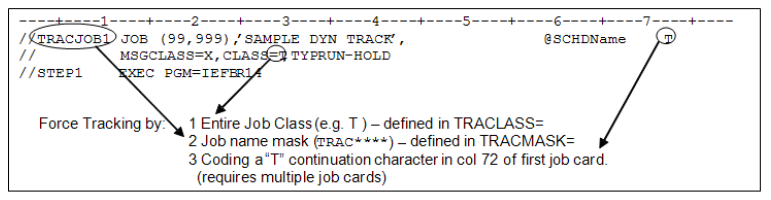
The "TRACJOB" job above illustrates all three ways to set up a user submitted or non-scheduled submission as a scheduled "tracked" job.
- Job Name mask as defined in XPSPRMxx. In the above, this is TRACMASK=TRAC****.
- A special held class or class list as defined in XPSPRMxx. In the above, this is TRACLASS=TQA.
- A "T" is placed in continuation column 72 of the 1st job card (this option requires multiple continued job cards).
Dynamically tracked jobs may or may not have dependency capabilities. Because their arrival on the schedule may be arbitrary, using them as dependent triggers should be avoided as a standard practice. However, when needed, dynamic job tracking can be a powerful tool for automation.
Every job that is to be dynamically tracked by the z/OS agent must be predefined on the OpCon schedule. If it has no dependencies or resource requirements, it is released immediately by the agent. Otherwise, it is released as dependencies or resources are satisfied.
As seen in the above example, a schedule name token (e.g., @SCHDName) starting in column 59 overrides the AdHoc schedule name default. This allows the scheduling of a job through any schedule on OpCon.
The @ character is an indicator flag, and not part of the schedule name.
The requested schedule must exist on the CURRENT day, or dynamic tracking fails. The "AdHoc" schedule always exists or will be added automatically. Note:
When the 'Q' continuation character is used and a schedule name is supplied on the job card, the job will be added to the LATEST date with the schedule. This helps to link jobs across the "midnight boundary".
The default schedule name can be changed from AdHoc by defining the TRACSCHD parameter in XPSPARMS.
Assigning a Date, Schedule, Job and Frequency to a Job
To assign a Date, Schedule name, Job name ,and Frequency to the job, create an event in the ISPF Event table:
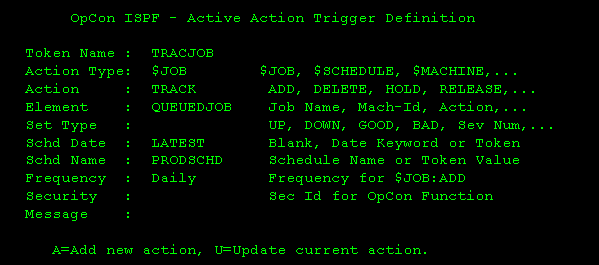
- The token name must match the name on the job card
- The Action Type must be $JOB
- The Action must be TRACK
- The only fields used are Element (the OpCon job name), Schd Date, Schd Name and Frequency.
- Element and Schd Name are required
In the sample screen above, a job named TRACJOB will be added to the OpCon PRODSCHD schedule on the LATEST date as job name QUEUEDJOB with Frequency Daily.
If a job has an Event table entry and a job card frequency definition, the job card definition will override the entry table.
Prerun Conditions
Pre-run conditions are provided as resource management and triggering functions for scheduled events. Pre-run conditions are logically associated to a production-scheduled event, such as a batch job. When SAM sends the agent a "Start Job" request, that request may have Pre-run conditions. A file may be needed or a tape drive must be available or a non-scheduled task (e.g., CICS) must be down, before a job can run. The Pre-run condition defines the resources required to run a job successfully.
If the pre-run resources are available for execution of the scheduled event, the agent immediately submits or initiates the associated job, task, or command.
- File Resource:
- Check for the existence, creation, modification, deletion, reference, or change of catalog status of a specific dataset, either anonymously or by a specific job or task name.
- It is possible to request that a file resource is satisfied a number of times before triggering the associated job or event.
- It is also possible to request that the file trigger can only occur on the scheduled date of the associated job. This action waits for the trigger to occur or the expiration of the parameters (e.g., scheduled date).
- The 'Delete' option triggers when JCL containing DISP=(,DELETE,[DELETE]) is honored, or when a dataset scratch is recorded (Type 17 SMF record). If Type 17 recording is not active, only DISP=DELETE will trigger the condition.
- 'Reference' works for ANY reference, including Open and Close processing, and should be used sparingly. Each I/O function counts as a reference generation, regardless of file processing. For example, the sequence of Open-Process-Close generates 3 references.
- Datasets accessed by an abending task, temporary datasets, VIO datasets, and end-of-volume records are excluded from trigger processing.
- For VSAM datasets, triggers only fire on dataset close, not on open. A VSAM 'Updated' condition requires that records were actually added, deleted, or changed during the access.
- The 'Condition' choices are:
- Exists
- Created
- Updated
- Deleted
- Referenced
- Cataloged
- Uncataloged
- Message Trigger: The 'When' choices are:
- Continuous Monitoring
- While/As Scheduled Only
- Any message issued to the system log can be used as a trigger for a scheduled event (e.g., Log Full Messages can release log maintenance utilities). For additional information, refer to Message Trigger.
- Job/Task Resource: 'Job/Task Must Be' choices are:
- Running
- Not Running
- Check for the existence of a job or task, by name. If the named task is running, the appropriate action is taken.
- Request that the associated job be run or not run if the pre-run task is found in an running state.
- Tape Units:
- Check for the availability of several tape class units (by esoteric name or device type) on a specific machine ID.
- If the check fails, OpCon schedules a retry later.
- The 'Device' choices are:
- <User-defined>
- 3420
- 3423
- 3480
- 3490
- 3590
- REXX Procedure:
- A REXX program
- Execution PARM
- A Return Code of ZERO allows the associated job/task to run
- A NON-ZERO return code delays the start of the associated job
Pre-run Conditions -- How They Work
Pre-run conditions can be Immediate and Monitored. Most File Resource and all Message Trigger events are monitored; the criteria for these conditions are stored in continuously monitored tables. All other pre-run conditions are "Immediate" events; they are essentially a "true/false" test.
Immediate Events
Each Immediate pre-run event has its own special use or purpose:
- File Resource "EXISTS" Option: Only the "Exists" option of the File Resource pre-run is an immediate event. All others are tabled and monitored. An MVS catalog "Locate" is issued for this type of pre-run. For this reason, the dataset name used for the Exists option must be fully qualified and contain no wild card characters.
- Job/Task Resource: Used to check for the presence or absence of a non-scheduled task. Such tasks as TSO User-ids, report writers and other tasks can be verified. If the required task is in the required state, the associated job is immediately submitted. Otherwise, the test is repeated throughout the scheduled day, until the pre-run condition is satisfied or the job is removed from the schedule.
- Tape Units: Used to check for the presence of a fixed number of unallocated tape unit devices by esoteric name or device type (e.g., four 3480 units). If the required units are found unallocated the associated job is immediately submitted. Otherwise, the test continues every couple of minutes throughout the scheduled day, until the pre-run condition is satisfied or the job is removed from the schedule.
- REXX Procedure: Used for any automation purpose. The named REXX routine is run. A Return code from the routine of ZERO allows the associated job to be immediately submitted. Any Non-Zero Return Code causes the test to be repeated throughout the scheduled day, until the REXX routine ends with a Return Code of Zero or the job is removed from the schedule. A REXX Pre-run runs as a started task in its own address space. Unlike the other immediate pre-runs, it starts immediately but it may not end for hours or days. Write unique/special monitors that look for very complicated events or provide for custom interfaces.
Monitored Events
Monitored pre-run events have a completely different life cycle. When a monitored pre-run event is defined, it becomes part of a continuously monitored event stream. An independent set of programs maintains tables that record when events are triggered, by what task and when those events are referenced by scheduled OpCon Pre-runs. The two types of monitored events are called "PASSIVE" and "ACTIVE" trigger events.
Active Event Triggers
Active event triggers represent a scheduled event waiting to happen. It is ALWAYS ACTIVE regardless of the contents or disposition of the daily schedule. The trigger is defined ON THE z/OS SYSTEM only. The trigger has a defined action to be taken when the trigger is activated. Event (refer to XPSCOMM event parameters) may describe jobs to be added, deleted or released, or non-job related events such as notifications, machine reconfiguration or schedule level events. Once an Active Trigger activates and performs the assigned task, it is placed back into the "active" state and the process repeats itself.
Passive Event Triggers
Passive triggers represent a trigger waiting on a scheduled event. The trigger is activated by a scheduled job. The trigger itself is defined in the JOB DETAIL for the job requiring the trigger. After the trigger is recognized AND the target job is started, the trigger may be reset to await the next occurrence of the job or it may be deleted from the monitoring table. These two different behaviors are termed "Continuous" and "As Scheduled".
"Continuous" Monitoring
Once a scheduled event has set a PASSIVE trigger, it can request that the trigger stay "alive" even after the associated job or event has started. The next time the event or job is scheduled the trigger is tested to see if it triggered again at any time since the last execution of the job. If it has, the job immediately runs and the trigger is reset to monitor continuously.
"As Scheduled" Monitoring
Once a scheduled event has set a PASSIVE trigger, it can request that trigger be deleted as soon as it triggers the event or job. In this way, only events that occur within the scheduled time window of the associated job are considered triggers.
Implied Pre-run Conditions
Several "implied" pre-run conditions are displayed in the Enterprise Manager:
| Prerun Message | Meaning | Job Status |
Defining File Resource (DSN) Triggers
A File Resource trigger is used to illustrate the life cycle of a passive monitored event:
-
A new job is scheduled that requires a pre-run File Resource defined as:
-
DSName: PROD.BANK.DRAFT.G*
-
Generations: 3
-
Condition: Created
-
Creating Job: Any
-
Created on SysID: ANY
-
Type: As Scheduled only When the associated job is ready to START (all other SAM dependencies are met), the z/OS Agent adds the DSN trigger criteria to the internal DSN Trigger Table on all agents in the SYSPLEX.
-
SAM sets the job to "Waiting Start Time -- DSN(s) Not Available" on the SAM schedule.
-
At a user-defined interval, SAM checks the z/OS Agent for any trigger hits on the pre-run DSN(s). If none is found, the "Waiting Start Time" message persists. For information on this Prerun setting, refer to Time Settings.
-
At the same time, on each z/OS machine, the File Tracking components are checking every "File Close" event and looking for a match on the entry in the DSN Table. In this example, it takes three GDG creations for a "trigger" to be posted.
-
At some point, all three generations have been created and the job runs. In this example, the DSN trigger entry in the agent is deleted as soon as the job is released because the proper procedure is to look for this DSN only "While/As Scheduled".
-
If "Continuous Monitoring" was requested, the DSN trigger would be reset to look for three more generations. The next time a job with the same pre-run DSN is scheduled, the table already has the status of the DSN. If three generations (or more) have been created since the last time the associated job was scheduled, it would be immediately submitted.
Refer to the IVP pre-defined jobs for examples of defining PASSIVE File Resource triggers. The section on the ISPF Automation Table Administrator has examples of setting ACTIVE triggers and administering defined trigger events.
Wildcard characters may be used in DSN Trigger definitions to automate triggering on similar file names. For instance, "PROD.????.DRAFT.*" would trigger on a DSN match, regardless of the contents of '????'. Wild cards may be any non-valid DSN character except blank (space) and asterisk (*). Valid wildcard characters are any of "?+_&!~%". Any number or combination of wildcards may be used in any position of the dataset name definition.
Message Triggers
WTO table (Console Message) triggering is accomplished by program XPSWTOEX. It allows triggering on two keys in a message: one FIXED and one VARIABLE. The Msg Off column defines the number of character positions (bytes) from the beginning of the message text to the start of the FIXED key. The Msg Len column defines the length of the FIXED key. ALL WTO triggers MUST have a FIXED key. The variable portion is optional. A variable key is defined within brackets {}. Once the fixed key is located in a record, a variable key is scanned for AFTER the end of the fixed key. The variable text between the brackets is limited to 42 characters; if exceeded, the trigger entry is skipped. If MLWTO=Y is set in XPSPARMS, the variable key will also be searched in any minor (continuation) lines of a multi-line WTO message.
For WTOR (Write-To-Operator with Reply) messages, the reply ID number at the beginning of the message is automatically excluded before matching. The Msg Off value should be set relative to the message text that follows the reply number, not relative to the reply number itself.
IVP job IVPPROC1 is used as a series of complex repeated messages that have variable contents. IVPPROC1 triggers on the following message:
XPS072I - Prerun MSG: XPS072I IVPJOB15 For IVPPROC1 Triggered by..
The message has two key components. First, its message id and event qualifier (XPS072I) and the name of a schedule event being triggered (IVPJOB15). To create a PASSIVE event or to trigger an awaiting ACTIVE event, the Message Key must be qualified. This example selects the correct message.
This key tells the agent WTO monitor program to look in position zero of the message for seven characters ('XPS072I'), and then scan for the text within brackets ({IVPJOB15}) somewhere AFTER the fixed text.
Console Message Triggers work exactly the same way as DSN Triggers. The first time a job is requested with a Message Trigger pre-run, the Message (WTO) Table is updated and subsequent start requests interrogates that table for a trigger until the trigger is satisfied or the job is removed from the schedule. "When/AS" and "Continuous" triggers act the same way.
Table cleanup for the DSN and WTO tables is automatic. If a trigger goes un-referenced for 45 days, it is removed. In addition, the XPSPF001 ISPF Table Administration Application can be used to perform maintenance on storage tables.
Refer to the IVP pre-defined jobs for examples of defining PASSIVE message triggers. The section on the ISPF Automation Table Administrator has s of setting ACTIVE triggers and administering defined trigger events.
Resource Requirements
Resource requirements at the agent level are controlled by resource tabs in the Job Information display. Multiple resources can be requested but they can only be honored in the sequence of the tabs. For example, File Resources are always checked first, once they are satisfied, the next resource is sought. The last resource function to be performed is the REXX script procedure. It is processed after all other resources have been satisfied.
| Resource Requirement | Description |
: Resource Requirements
All pre-runs are tested at a user-defined interval, starting as soon as all other schedule dependencies are met for an event. The status in SAM shows "Start Attempted". If the associated pre-run test fails, it returns to a "Wait Start Time" status. The Pre-run test it is waiting for is also displayed in the status.
Restart
An MVS job is controlled by JCL, which may contain multiple steps. An error in a late step may not require the repeated execution of previous, correct steps. IBM provides the ability, using a RESTART keyword on the JOB card, to designate a starting step for these cases.
Restart Solutions in OpCon
OpCon automates the restart process and provides the features that are lacking in the JOB card RESTART.
- The user can start and end the job in any step, even if the names are not unique.
- Optionally, the restart step may be placed on the job card so that resource managers, such as JES3, will not attempt to find resources for steps that will be skipped when the job is restarted.
- Completion codes for steps that do not run during the restart can be restored, so that subsequent conditional processing is evaluated correctly.
- If a dataset to be created or recreated is already catalogued at the beginning of a step, it can be uncataloged and, if it is on DASD, scratched. This avoids processing errors.
- Dataset cleanup can be suppressed (e.g., for database journal files) by defining patterns for the dataset names in one or more tables.
- Generation numbers used during the first run can be restored during the restart so that the correct data is used.
- Other options are available to reset the base generations in such as way as to avoid JCL errors and skipped generations, based on the current catalog and restart JCL.
GDG Regression Options
A Generation Data Group (GDG) is a set of related datasets that can be referenced by generation. A Generation Data Set (GDS) is a member of the group with a specific generation. A GDS can be allocated by absolute generation, but is normally referenced by a base name (e.g., A.B.C) and a relative generation, which can be '0', for the current generation, or a signed number (e.g., -1, +1, +2). The relative generation is used, with the catalog, to compute the absolute generation of the GDS.
GDG A.B.C is defined and has generations 7, 8, 9, and 10 cataloged.
- A.B.C(0) resolves to generation 10: A.B.C.G0010V00
- A.B.C(-1) resolves to generation 9: A.B.C.G0009V00
- A.B.C(+1) resolves to generation 11: A.B.C.G0011V00
The base generation is determined and recorded by the system when the group is first referenced in the job. Thus, a given relative generation always refers to the same absolute generation for the life of a job. If the previous run of the job created any new generations, the base is different during a restart, and the absolute generation for a given relative generation is not the same. To use the correct generation during a restart, it is normally necessary to un-catalogue the new generations or change the relative generations in the JCL.
Given JCL that includes the following statements:
//STEP1 ....
//DD1 DD DSN=A.B.C(+1),DISP=(NEW,CATLG)
...
//STEP3 ...
//DD2 DD DSN=A.B.C(+1),DISP=SHR
...
This is the correct way to refer to a new GDS across steps, and works as expected. In this example, both statements would refer to generation 11. During a restart, the new base is 11, and the statements refer to generation 12. If the job is restarted in STEP3, an error occurs because generation 12 does not exist.
Solutions
An automated restart solution can help to avoid the errors in several ways. It can un-catalog the new generations, change the absolute or relative generation internally, or reset the base. Usually some combination is used.
OpCon offers four options for GDG regression: None, Absolute, Relative, and Catalog Resync. OpCon takes no action for any GDS that is referenced by explicit absolute generation.
- None is the trivial, do nothing option. The user takes full responsibility.
- Absolute requests XPR to reset the base generation to the value it had during the first run. This ensures that all relative generations resolve to the same absolute generations during the restart.
- Relative and Catalog Resync are related options that allow for the creation of new generations by other jobs between the first run and the restart. The goal is to avoid scratching valid datasets created by other jobs and prevent JCL errors due to positive relative generations, without causing gaps in the cataloged generations. OpCon associates the highest cataloged generation with a particular relative generation in the JCL.
| JCL | First run\ | Restart in Step 3\ | | | Base generation 7 | Base generation 10 | |---|---| | //STEP1 ... | | | | //DD DD | G0008V00 | n/a | | DSN=A | | | | .B.C(+1),DISP=(NEW,CATLG) | | | | //STEP2 ... | | | | //DD DD | G0009V00 | n/a | | DSN=A | | | | .B.C(+2),DISP=(NEW,CATLG) | | | | //STEP3 ... | | | | //DD DD | G0010V00 | G0013V00 | | DSN=A | | | | .B.C(+3),DISP=(NEW,CATLG) | | | | //STEP4 ... | | | | //DD DD | G0011V00 | G0014V00 | | DSN=A | | | | .B.C(+4),DISP=(NEW,CATLG) | | |
: Sample JCL: Undesirable GDG Resolution
This JCL normally creates four new generations in a GDG. If it is restarted in STEP3, it runs correctly, but skips two generation for the new datasets (e.g., If the current generation is 10, a restart in STEP3 creates generation 13 and 14). There are no datasets corresponding to generations 11 and 12. While this is not an error, it is not desirable.
| JCL | First run\ Base generation 7 | Restart in Step 3\ Base generation 10 |
|---|---|---|
| //STEP1 ... | ||
| //DDI DD | G0007V00 | n/a |
| DSN=A.B.C(0),DISP=SHR | ||
| //DDO DD | G0008V00 | n/a |
| DSN=A | ||
| .B.C(+1),DISP=(NEW,CATLG) | ||
| //STEP2 ... | ||
| //DDI DD | G0008V00 | n/a |
| DSN=A.B.C(+1),DISP=SHR | ||
| //DDO DD | G0009V00 | n/a |
| DSN=A | ||
| .B.C(+2),DISP=(NEW,CATLG) | ||
| //STEP3 ... | ||
| //DDI DD | G0009V00 | G0012V00 |
| DSN=A.B.C(+2),DISP=SHR | ||
| //DDO DD | G0010V00 | G0013V00 |
| DSN=A | ||
| .B.C(+3),DISP=(NEW,CATLG) | ||
| //STEP4 ... | ||
| //DDI DD | G0010V00 | G0013V00 |
| DSN=A.B.C(+3),DISP=SHR | ||
| //DDO DD | G0011V00 | G0014V00 |
| DSN=A | ||
| .B.C(+4),DISP=(NEW,CATLG) |
: Sample JCL: Undesirable GDG Resolution
In this case, the restart in STEP3 results in a JCL error, because STEP3.DDI refers to generation 12, which does not exist.
- Relative looks for positive relative generations in the steps to be run to determine the correct base.
If there are positive references to NEW datasets, the base is set so that the lowest positive NEW dataset is '+1' relative to the current catalog. In this first example, this requires that the base be set to '8', so that '+3' resolves to '11', which is the next available generation.
If there are no positive NEW references, the base is set so that the highest relative generation is the current generation. If the JCL contains no positive generations, the base is not reset.
In the example, only STEP3 and STEP4 are examined, with the result that '+3' is chosen as the lowest positive NEW generation, so '+2' is associated with the current catalog generation. If the current generation is 10, the base is set to '8' (10-2).
| JCL | Positive | Positive\ NEW | Restart\ in Step 3\ generation\ used | Equivalent\ Generation\ relative to\ current |
|---|---|---|---|---|
| //STEP1 ... | ||||
| //DDI DD | n/a | |||
| DSN=A.B.C | ||||
| (0),DISP=SHR | ||||
| //DDO DD | n/a | |||
| DSN=A. | ||||
| B.C(+1),DISP | ||||
| =(NEW,CATLG) | ||||
| //STEP2 ... | ||||
| //DDI DD | n/a | |||
| DSN=A.B.C( | ||||
| +1),DISP=SHR | ||||
| //DDO DD | n/a | |||
| DSN=A. | ||||
| B.C(+2),DISP | ||||
| =(NEW,CATLG) | ||||
| //STEP3 ... | ||||
| //DDI DD | +2 | G0010V00 | +0 | |
| DSN=A.B.C( | ||||
| +2),DISP=SHR | ||||
| //DDO DD | +3 | +3 | G0011V00 | +1 |
| DSN=A. | ||||
| B.C(+3),DISP | ||||
| =(NEW,CATLG) | ||||
| //STEP4 ... | ||||
| //DDI DD | +3 | G0011V00 | +1 | |
| DSN=A.B.C( | ||||
| +3),DISP=SHR | ||||
| //DDO DD | +4 | +4 | G0012V00 | +2 |
| DSN=A. | ||||
| B.C(+4),DISP | ||||
| =(NEW,CATLG) |
: Sample JCL: GDG Relative Option
- Catalog Resync is based on looking at the bypassed steps to determine the highest relative generation already created, and setting the base so that it resolves to the current generation. In both of these examples, a restart in STEP3 would require that '+2' resolve to '10', because that was the highest generation in the previous steps. Again, the new base is '8'. If no positive generations are found, the base is not reset.
In the example, only STEP1 and STEP2 are examined, and '+2' is the highest positive reference, which is associated with the current catalog generation. Again, if the current generation is 10, the base is set to '8' (10-2).
| JCL | Positive | Restart in Step 3\ generation used | Equivalent generation\ relative to current |
|---|---|---|---|
| //STEP1 ... | |||
| //DDI DD | n/a | ||
| DSN=A | |||
| .B.C(0),DISP=SHR | |||
| //DDO DD | +1 | n/a | |
| DSN=A.B.C(+1), | |||
| DISP=(NEW,CATLG) | |||
| //STEP2 ... | |||
| //DDI DD | +1 | n/a | |
| DSN=A. | |||
| B.C(+1),DISP=SHR | |||
| //DDO DD | +2 | n/a | |
| DSN=A.B.C(+2), | |||
| DISP=(NEW,CATLG) | |||
| //STEP3 ... | |||
| //DDI DD | n/a | G0010V00 | +0 |
| DSN=A. | |||
| B.C(+2),DISP=SHR | |||
| //DDO DD | n/a | G0011V00 | +1 |
| DSN=A.B.C(+3), | |||
| DISP=(NEW,CATLG) | |||
| //STEP4 ... | |||
| //DDI DD | n/a | G0011V00 | +1 |
| DSN=A. | |||
| B.C(+3),DISP=SHR | |||
| //DDO DD | n/a | G0012V00 | +2 |
| DSN=A.B.C(+4), | |||
| DISP=(NEW,CATLG) |
: Sample JCL: GDG Catalog Resync Option
Using z/OS JCL Symbolic Substitution (&)
Manual setup of JCL can be reduced or eliminated by utilizing OpCon JCL Symbolic replacement options. JCL symbolic substitutions are defined in the Batch Control Section of the Job Master Detail display. Each override or symbolic definition must be separated by two backslashes (\\).
When the z/OS Agent encounters an "&name=" symbolic it scans each JCL for an operand match. For instance, changing a Generation Data Group (GDG) reference from the last DSN created, to its predecessor. If the EXEC statement has a "GDG=(-0)" operand, a "&GDG=(-1)" symbolic definition in the SAM schedule record causes the GDG symbolic to be changed -- for this run only.
Only "Operands" are changed by an "&" Symbolic substitution. The rule for locating an Operand is that it must be preceded by a comma or a blank AND be followed by an "=" sign. In the following example, JCL #1 is changed, but JCL #2 is not, if "&PARM=(YES)" is coded in the Enterprise Manager:
- //STEP1 EXEC LIB=SYS1.OKLIB**,PARM=**(NO),MBR=TEMPNAME
- //MYDD DD DSN=SYS1.PARMLIB,DISP=SHR
Also, the z/OS Agent does EXACTLY what is said, so if an error is coded in the symbolic override, the error is passed to the job JCL. If "&PARM=(YES" was coded in the previous example, the result would be:
\
//STEP1 EXEC LIB=SYS1.OKLIB**,PARM=(YES**,MBR=TEMPNAME
\
This probably results in a JCL Error.
If the JCL syntax matches the criteria for an "Operand", a replacement is forced. For example, a symbolic definition of "&UNIT=3420" would be a match on BOTH the following statements:
- //STEP1 EXEC LIB=SYS1.OKLIB**,UNIT=3380,**MBR=TEMPNAME
- //MYDD DD DSN=SYS1.PARMLIB,DISP=SHR,UNIT=SYSDA
When developing symbolic operands, make sure that they do not duplicate JCL operands or statements -UNLESS - the substitutions are common throughout the JCL. This is a powerful feature, but it can cause unexpected results if not defined and tested properly.
Using z/OS Data Overrides (@)
Overrides are beneficial for REXX Parms, date cards or other dynamic JCL or data requirements in a job stream. For example, if a step only runs at end of month or a control card is inserted only on certain frequencies -- these applications are best for @ Overrides.
"@"Overrides are not to be confused with "&" Symbolics. Overrides are "place holders" for data and symbolics are substitutions of very specific operands. Symbolics reference "Operands" only. Overrides can be imbedded anywhere in JCL or SYSIN data and can define an entire 80 byte JCL record if need be. Overrides have no restrictions on content or delimiters except that they cannot contain double backslashes.
The data override keys are matched against the JCL in the order that they are defined in the parameter string. If a key begins with the same characters as a previously defined key, the shorter key always matches first.
Consider the following:
\\ @MONTH=Jan\\@MONTH2=Mar\\
@MONTH in the JCL will always match before @MONTH2.
To avoid this problem, define the longer key first, or make the shorter key unique:
\\@MONTH2=Mar\\@MONTH=Jan\\ - or -
\\@MONTH1=Jan\\@MONTH2=Mar\\
To avoid formatting errors, the token placeholder should be the same length as the substitution value, or appropriate padding must be provided.
Using OpCon as Data Overrides
Internal OpCon tokens are represented by [[$...]] notations and may be used as data components of either Symbolics or Overrides. Refer to Properties.
In the following example, the OpCon system variable token "$DATE" (MM/DD/YY) is substituted for the @DATE MVS override in the JCL //SYSIN DD data:
DATE CARD AB.224@DATE /* TODAYS DATE IN COL 17 -- MM/DD/YY */
Becomes:
DATE CARD AB.22412/15/02 /* TODAYS DATE IN COL 17 -- MM/DD/YY */
The following is an example of incorrectly padding the override: DATE CARD AB.224@DATE /* TODAYS DATE IN COL 17 - MM/DD/YY */
Becomes:
DATE CARD AB.22412/15/02 TODAYS DATE IN COL 17 - MM/DD/YY */
Start Command
The $START COMMAND property resolves to the value of the start command the agent attempted when a job was submitted to the operating system. The table provides z/OS start commands by Job Sub-Type.
| Job Sub-Type | Start Command |
|---|---|
| Batch | ddname(member)#programmer name |
| Note: "Programmer name" is taken from the JCL job statement. This 20-character field allows the user to describe the job better than the member name. | |
| Started Task | S taskname[,parms] |
| Command | C:command text |
| Rexx | R:rexxname [parms] |
| Queued | Q:jobname JobID|machineID#programmer name |
| Tracked | T:jobname JobID|machineID#programmer name |
: z/OS Start Commands :::
Configuration Options
| Setting | What It Does | Default | Notes |
|---|---|---|---|
| z/OS Job Type | Defines the z/OS job type. | a standard Batch Job | — |
| Member Name | This is the name of the library member containing | — | — |
| Temporary Member | The Temporary Member name overrides the Member | — | — |
| Batch User | Defines the z/OS security ID to be assigned to this job, if any. | — | — |
| DDNAME | Defines the DD Name in the agent task that points to the library that contains this job's JCL. | XPSJCL | — |
| Override DDNAME | Defines a DD Name in the agent task to search for JCL before the batch DD NAME. | — | — |
| Sysplex | A coupled group of z/OS systems. | — | — |
| Failure criteria | Defines a range of successful condition codes | blank | must be set between 0 and 4095. - Max CC: The maximum tolerated condition code for |
| JCL/SYSOUT Access | Provides access to z/OS JCL and job output | TEMPJCL | — |
| Started Task Name | This is the name of the started task defined | — | must be defined (as normal with any started task) to the SAF security product. - **E |
| Execution Parms | The parms will be appended to the started task | — | — |
| Host Job Name | The command is issued from a dynamic started | — | — |
| Operator Command | Defines the text of the command to be run | — | — |
| Exec Name | The Exec name is taken from the job name | SYSEXEC | — |
| Submit DDName | Defines the DD Name in the OPCONxx PROC that points to the library containing the REXX program. | SYSEXEC | — |
| Step Name | Defines the fully qualified step name in the format: | — | — |
| Min CC and Max CC | Defines the minimum to maximum range of return codes this step control definition checks. | — | — |
| Step Action | Defines the action to be taken when the defined | — | — |
| Trigger Message | Required only with the Send Trigger Message to | — | up to 20 characters, and is posted to Schedule Ope |
| Dataset | Defines up to 44 characters of DSN trigger information | — | up to 44 characters of DSN trigger information. Wild c |
| Generations | Defines the number of times the condition must be met before releasing the job. | — | — |
| Condition | Defines the type of data access condition to cause a trigger: Available options are *Exists, Created, Updated, Deleted | — | — |
| Job Name | Defines the job that must satisfy the condition before | — | up to 80 pre-run definitions for Console Message |
| Key | Defines the trigger text to be sought. | — | must be defined to match the key. - Following the fixed text key, a variable key may |
| Offset | Defines the number of leading characters (0-120) to skip | — | — |
Operations
Monitoring
- For Batch and Started Task jobs, the Failure Criteria (Min CC / Max CC) defines the acceptable return code range (0–4095). Any condition code outside this range is treated as a failure. A blank value means no job-level condition code checks are applied.
- Agent response codes in
SMANetComTrace.logindicate z/OS job state: character 11 of the 48-character response string identifies status (e.g.,5= Job Running,8= Finished OK,9= Job Erred). Characters 12–23 contain the job start and stop time. - For Tracked and Queued z/OS jobs, the job tracking format is
T:jobname JobID|machineID#programmer name(Tracked) andQ:jobname JobID|machineID#programmer name(Queued).
Common Tasks
- To view or edit JCL from within OpCon, use the JCL/SYSOUT Access dialog: set the Member Name and View JCL DD, then select View JCL. After editing, select Save JCL to upload the revised JCL to the override library.
- Set the Outlimit value in JCL/SYSOUT Access to control how many output files are retrieved (default: 3, which retrieves JESMSGLG, JESJCL, and JESYSMSG).
- To fetch JCL from the spool (similar to SDSF SJ), set Member Name to the JES JobID and View JCL DD to
JESJCLIN.
Alerts and Log Files
- JCL upload via the Save JCL function fails if the OpCon user is not registered in the z/OS security product (e.g., RACF) or lacks update authority to the target library. Check the z/OS security system for the user's access rights if uploads fail.
- A REXX pre-run procedure that returns a non-zero return code prevents the associated job from being submitted; review the REXX return code logic when batch jobs fail to start.
- When a trigger message uses
$EVENT=eventname, OpCon looks up the event name in the z/OS event trigger table; if not found, the message is changed toJEVENT=eventnameand processed as a generic message.
Exception Handling
Save JCL upload fails when the OpCon user lacks access to the security system or the Save JCL library — If the OpCon user ID is not recognized by the z/OS security system or does not have permission to update the Save JCL DD library, the JCL upload will fail — Ensure the OpCon user is registered in the z/OS security product (such as RACF) and is granted the appropriate update authority to the target library before using the Save JCL function.
REXX pre-run procedure does not submit the job if it returns a non-zero return code — A REXX procedure defined as a Pre-Run condition must return a code of zero to allow the associated job to be submitted; any non-zero return code prevents submission — Review and correct the REXX procedure logic to ensure it returns zero when pre-run conditions are satisfied.
Trigger Message using $EVENT=eventname is not processed if the event name is not in the z/OS event table — When a trigger message uses $EVENT=eventname, OpCon looks up the event name in the z/OS event trigger table; if the name is not found, the message is changed to JEVENT=eventname and sent as a generic message, bypassing the intended automation — Verify that the event name is correctly defined in the z/OS agent's event table, or use agent Feedback codes to define triggers without requiring the event table.
GDGBIAS=STEP JCL option is not compatible with the Absolute GDG restart option — Using the GDGBIAS=STEP option in JCL alongside the Absolute GDG restart option in OpCon causes GDG bias resolution to not be attempted during restart — Remove the GDGBIAS=STEP option from the JCL when using the Absolute GDG restart option, or use a different restart option that is compatible with step-level GDG bias.
FAQs
Q: What z/OS job types does OpCon support?
OpCon supports Batch (standard JCL submitted to a JES initiator), Started Task, Command, REXX, Tracked, and Queued z/OS job types. Each has a different execution profile and method of resolving security and access permissions.
Q: What is the difference between a Tracked and a Queued z/OS job?
A Tracked job follows the format T:jobname JobID|machineID#programmer name and is monitored after being submitted externally. A Queued job follows Q:jobname JobID|machineID#programmer name and is queued for execution via OpCon.
Q: Does the z/OS job type support token replacement in text fields?
Yes. Text fields in the graphical interfaces support OpCon token replacement, with tokens resolved as the SAM prepares to send the job to the agent.
Glossary
DSN (Data Source Name): An ODBC connection identifier that stores database connection parameters. OpCon utilities use system DSNs to connect to the OpCon SQL Server database.
SAM (Schedule Activity Monitor): The logical processor for OpCon workflow automation. SAM monitors schedule and job start times, dependencies, and user commands to determine job execution timing, and processes OpCon events.
Agent: An agent installed on a target platform that runs jobs in the native language of that platform and communicates results back to SAM via SMANetCom over TCP/IP.
Enterprise Manager (EM): OpCon's rich client graphical user interface for Windows and Linux, used to define schedules and jobs, manage automation data, and perform operational tasks.
Frequency: A set of rules that defines when a job or schedule is eligible to run, based on calendar rules, day-of-week settings, period offsets, and other timing criteria.
Threshold: A numeric variable stored in the OpCon database used to control job execution. Jobs can be made dependent on threshold values, and OpCon events can update threshold values at runtime.
OpCon Event: A command sent to OpCon that triggers an automated action, such as adding a job to a schedule, updating a property value, sending a notification, or changing a job or schedule status.
Token (Global Property): A named value stored in the OpCon database, referenced in job definitions and events using [[PropertyName]] syntax. Tokens pass dynamic values — such as dates, file paths, or counts — into automation workflows.