Azure VM Connector overview
Theme: Overview | Audience: System Administrator, Automation Engineer
What is it?
The Azure VM Connector is an OpCon connector for Windows that uses the Azure Java SDK to interact with Azure virtual machines. It enables OpCon to automate the full lifecycle of Azure VMs — from provisioning to shutdown — without manual intervention.
- Use this connector when you need to start, stop, deallocate, restart, or provision Azure virtual machines as part of an automated OpCon workflow.
- Use this connector when you need to list and report on VM status across a resource group as part of a monitoring or operations schedule.
- Use this connector to integrate cloud VM management with on-premises job scheduling, ensuring VMs are running only when required.
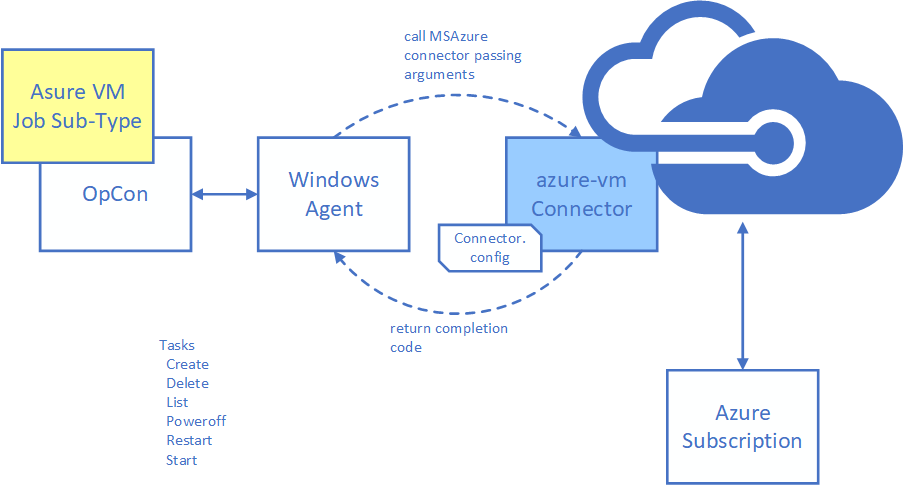
Supported tasks
The connector supports the following tasks against Azure virtual machines:
| Task | Description |
|---|---|
| list | Returns status, region, IP addresses, and OS type for all VMs in the resource group. |
| create | Creates a new virtual machine from a defined image. |
| delete | Removes a virtual machine from the resource group. |
| poweroff | Powers off a virtual machine. The machine is stopped but Azure continues to reserve its resources. |
| deallocate | Stops a virtual machine and releases its compute resources, so Azure stops charging for them. |
| restart | Restarts a virtual machine. |
| start | Starts a stopped virtual machine. |
Sub-type options
The connector supports two job sub-type options depending on which OpCon interface you use to define jobs.
Enterprise Manager sub-type
Enterprise Manager provides a Windows job sub-type plug-in that simplifies creating the command-line arguments required to run connector tasks. The sub-type appears as Azure VM in the Windows job sub-type list.
Requires OpCon Release 19.0 or higher.
Solution Manager sub-type
The ACS framework (available in OpCon 25.0.3 or higher) provides a Solution Manager-based sub-type for the Azure VM connector. It centralizes the Connector.config file within the OpCon environment and provides a wrapper around the connector executable.
The sub-type appears as an ACS Agent of type AzureVM in Solution Manager.
Requires OpCon Release 25.0.3 or higher.
FAQs
Which sub-type should I use? Use the Solution Manager sub-type if you are running OpCon 25.0.3 or higher and prefer managing configuration centrally within Solution Manager. Use the Enterprise Manager sub-type if you are running an older OpCon release or prefer to manage configuration files directly on the Windows agent.
Can the connector be installed on any Windows server? When using the Enterprise Manager sub-type, the connector can be installed on any Windows server that has an OpCon Windows agent installed. When using the Solution Manager sub-type, the connector must be installed on the same Windows server as the OpCon installation or the Relay installation.
Does the connector support custom VM images? Yes. When creating a virtual machine, you can select a custom image by checking the Custom Image option. When using a custom image, a disk size is not required, and the image size should match the size used when the custom image was created.
What Java version does the connector use?
The connector uses an embedded OpenJDK 11 distribution bundled in the java directory of the installation. No separate Java installation is required.
Glossary
ACS framework — The Agent Configuration Service framework, available in OpCon 25.0.3 and later, that centralizes connector configuration within the OpCon environment and provides a wrapper for ACS-compatible connectors.
Resource group — An Azure container that holds related Azure resources, such as virtual machines, for a solution. The Azure VM Connector operates within a single resource group per job definition.
Connector.config — The configuration file used by the Azure VM Connector to store Azure account credentials (encoded) and OpCon API connection settings.
Sub-type — A job definition template in OpCon that provides a guided form for entering the arguments required by a specific connector or integration. The Azure VM Connector provides sub-types for both Enterprise Manager and Solution Manager.