EASE ACS overview
Theme: Overview
Who Is It For? System Administrator, Automation Engineer
What is it?
Ease ACS provides direct Rest-API access to applications without installing additional components. It is part of the ACS (Agentless Connector System) suite of products.
ACS is an OpCon Agent type that provides a framework for agent development. It is an internal SMANetCom component.
All integrations are generated .dll files placed in a monitored folder.
These modules are loaded into the OpCon environment during startup. New modules can be copied to the monitored folder and become available after restarting the SMA OpCon Service Manager and SMA OpCon RestAPI services.
All task and agent screen definitions are contained in the generated DLL. Solution Manager retrieves form layouts from the DLL to render task and agent definitions. Agent and task definitions are stored as JSON in the OpCon database.
Agent and task definitions can only be created or updated in Solution Manager. JORS is only available through Solution Manager.
- Use this when your OpCon system needs to submit tasks to an Ease DataCenter without installing additional components on the local system.
- Use this when you need to view Ease DataCenter job logs locally without accessing the Ease DataCenter environment directly.
- Use this when multiple Ease DataCenter target schedules are required — each target schedule requires a separate ACS Ease agent connection.
Implementation
Ease ACS comprises connectors copied to the ..\OpConxps\SAM\plugins folder of an on-prem OpCon environment or the ..\SAMRelay\plugins folder of an on-prem SMA Relay installation.
The ACS Ease module provides the screen definitions for ACS Ease task types and the code that runs them. Use Solution Manager to define the Ease DataCenter connection and ACS Ease task types, which are stored in a schedule in your OpCon system.
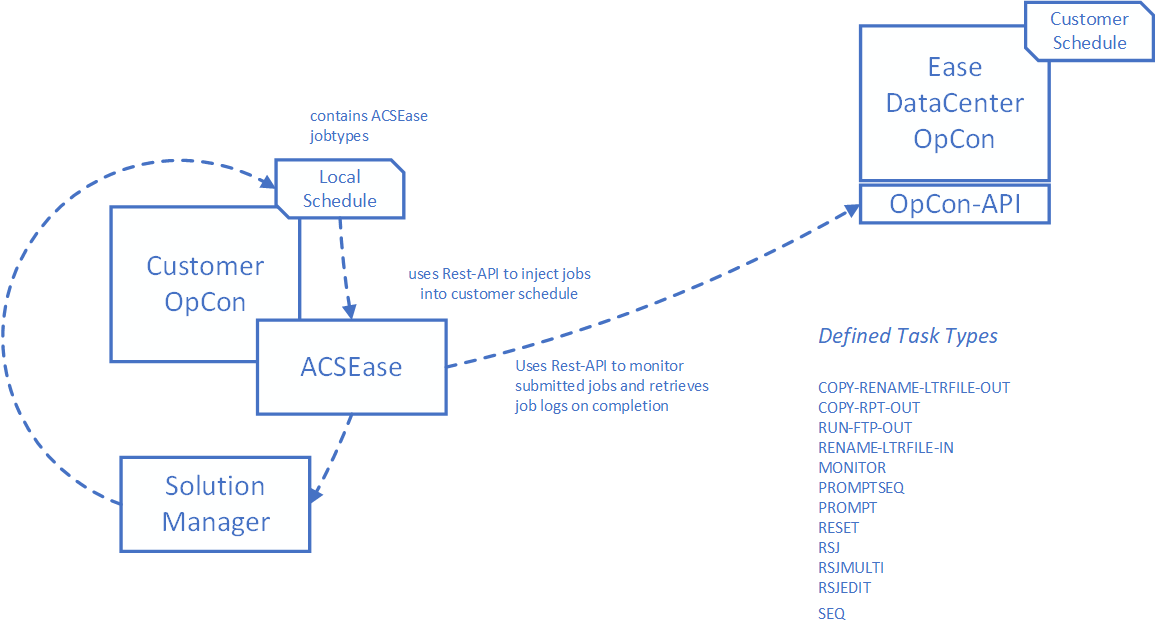
During a task run, the ACS Ease task uses the OpCon Rest-API to inject tasks into the target Ease DataCenter schedule. When the tasks complete, their job logs are retrieved and appended to the local ACS Ease task job log.
ACS Ease
Each connection is associated with a target schedule in the Ease DataCenter. If multiple target schedules are required, define a separate connection for each.
Job logs from tasks running in the Ease DataCenter are retrieved and appended to the local job log. You do not need to access the Ease DataCenter to view job logs.
The following connection information is required:
| Information | Description |
|---|---|
| Customer Id | The customer Id allocated by the Ease Datacenter. |
| Ease Schedule Name | The schedule name allocated by the Ease Datacenter. |
| Ease URL | The URL provided by the Ease DataCenter to access the target OpCon Rest-API. |
| Ease User | The Ease user allocated by the Ease Datacenter. |
| Ease User Password | The password of the allocated Ease user. |
| Schedule Name (Local Datacenter) | The local schedule, such as EASE-LOCAL, into which bundle tasks inject their container jobs. |
| OpCon URL | The host and port of the local OpCon Rest-API. |
| User | The local OpCon user. |
| User Password | The password of the local OpCon user. |
The following task types are available.
| Task Type | Description |
|---|---|
| BUNDLE-RSJEDIT | MONITOR and RSJEDIT tasks |
| BUNDLE-SEQ-FTP | SEQ, COPY-RPT-OUT and RUN-FTP-OUT tasks |
| BUNDLE-SEQ-PROMPT | SEQ and PROMPT tasks |
| COPY-DATA-TO-LTRFILE | Copy outgoing Data File to Letter Files for FTP |
| COPY-RENAME-LTRFILE-OUT | Copy or Rename Letter File for FTP |
| COPY-RPT-OUT | Copy Report to Letter Files for FTP |
| FILEPERMS | Update Letter File Privileges to 774 |
| MONITOR | File Monitor for Incoming File |
| MOVE-LTRFILE-TO-DATA | Move incoming Letter File to Data Files |
| PROMPT | Answer a Single Prompt |
| PROMPTSEQ | Answer a Single Prompt with a SEQ |
| RUN-FTP-OUT | FTP Letter File off Symitar |
| RENAME-LTRFILE-IN | Rename Letter File Removing Prefix |
| RESET | Reset a Single Prompt |
| RSJ | Run Symitar Job (single-threaded) |
| RSJEDIT | Runs Symitar Job with Edit File |
| RSJMULTI | Run Symitar Job (multi-threaded) |
| SEQ | Collect the SEQ of a Report |
| SEQ-SEND | Copy Specified SEQ to Reports for FTP |
| TRANSLATE2COMMAS | Answer a Single Prompt containing commas |
Related topics: