SAP Data Services
What is it?
SAP Data Services provides a batch and real-time data integration system to drive today's new generation of analytic and supply-chain management applications. Using the highly scalable data integration solution provided by SAP, the enterprise can maintain a real-time, on-line dialogue with customers, suppliers, employees, and partners, providing the critical information needed for transactions and business analysis.
SAP Data Services combines both batch and real-time data movement and management to provide a single data integration platform for information management from any information source, for any information use.
Using the software, you can:
- Stage data in an operational data store, data warehouse, or data mart.
- Update staged data in batch or real-time modes.
- Create a single graphical development environment for developing, testing, and deploying the entire data integration platform.
- Manage a single metadata repository to capture the relationships between different extraction and access methods and provide integrated lineage and impact analysis.
The SMA OpCon SAP Data Services Connector interacts with the Central Management Console (CMC) through web services to start and track (monitor) jobs defined within the Repository and running on Job Servers within the SAP Data Services environment.
SAP Data Services Connector
The SAP Data Services Connector lets OpCon start, cancel, and track jobs running in the SAP Data Services environment. It is a Java program that the Windows Agent runs, using the Java runtime supplied in the connector package. Job definitions are entered as Windows jobs using the SAP Data Services job subtype. When the job is scheduled by OpCon, the definitions are passed as arguments to the SAP Data Services Connector.
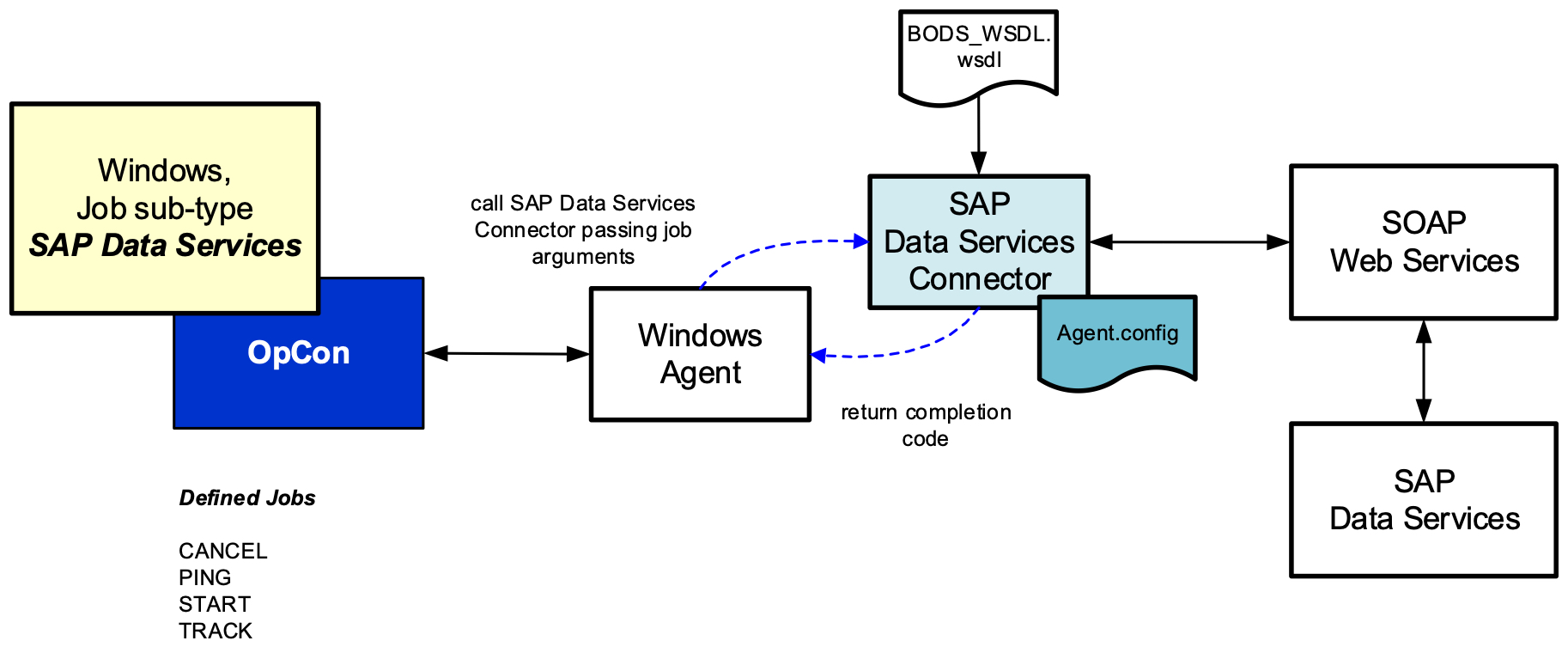
Supported job types
The SAP Data Services Connector supports the following job types, which can be used to communicate with the SAP Data Services batch environment:
| Job type | Purpose |
|---|---|
| CANCEL | Cancels a running batch job. |
| PING | Tests a connection to the SAP Data Services environment. |
| START | Starts a batch job defined within the SAP Data Services environment. |
| TRACK | Monitors a job running within the SAP Data Services environment that was started by the SAP Data Services Scheduler. |
How the connector communicates
The job definitions are passed to the SAP Data Services Connector as arguments. The connector uses the BODS_WSDL.wsdl definition to define the web services endpoints. The job definition information received from OpCon is then mapped to the appropriate structures and the web service is called.
Every job type requires the user name, password, CMS system and CMS authentication values to be supplied in the job definition. CANCEL, START and TRACK use them to log on to SAP Data Services: a security token is returned and used on all subsequent calls to the web service until the job has completed, then discarded.
PING is the exception. It still requires the values to be present, but it does not log on — it calls the ping operation directly. So a PING job confirms that the connector can reach the web service and tells you nothing about whether the credentials are valid.
FAQs
Does the connector create job definitions in SAP Data Services? No. The connector does not create job definitions in the SAP Data Services database. It only references existing jobs in the Repository.
Where does the connector run? The connector runs as a Java program started by the Windows Agent, using the runtime supplied in the package. It can be installed on the OpCon server or on a separate Windows server with a Windows Agent installed.
What does the PING job type do? A PING job type has no additional parameters beyond the common fields and is used to test the communications link between the SAP Data Services Connector and the SAP Data Services environment. It does not authenticate, so a successful PING does not confirm that the credentials are correct.
Glossary
BODS — Business Objects Data Services, the legacy name for SAP Data Services. The connector's WSDL file is named BODS_WSDL.wsdl for historical reasons.
Central Management Console (CMC) — The SAP Business Objects administration interface that the connector communicates with through web services.
Repository — The SAP Data Services metadata store where job definitions reside. The connector references jobs in the Repository by name.
Security token — A short-lived identifier returned by SAP Data Services after a successful logon. The connector uses this token for subsequent web service calls during a job and discards it when the job completes.