Failover Scenarios
Theme: Troubleshoot
Who Is It For? System Administrator
What Is It?
Failover in OpCon shuts down the primary SMA Service Manager and starts the secondary, transferring control of the application group to the standby server. OpCon supports both automatic and manual failover, and the configuration depends on whether the database uses mirroring, replication, or a standalone setup.
Introduction
Failover shuts down the primary SMA Service Manager (SMAServMan) and starts the secondary SMAServMan. The SMAServMan controls the activation and shutdown of an application group defined in its configuration file. The primary SMAServMan runs on the primary machine; the secondary SMAServMan runs on the secondary machine (refer to Configuration Scenarios). A machine without a failover configuration is a Stand Alone machine. Failover must also consider the database configuration.
OpCon supports two types of failover:
- Automatic Failover
- Manual Failover
Automatic Failover
On a network, two SMAServMans can communicate with each other to orchestrate automatic failover. When properly configured, Automatic Failover can occur in the following situations:
- When the Primary SMAServMan shuts down abnormally. (Refer to Abnormal Shutdown of the Primary SMAServMan.)
- When the Secondary SMAServMan can no longer communicate with the Primary SMAServMan. (Refer to Communication Loss between SMAServMans.) Loss of communication can occur because of:
- The network connection between the two machines fails
- The Primary machine crashes
- When the Primary SMAServMan shuts down normally. Normal shutdown can occur because of:
- The administrator shuts down the SMA Service Manager through the Windows Service Control Manager (SCM) or through the
net stopcommand - The administrator manually performs a normal machine shutdown (e.g., through the Start > Shutdown menu)
- The administrator shuts down the SMA Service Manager through the Windows Service Control Manager (SCM) or through the
Failover Rules
- Failover is always from the Primary SMAServMan to the Secondary SMAServMan
- Returning the primary SMAServMan to an active state after failover requires manual intervention (OpCon does not support automatic recovery). Refer to Normal Shutdown of the Primary SMAServMan
- The Secondary SMAServMan only starts its application group based on criteria defined by a user
When the Secondary SMAServMan's application group is active, starting the Primary SMAServMan has no effect.
The administrator must activate at least one failover option in the Secondary SMAServMan's configuration file for automatic failover to occur.
Choosing Failover Triggers
The administrator must carefully choose the triggers that cause failover.
Abnormal Shutdown of the Primary SMAServMan
Continuous strongly recommends configuring the Secondary SMAServMan to take control of processing upon an abnormal shutdown of the Primary SMAServMan. Abnormal shutdown occurs in the following situations:
- A critical Windows error or Windows exception shuts down the Primary SMAServMan
- The Primary SMAServMan shuts down with an error after exceeding the maximum number of retries attempting to restart a critical application
- For configuration details, refer to the PrimaryAbnormalShutdownFailover and PrimaryAbnormalShutdownScript settings in the Server Programs online help
Communication Loss between SMAServMans
Continuous does not recommend configuring the Secondary SMAServMan to take control of processing upon communication loss. Communication loss can occur if the network connection becomes too slow or fails. Because the Secondary SMAServMan determines connection loss based on lack of ping response from the Primary SMAServMan, there is no distinction between a temporary network problem and a primary machine crash.
If configuring the Secondary SMAServMan to take control of processing upon connection loss, the customer must guarantee network connectivity.
For configuration details, refer to the SyncLostFailover and SyncLostScript settings in the Server Programs online help.
Normal Shutdown of the Primary SMAServMan
Continuous does not recommend configuring the Secondary SMAServMan to take control of processing upon normal shutdown of the Primary SMAServMan. With a controlled shutdown, failover is normally unnecessary; however, Continuous includes failover on normal shutdown to support unique failover configurations.
For configuration details, refer to the PrimaryNormalShutdownFailover and PrimaryNormalShutdownScript settings in the Server Programs online help.
Manual Failover
With manual failover, the administrator decides when to initiate failover to the Secondary SMAServMan. Both SMAServMans should be StandAlone machines. Because only one SAM should access the OpCon database at a time, the SMAServMan on the Secondary machine should never start without manual intervention. Ensure that the SMAServMan service on the Primary machine has a startup type of Automatic (Delayed Start) and the SMAServMan on the Secondary machine has a startup type of Manual.
Configure the SMAServMan Service on the Primary Machine
-
Use menu path: Start > Control Panel
-
In the Control Panel window: Select the Administrative Tools icon
-
In the Administrative Tools window: Select the Services icon
-
In the Services window: Select on the SMA OpCon Service Manager service
-
Change the SMAServMan's Startup Type to Automatic (Delayed Start) using the following steps:
- Select on SMA OpCon Service Manager
- Select Automatic (Delayed Start) in the Startup type list and select OK
-
Select Close ☒ to close the Services window
Configure the SMAServMan Service on the Secondary Machine
-
Use menu path: Start > Control Panel
-
In the Control Panel window: Select the Administrative Tools icon
-
In the Administrative Tools window: Select the Services icon
-
In the Services window: Select on the SMA OpCon Service Manager service
-
Change the SMAServMan's Startup Type to Manual using the following steps:
- Select on SMA OpCon Service Manager
- In the SMA OpCon Service Manager Properties window:
- Select Manual in the Startup type list and select OK
-
Select Close ☒ to close the Services window
Configuration Scenarios
OpCon supports four failover scenarios:
- Scenario One: Manual Failover with a Single Database
- Scenario Two: Manual Failover with Secondary Database
- Scenario Three: Automatic Failover with No Secondary Database
- Scenario Four: Automatic Failover with a Secondary Database
The table below represents the failover scenarios.

Configuration and Process Flows
The configuration settings and process flows below give administrators a clearer picture of the failover process. These four configurations are the most common implementations; numerous other configurations are possible. Administrators should have a thorough understanding of all SMAServMan configuration options before implementing more elaborate failover solutions. Continuous strongly suggests performing failover and disaster recovery testing before employing any failover scenario in a production environment.
Scenario One: Manual Failover with a Single Database
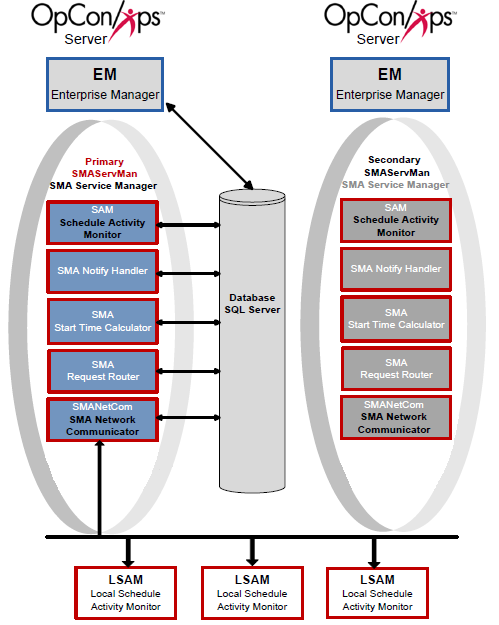
Scenario One includes a primary machine, a secondary machine, and a single database. The Primary and Backup SMAServMans do not communicate with each other.
Configuration
The primary SMAServMan is on the primary machine and the Secondary SMAServMan is on the secondary machine. The database can reside on the primary, secondary, or a third machine. The SMAServMan manages the SAM and Supporting Services. For more information, refer to the Introduction in the Server Programs online help.
The following tables list critical configuration settings and sample values. This scenario uses scripts invoking the SMALogEvent utility for notification. Refer to SMALogEvent in the Utilities online help.
| SMAServMan.ini Setting | Primary Machine Value |
|---|---|
| Mode | StandAlone |
| TerminationScript | ""<Termination Event Script>"" |
| SMAServMan.ini Setting | Secondary Machine Value |
|---|---|
| Mode | StandAlone |
| InitializationScript | ""<Initialization Event Script>"" |
| SMA Connection Configuration Setting | Primary Machine Value |
|---|---|
| Server\Instance Name | SMAProdDBServer |
| Database Name | OpConxps |
| Database Login ID | opconsam |
| SMA Connection Configuration Setting | Secondary Machine Value |
|---|---|
| Server\Instance Name | SMAProdDBServer |
| Database Name | OpConxps |
| Database Login ID | opconsam |
Process Flows
Based on the above configuration values, the following process flows show SMAServMan's expected behavior.
Good Startup
| Step | Description |
|---|---|
| 1 | Primary StandAlone SMAServMan starts Primary SAM-SS. |
| 2 | Primary SAM-SS connects to Database. |
| 3 | Normal process flow. |
Critical Application Failure during Processing
| Step | Description |
|---|---|
| 1 | Normal Process Flow on primary StandAlone. |
| 2 | Critical application fails on primary StandAlone Machine one time more than the RestartApplicationLimit. |
| 3 | Primary StandAlone SMAServMan shuts down SAM-SS. |
| 4 | Primary StandAlone SMAServMan runs the TerminationScript. In this example, the script writes an event to the Windows Event Log notifying the administrator that the SAM-SS is shutting down. |
| 5 | Primary StandAlone SMAServMan shuts itself down. |
Manual Failover
| Step | Description |
|---|---|
| 1 | The OpCon administrator reviews all SAM-SS logs to determine the cause of the failure. For information on the logs, refer to Logging in the Server Programs online help. |
| 2 | If possible, the OpCon administrator corrects the issue on the primary server. |
| 3 | If the OpCon administrator cannot resolve the issue quickly, the administrator sets the Primary SMAServMan service startup type to Manual and confirms the service is stopped. |
| 4 | On the Backup StandAlone machine, the OpCon administrator sets the SMAServMan startup type to Automatic and starts the service. |
Scenario Two: Manual Failover with Secondary Database
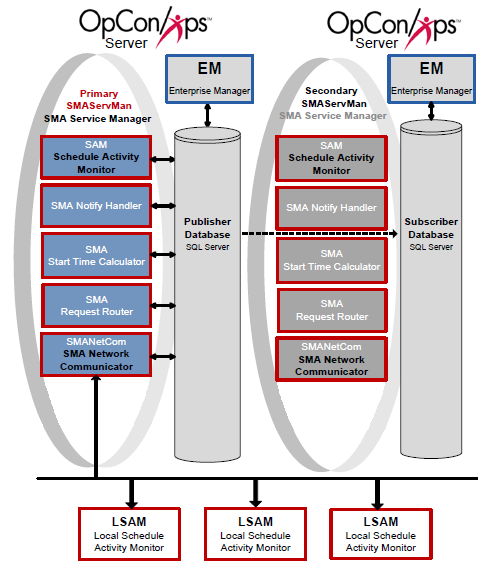
Scenario Two includes a Primary machine, a Secondary machine, and a replicated database. The Primary and Backup SMAServMans do not communicate with each other.
Configuration
The primary StandAlone SMAServMan is on the primary machine and the backup StandAlone SMAServMan is on the secondary machine. The publishing database resides on the primary machine; the subscribing database is on the secondary. The SMAServMan manages the following applications: SAM, SMANetCom, SMANotifyHandler, SMARequestRouter, and SMAStartTimeCalculator. This scenario uses scripts invoking the SMALogEvent utility for notification. Refer to SMALogEvent in the Utilities online help.
The following tables list critical configuration settings and sample values. All other values in the SMAServMan.ini files should remain at Continuous default settings. The administrator must also establish replication between the databases and configure a command file (StopRepl.cmd or StopRepl_WinAuth.cmd) to stop replication. For replication setup, refer to Manual Setup for Microsoft SQL Replication. For the StopRepl.cmd and StopRepl_WinAuth.cmd files, refer to Determining Values for the Command Files.
| SMAServMan.ini Setting | Primary Machine Value |
|---|---|
| Mode | StandAlone |
| TerminationScript | ""<Termination Event Script>"" |
| SMAServMan.ini Setting | Secondary Machine Value |
|---|---|
| Mode | StandAlone |
| InitializationScript | ""<Initialization Event Script>"" |
| SMA Connection Configuration Setting | Primary Machine Value |
|---|---|
| Server\Instance Name | SMAProdDBServer |
| Database Name | OpConxps |
| Database Login ID | opconsam |
| SMA Connection Configuration Setting | Secondary Machine Value |
|---|---|
| Server\Instance Name | SMABckupDBServer |
| Database Name | OpConxps |
| Database Login ID | opconsam |
Process Flows
Based on the above configuration values, the following process flows indicate SMAServMan's expected behavior.
Good Startup
| Step | Description |
|---|---|
| 1 | Primary StandAlone SMAServMan starts Primary SAM-SS. |
| 2 | Primary SAM-SS connects to Publishing Database. |
| 3 | Normal process flow. |
Critical Application Failure during Processing
| Step | Description |
|---|---|
| 1 | Normal Process Flow on primary StandAlone. |
| 2 | Critical application fails on primary StandAlone Machine one time more than the RestartApplicationLimit. |
| 3 | Primary StandAlone SMAServMan shuts down SAM-SS. |
| 4 | Primary StandAlone SMAServMan runs the TerminationScript. In this example, the script writes an event to the Windows Event Log notifying the administrator that the Primary SAM-SS is shutting down. |
| 5 | Primary StandAlone SMAServMan shuts itself down. |
Manual Failover
| Step | Description |
|---|---|
| 1 | The OpCon administrator reviews all SAM-SS logs to determine the cause of the failure. For information on the logs, refer to Logging in the Server Programs online help. |
| 2 | If possible, the administrator corrects the issue on the primary server. |
| 3 | If the administrator cannot resolve the issue quickly, the administrator sets the Primary SMAServMan service startup Type to Manual and confirms the service is stopped. |
| 4 | The administrator runs the StopRepl.cmd file on the backup StandAlone machine. |
| 5 | On the Backup StandAlone machine, the OpCon administrator sets the SMAServMan startup type to automatic and starts the service. |
Scenario Three: Automatic Failover with No Secondary Database
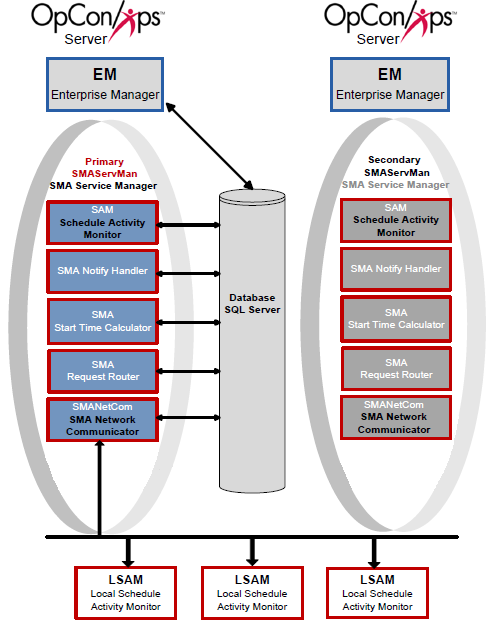
Scenario Three includes a Primary machine, a Secondary machine, and a single database. The SMAServMans on each machine communicate with each other to provide automatic failover.
Configuration
The Primary SMAServMan is on the primary machine and the Secondary SMAServMan is on the secondary machine. The database can reside on the primary, secondary, or a third machine. The SMAServMan manages the following applications: SAM, SMANetCom, SMANotifyHandler, SMARequestRouter, and SMAStartTimeCalculator. This scenario uses scripts invoking the SMALogEvent utility for notification. Refer to SMALogEvent in the Utilities online help.
| SMAServMan.ini Setting | Primary Machine Value |
|---|---|
| Mode | Primary |
| FailOverSocketNumber | 6500 |
| TimeOutInSecondsForSync | 60 |
| SyncInitFailureScript | ""<Synchronization Event Script>"" |
| SMAServMan.ini Setting | Secondary Machine Value |
|---|---|
| Mode | Secondary |
| FailOverSocketNumber | 6500 |
| PrimaryMachine | OpConxps1 |
| SecondsBetweenPings | 15 |
| PingRetryCount | 1 |
| PingTimeOutInMilliseconds | 500 |
| SyncInitFailureScript | ""<Synchronization Event Script>"" |
| PrimaryAbnormalShutdownFailover | Y |
| PrimaryAbnormalShutdownScript | ""<Shutdown Script>"" |
| SMA Connection Configuration Setting | Primary Machine Value |
|---|---|
| Server\Instance Name | SMAProdDBServer |
| Database Name | OpConxps |
| Database Login ID | opconsam |
| SMA Connection Configuration Setting | Secondary Machine Value |
|---|---|
| Server\Instance Name | SMAProdDBServer |
| Database Name | OpConxps |
| Database Login ID | opconsam |
Startup Process Flows
Based on the above configuration values, the following process flows indicate SMAServMan's expected behavior.
Synchronization Failure
| Step | Description |
|---|---|
| 1 | Primary and Secondary SMAServMan's attempt to synchronize. |
| 2 | If synchronization unsuccessful, the Primary SMAServMan continues to attempt synchronization after every number of seconds specified by the TimeOutInSecondsForSync configuration setting. The Secondary SMAServMan continues to attempt synchronization after every number of seconds specified by the SecondsBetweenPings configuration setting. |
| 3 | After every unsuccessful attempt at synchronization, the Primary and Secondary SMAServMan's run the script specified by the SyncInitFailureScript configuration setting on each machine. In this example, the scripts write events to the Windows Event Log notifying the administrator that synchronization has failed between the machines. |
| 4 | After running the scripts, both SMAServMan's restart the process of initializing synchronization. Refer to step 1. |
Good Startup
| Step | Description |
|---|---|
| 1 | Primary and Secondary SMAServMan's attempt to synchronize. |
| 2 | If synchronization successful, Primary SMAServMan sets Primary Application Group to ACTIVE. |
| 3 | If synchronization successful, Secondary SMAServMan sets Secondary Application Group to STANDBY. |
| 4 | Primary SMAServMan starts Primary SAM-SS. |
| 5 | Primary SAM-SS connects to Primary Database. |
| 6 | Normal Process Flow on Primary Machine with Primary Database. |
| 7 | Secondary SMAServMan continually pings Primary SMAServMan for status of the Primary Application Group. |
Failover Process Flow
Process Flow for Automatic SMAServMan Failover with No Secondary Database.
Critical Application Failure during Processing
| Step | Description |
|---|---|
| 1 | Normal Process Flow on Primary. |
| 2 | Secondary SMAServMan continually pings Primary SMAServMan for status. |
| 3 | Critical application fails on Primary Machine one time more than the RestartApplicationLimit. |
| 4 | Primary SMAServMan shuts down SAM-SS. |
| 5 | Primary SMAServMan sets Primary Application Group to INACTIVE. |
| 6 | Secondary SMAServMan sets Secondary Application Group to ACTIVE because of the abnormal shutdown on the Primary. |
| 7 | Secondary SMAServMan starts Secondary SAM-SS. |
| 8 | Secondary SAM-SS connects to Primary Database. |
| 9 | Normal Process Flow on Secondary machine with Primary Database. |
Scenario Four: Automatic Failover with a Secondary Database
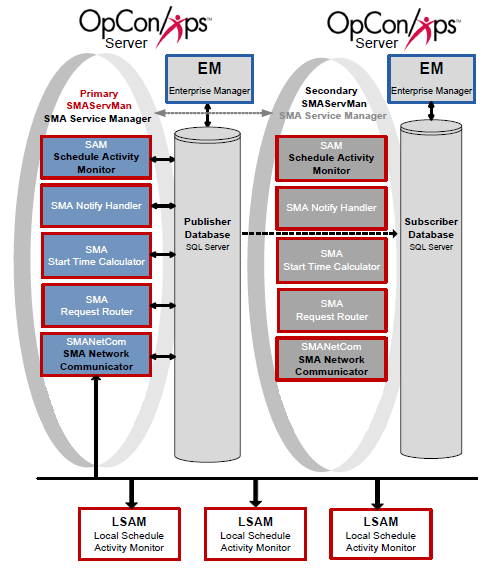
Scenario Four includes a Primary machine, a Secondary machine, and a replicated database. The SMAServMans on each machine are aware of each other to provide hot failover.
Configuration
The Primary SMAServMan is on the primary machine and the Secondary SMAServMan is on the secondary machine. The publishing database resides on the primary machine; the subscribing database resides on the secondary. The SMAServMan manages the following applications: SAM, SMANetCom, SMANotifyHandler, SMARequestRouter, and SMAStartTimeCalculator. This scenario uses scripts invoking the SMALogEvent utility for notification. Refer to SMALogEvent in the Utilities online help.
The following tables list critical configuration settings and sample values. All other values in the SMAServMan.ini files should remain at Continuous default settings. The administrator must establish replication between the databases and configure a command file to stop replication. For replication setup, refer to Manual Setup for Microsoft SQL Replication. For the StopRepl.cmd file, refer to Determining Values for the Command Files.
| SMAServMan.ini Setting | Primary Machine Value |
|---|---|
| Mode | Primary |
| FailOverSocketNumber | 6500 |
| TimeOutInSecondsForSync | 60 |
| SyncInitFailureScript | ""<Synchronization Event Script>"" |
| SMAServMan.ini Setting | Secondary Machine Value |
|---|---|
| Mode | Secondary |
| FailOverSocketNumber | 6500 |
| PrimaryMachine | OpConxps1 |
| SecondsBetweenPings | 15 |
| PingRetryCount | 1 |
| PingTimeOutInMilliseconds | 500 |
| SyncInitFailureScript | ""<Synchronization Event Script>"" |
| PrimaryAbnormalShutdownFailover | Y |
| PrimaryAbnormalShutdownScript | ""C:\ProgramData\OpConxps\Utilities\Database\StopRepl.cmd"" |
| SMA Connection Configuration Setting | Primary Machine Value |
|---|---|
| Server\Instance Name | SMAProdDBServer |
| Database Name | OpConxps |
| Database Login ID | opconsam |
| SMA Connection Configuration Setting | Secondary Machine Value |
|---|---|
| Server\Instance Name | SMABckupDBServer |
| Database Name | OpConxps |
| Database Login ID | opconsam |
Startup Process Flows
Based on the above configuration values, the following process flows indicate SMAServMan's expected behavior.
Synchronization Failure
The Secondary SMAServMan.ini file is configured not to failover when there is a synchronization failure.
| Step | Description |
|---|---|
| 1 | Primary and Secondary SMAServMan's attempt to synchronize. |
| 2 | If synchronization unsuccessful, the Primary SMAServMan continues to attempt synchronization after every number of seconds specified by the TimeOutInSecondsForSync configuration setting. The Secondary SMAServMan continues to attempt synchronization after every number of seconds specified by the SecondsBetweenPings configuration setting. |
| 3 | After every unsuccessful attempt at synchronization, the Primary and Secondary SMAServMan's run the script specified by the SyncInitFailureScript configuration setting on each machine. In this example, the scripts write events to the Windows Event Log notifying the administrator that synchronization has failed between the machines. |
| 4 | After running the scripts, both SMAServMan's restart the process of initializing synchronization. Refer to step 1. |
Good Startup
| Step | Description |
|---|---|
| 1 | Primary and Secondary SMAServMan's attempt to synchronize. |
| 2 | If synchronization successful, Primary SMAServMan sets Primary Application Group to ACTIVE . |
| 3 | If synchronization successful, Secondary SMAServMan sets Secondary Application Group to STANDBY. |
| 4 | Primary SMAServMan starts Primary SAM-SS. |
| 5 | Primary SAM-SS connects to Primary Database. |
| 6 | Normal Process Flow on Primary machine. |
| 7 | Primary Database continually Replicates to Secondary Database. |
| 8 | Secondary SMAServMan continually pings Primary SMAServMan for status of Primary Application Group. |
Failover Process Flow
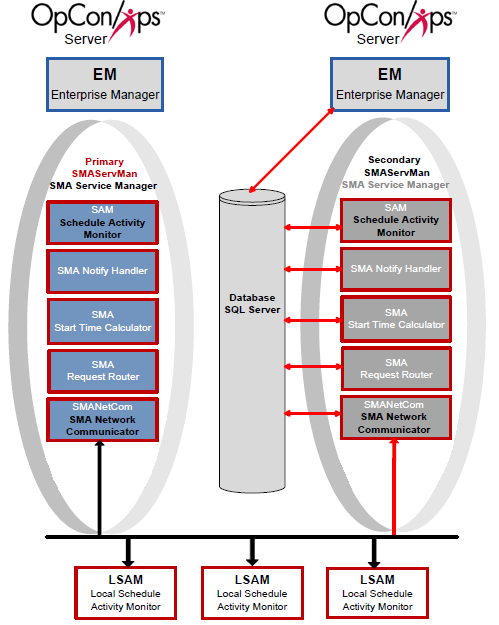
Critical Application Failure during Processing
| Step | Description |
|---|---|
| 1 | Normal Process Flow on Primary. |
| 2 | Secondary SMAServMan continually pings Primary SMAServMan for status of Primary Application Group. |
| 3 | Critical application fails on Primary Machine one time more than the RestartApplicationLimit. |
| 4 | Primary SMAServMan shuts down SAM-SS. |
| 5 | Primary SMAServMan sets Primary Application Group to INACTIVE. |
| 6 | Secondary SMAServMan runs the PrimaryAbnormalShutdownScript that specifies the StopRepl.cmd file. This command file disconnects any users attached to the publishing database, deletes the subscriptions, and deletes the publication, and marks the publishing database as read-only. |
| 7 | Secondary SMAServMan sets Secondary Application Group to ACTIVE. |
| 8 | Secondary SMAServMan starts Secondary SAM-SS. |
| 9 | Secondary SAM-SS connects to what was the Subscribing Database. |
| 10 | Normal Process Flow on Secondary machine with what was Subscribing Database. |
Recovery
Recovery back to the Primary SMAServMan requires manual intervention. Complete the procedures below to restore processing to the original failover configuration.
Recover from Failover with No Secondary Database
After remedying the problem that caused the failover, complete the following procedure to recover the primary machine.
- Stop the SMA Service Manager on the Secondary Machine. Refer to License Types in the Server Programs online help
- Start the SMA Service Manager on the Primary Machine. Refer to License Types in the Server Programs online help
- If using hot failover, start the Scenario Four: Automatic Failover with a Secondary Database
Recover from Failover with a Secondary Database
After remedying the problem that caused the failover, complete the procedures in the Failover and Recovery with Replication chapters. Refer to Failover and Recovery with Replication.
Operations
Monitoring
- Automatic failover triggers on: abnormal shutdown of the primary SMAServMan (recommended), loss of communication between SMAServMans (not recommended unless network is guaranteed), or normal shutdown of the primary (not recommended).
- When the secondary application group is active, starting the primary SMAServMan has no effect; the primary must be manually restored after the secondary is stopped.
Common Tasks
- Configure the primary SMAServMan service startup type to Automatic (Delayed Start); configure the secondary SMAServMan startup type to Manual for manual failover scenarios.
- To perform a manual failover: stop the primary SMAServMan service, then manually start the secondary SMAServMan service on the secondary machine.
- To return to the primary after failover: stop the secondary SMAServMan, resolve the issue on the primary machine, and restart the primary SMAServMan — OpCon does not support automatic recovery back to the primary.
- Perform failover and disaster recovery testing before employing any failover scenario in a production environment.
Alerts and Log Files
- Use SMALogEvent scripts (via WriteEvent.cmd) in SMAServMan trigger scripts to write events to the Windows Event Log on abnormal shutdown or communication loss.
Exception Handling
Configuring the secondary SMAServMan to fail over on communication loss triggers failover on temporary network issues — The secondary SMAServMan cannot distinguish between a temporary network slowdown and a primary machine crash; any loss of ping response from the primary triggers failover, which starts a second SAM-SS and allows two SAMs to potentially access the same database — Continuous does not recommend configuring failover on communication loss unless the customer can guarantee network connectivity; use abnormal shutdown as the failover trigger instead.
Starting the secondary SMAServMan without manual intervention causes two SAMs to access the database simultaneously — In manual failover configurations, the secondary SMAServMan must never start without explicit manual intervention; only one SAM should access the OpCon database at a time — Set the secondary SMAServMan service startup type to Manual and only start it after confirming the primary SMAServMan service is stopped.
After failover, returning the primary SMAServMan to active requires manual steps — OpCon does not support automatic recovery back to the primary machine; when the secondary application group is active, starting the primary SMAServMan has no effect — The administrator must manually stop the secondary SMAServMan, resolve the issue on the primary machine, and restart the primary SMAServMan to restore normal operations.
FAQs
Q: How many steps does the Failover Scenarios procedure involve?
The Failover Scenarios procedure involves 15 steps. Complete all steps in order and save your changes.
Q: What does Failover Scenarios cover?
This page covers Introduction, Automatic Failover, Configuration Scenarios.
Q: Does OpCon support automatic recovery back to the primary machine after failover?
No. Returning the primary SMAServMan to an active state after failover requires manual intervention. OpCon does not support automatic recovery to the primary machine. Additionally, when the secondary SMAServMan's application group is active, starting the primary SMAServMan has no effect.
Glossary
SMANetCom (SMA Network Communications Module): Handles TCP/IP communication of platform-specific automation information between SAM and all agents. Uses database tables to maintain reliable communication and data integrity.
SMAServMan (SMA Service Manager): Manages the starting, stopping, and restarting of all OpCon server programs. Monitors configured applications and restarts them automatically if they fail unexpectedly.
SAM-SS (SAM and Supporting Services): The collective term for the OpCon server-side processing programs: SAM, SMANetCom, SMA Notify Handler, SMA Request Router, and SMA Start Time Calculator.
SMA Connection Configuration: A utility that generates the database connection file (.dat) used by OpCon server programs and utilities to connect to the OpCon SQL Server database.
SAM (Schedule Activity Monitor): The logical processor for OpCon workflow automation. SAM monitors schedule and job start times, dependencies, and user commands to determine job execution timing, and processes OpCon events.
OpConxps: The standard installation directory name for OpCon program files, configuration files, and output data on Windows machines.
Notification: A message sent by the SMA Notify Handler when a Machine, Schedule, or Job changes to a specific status. Notifications can be delivered as emails, text messages, Windows Event Log entries, SNMP traps, or other formats.
Resource: A numeric variable in OpCon representing a finite pool. Jobs can be configured to require a set number of resource units to run, limiting concurrent executions and preventing resource contention.