Editing Frequencies
Theme: Configure
Who Is It For? System Administrator, Automation Engineer
What Is It?
To edit Frequencies in Solution Manager, complete the following steps:
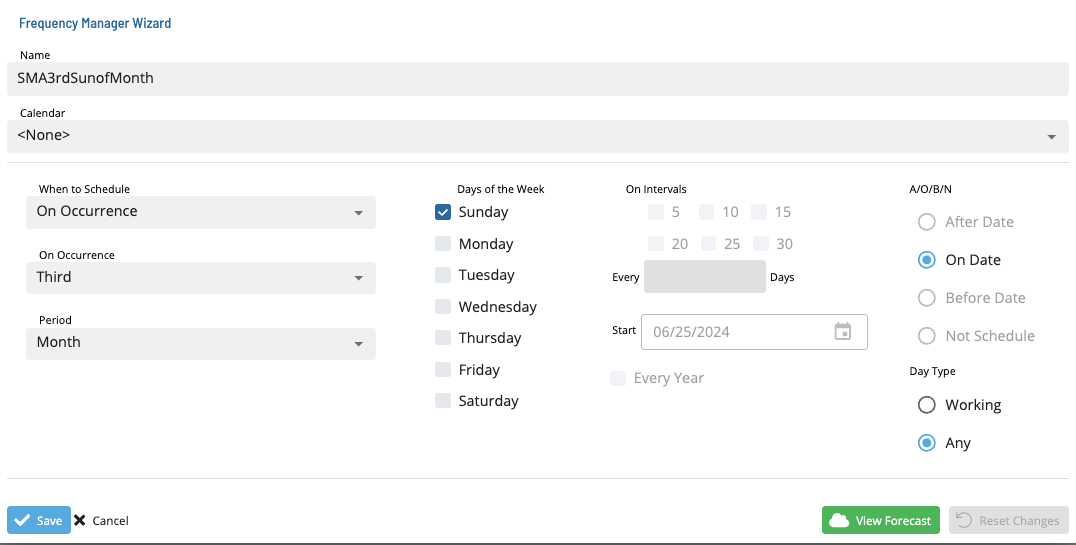
- Select a frequency and select the Edit button. The Frequency Manager Wizard dialog displays
- Make the desired changes to the frequency
- To preview the changes, select the Forecast button
- To undo the changes, select the Reset button
- Select Save to save or Cancel to discard
FAQs
Q: Do edits to frequencies take effect immediately?
Changes saved to frequencies in the Job Master take effect the next time the record is built or referenced. Edits to Daily table records apply only to the current instance.
Glossary
Daily Tables: The OpCon database tables that hold the active, date-specific instances of schedules and jobs built for execution. Changes to daily tables affect only the current day's automation.
Frequency: A set of rules that defines when a job or schedule is eligible to run, based on calendar rules, day-of-week settings, period offsets, and other timing criteria.
Resource: A numeric variable in OpCon representing a finite pool. Jobs can be configured to require a set number of resource units to run, limiting concurrent executions and preventing resource contention.
Job: The fundamental unit of work in OpCon. A job defines what to run, on which machine, when to start, and what conditions must be met. Job results are tracked and can trigger events and notifications.