Moving Master Jobs
Theme: Configure
Who Is It For? System Administrator, Automation Engineer
What Is It?
Use this procedure to move Master Jobs in Solution Manager.
Administration
Required Privileges
To move a master job, your role must have at least one of the following privileges:
- Departmental Function Privilege: All Function Privileges, Add Jobs To Master Schedules, or All Job Master Functions
Moving a Job
Go to Library > Master Jobs, select a job, and select Move. The Master Job Move dialog opens:
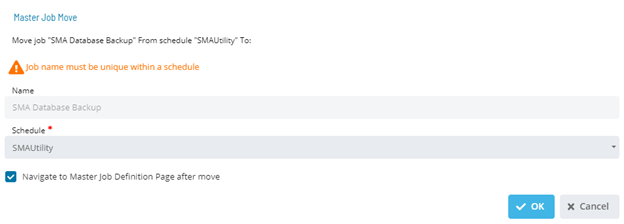
- Select a Schedule
- Select OK to move the job or Cancel to cancel
Configuration Options
| Setting | What It Does | Default | Notes |
|---|---|---|---|
| Departmental Function Privilege | All Function Privileges, Add Jobs To Master Schedules, or All Job Master Functions | — | — |
FAQs
Q: How many steps does the Moving Master Jobs procedure involve?
The Moving Master Jobs procedure involves 2 steps. Complete all steps in order and save your changes.
Q: What does Moving Master Jobs cover?
This page covers Required Privileges, Moving a Job.
Glossary
Resource: A numeric variable in OpCon representing a finite pool. Jobs can be configured to require a set number of resource units to run, limiting concurrent executions and preventing resource contention.
Role: A named security profile in OpCon that groups privileges together. Roles are assigned to user accounts to control which features, schedules, jobs, machines, and administrative functions a user can access.
Privilege: A specific permission granted through an OpCon role that controls access to a feature, function, or object type. Privileges are organized into categories such as Function Privileges, Machine Privileges, Schedule Privileges, and Access Codes.
Schedule: A named container for jobs in OpCon, built for a specific date to create that day's automation. Schedules define build settings, frequencies, and the jobs that run within them.
Job: The fundamental unit of work in OpCon. A job defines what to run, on which machine, when to start, and what conditions must be met. Job results are tracked and can trigger events and notifications.