Adding Master Jobs
Theme: Configure
Who Is It For? System Administrator, Automation Engineer
What Is It?
Use this procedure to add Master Jobs in Solution Manager.
Administration
Required Privileges
To add a master job, your role must have at least one of the following privileges:
- Departmental Function Privilege: All Function Privileges, Add Jobs To Master Schedules, or All Job Master Functions
Adding a Job
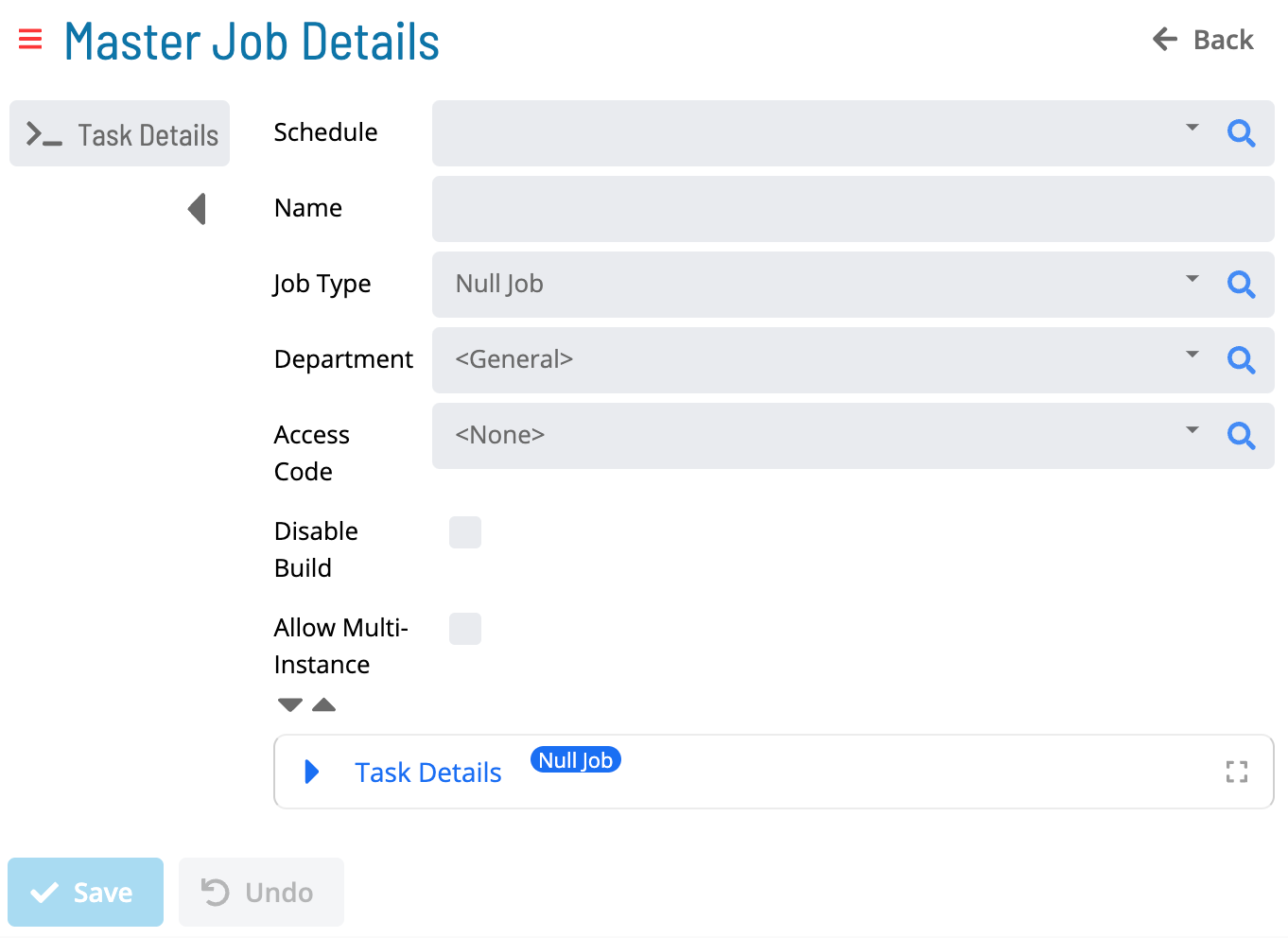
Go to Library > Master Jobs and select Add. The Master Job Details page opens:
-
Select a Schedule
-
Enter a Name
-
Select a Job Type
-
Select a Department
-
Select an Access Code
-
(Optional) Select the Disable Build option. See Jobs
-
(Optional) Select the Allow Multi-Instance option. See Multi-Instance Jobs
-
Expand Task Details and enter the required information for the selected Job Type
-
Select Save
Job Types
- Container Jobs
- File Transfer Jobs
- Null Jobs
- SAP BW Jobs
- SAP R/3 and CRM Jobs
- SQL Jobs
- Unix Jobs
- Windows Jobs
Additional Job Information
- Documentation
- Events
- Expression Dependencies
- Frequencies
- Instance Properties
- Job Dependencies
- Tags
- Threshold / Resource Dependencies
- Threshold / Resource Updates
Configuration Options
| Setting | What It Does | Default | Notes |
|---|---|---|---|
| Departmental Function Privilege | All Function Privileges, Add Jobs To Master Schedules, or All Job Master Functions | — | — |
FAQs
Q: How do you save a new master jobs record?
After completing the required fields, select the Save button on the toolbar to save the master jobs record.
Q: Can you add master jobs for multiple platforms?
Yes. This page covers master jobs for multiple platforms or contexts: Required Privileges, Adding a Job.
Glossary
Frequency: A set of rules that defines when a job or schedule is eligible to run, based on calendar rules, day-of-week settings, period offsets, and other timing criteria.
Threshold: A numeric variable stored in the OpCon database used to control job execution. Jobs can be made dependent on threshold values, and OpCon events can update threshold values at runtime.
Access Code: A security label applied to jobs and schedules in OpCon. Users must have the matching access code privilege to view or manage items with that label.
Department: An organizational grouping in OpCon used to assign jobs to logical divisions. User roles can be scoped to specific departments, controlling which jobs a user can manage.
Resource: A numeric variable in OpCon representing a finite pool. Jobs can be configured to require a set number of resource units to run, limiting concurrent executions and preventing resource contention.
Role: A named security profile in OpCon that groups privileges together. Roles are assigned to user accounts to control which features, schedules, jobs, machines, and administrative functions a user can access.
Privilege: A specific permission granted through an OpCon role that controls access to a feature, function, or object type. Privileges are organized into categories such as Function Privileges, Machine Privileges, Schedule Privileges, and Access Codes.
Schedule: A named container for jobs in OpCon, built for a specific date to create that day's automation. Schedules define build settings, frequencies, and the jobs that run within them.