Managing Vision Remote Instances
Theme: Configure
Who Is It For? System Administrator, Automation Engineer
What Is It?
Vision Remote Instances define instances of OpCon to be monitored that run and are accessed on a remote server. For more information, refer to Remote Instances in the Concepts online help.
The following fields apply for setting Vision Remote Instances:
- Name: The remote instance name
- Badge(Auto Gen.): An auto-generated two-character description based on the Name field. The badge icon appears on cards assigned to a remote instance
- Description: (Optional) Descriptions, explanations, and notes for the remote instance
- Vision Instance Connection: API and Solution Manager credentials for the remote OpCon instance
- Api URL: The API URL for the remote instance
- Api User: The API username for connecting to the database
- Api Password: The corresponding API password for the API user
- Solution Manager URL: The Solution Manager URL for the remote instance
- Vision Action User: The user for submitting Vision actions
- Complex Expression Connection: Connection information enabling the remote instance to be used in OpCon properties. (By default, OpCon expressions point to local properties.)
- SQL Server: The name of the server where the database resides
- Database: The name of the database to connect to
- Windows Auth: Use Windows Authentication to connect to the database. If selected, the SMA Service Manager must run as a user with privileges to the OpCon database. For more information, refer to Add the OpConxps Active Directory Group to the SQL Server in the OpCon Installation online help
- User: The authorized SQL Server username for connecting to the database
- Password: The corresponding password for the authorized SQL Server user
- Mirroring: Enables or disables mirroring, which ensures the proper connection string is used when the instance uses mirroring
- Transparent Network Ip Resolution: Specifies how to resolve the IP address when issues occur. Options:
- Disabled: No transparent Network IP resolution
- Enabled: Transparent Network IP resolution is active
- Auto: Network IP resolution is automatically detected. This is the default setting
Using the Vision Remote Instances Admin Page
The Vision Remote Instances page is the central location for viewing, adding, editing, and deleting remote instances.
Vision Remote Instances Admin Page
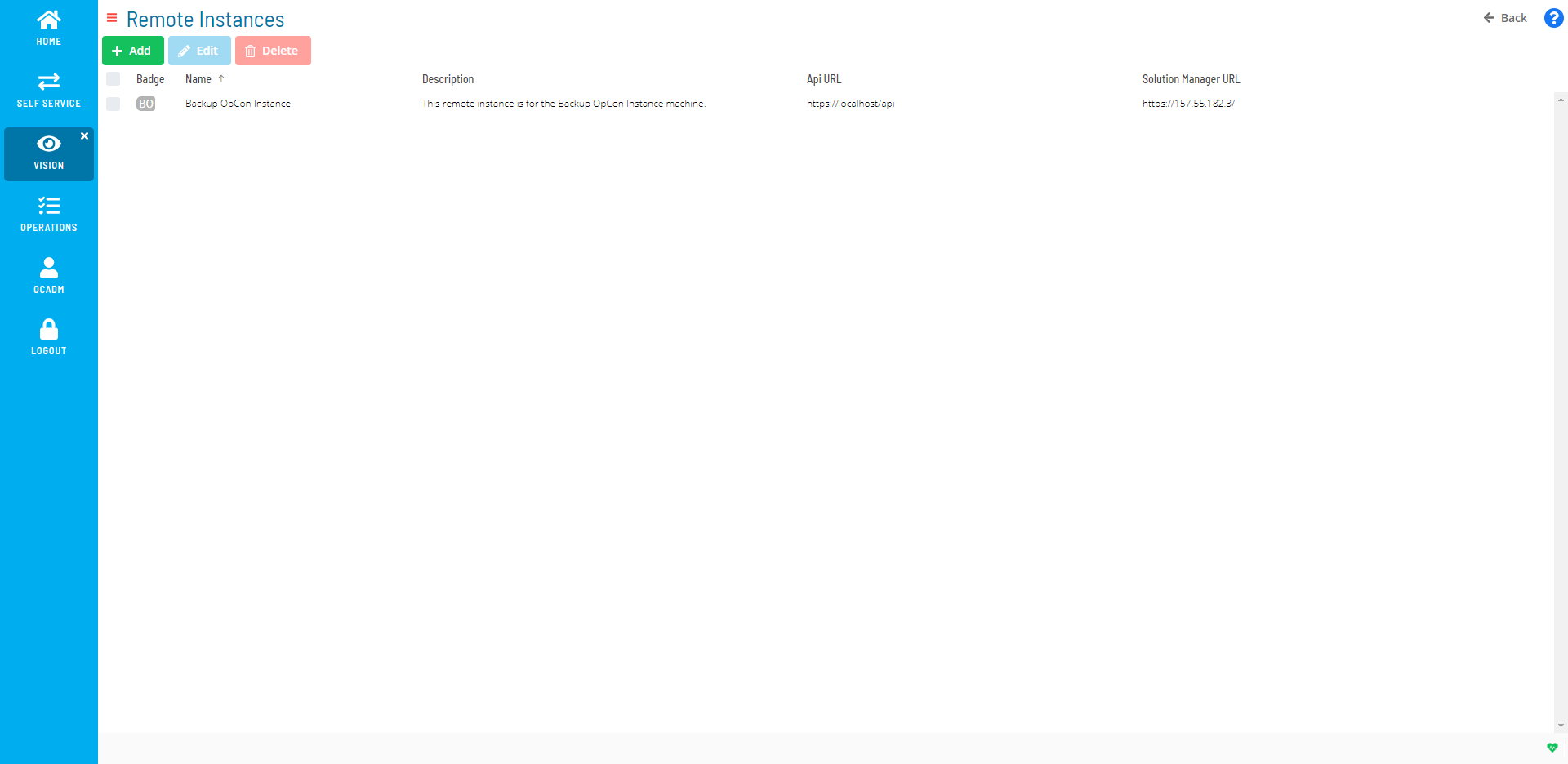
A user must be in the «ocadm» role to define remote instances. For more on Function Privileges including those pertaining to Vision, refer to Function Privileges in the Concepts online help.
 Related Topics
Configuration Options
| Setting | What It Does | Default | Notes |
|---|---|---|---|
| Name | The remote instance name | — | — |
| Badge(Auto Gen.) | An auto-generated two-character description based on the Name field. | — | — |
| Description | (Optional) Descriptions, explanations, and notes for the remote instance | — | — |
| Vision Instance Connection | API and Solution Manager credentials for the remote OpCon instance | — | — |
| Complex Expression Connection | Connection information enabling the remote instance to be used in OpCon properties. | — | — |
FAQs
Q: What does managing vision remote instances involve?
Managing vision remote instances includes Using the Vision Remote Instances Admin Page. Access vision remote instances through the Enterprise Manager navigation pane.
Q: Who can manage vision remote instances in OpCon?
Users with the appropriate privileges assigned through their role can manage vision remote instances. Contact your OpCon system administrator if you do not have access.
Glossary
SMAServMan (SMA Service Manager): Manages the starting, stopping, and restarting of all OpCon server programs. Monitors configured applications and restarts them automatically if they fail unexpectedly.
Enterprise Manager (EM): OpCon's rich client graphical user interface for Windows and Linux, used to define schedules and jobs, manage automation data, and perform operational tasks.
Solution Manager: OpCon's browser-based graphical user interface for managing automation data, performing operational actions, and administering the system.
OpConxps: The standard installation directory name for OpCon program files, configuration files, and output data on Windows machines.
Resource: A numeric variable in OpCon representing a finite pool. Jobs can be configured to require a set number of resource units to run, limiting concurrent executions and preventing resource contention.
Role: A named security profile in OpCon that groups privileges together. Roles are assigned to user accounts to control which features, schedules, jobs, machines, and administrative functions a user can access.
Privilege: A specific permission granted through an OpCon role that controls access to a feature, function, or object type. Privileges are organized into categories such as Function Privileges, Machine Privileges, Schedule Privileges, and Access Codes.
OpCon: Continuous' workflow automation platform. The OpCon server includes the database, SAM and Supporting Services (SAM-SS), and graphical user interfaces. agents installed on target platforms run jobs and report results.