Basic OpCon Server Configuration
Theme: Configure
Who Is It For? System Administrator
What Is It?
The basic OpCon Server configuration includes a single machine, a single database, and a StandAlone SMAServMan.
Basic SMA Service Manager Configuration
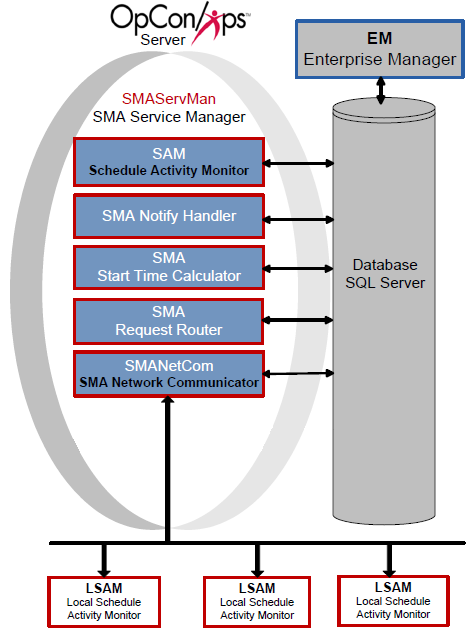
Configuration
The StandAlone SMAServMan manages the SAM and all supporting services. This configuration uses scripts invoking the SMALogEvent utility for notification. Refer to SMALogEvent in the Utilities online help.
| SMAServMan.ini Setting | Value |
|---|---|
| Mode | StandAlone |
| InitializationScript | Initialization Script |
| TerminationScript | Termination Event Script |
| SMA Connection Configuration Setting | Value |
|---|---|
| Server\Instance Name | Name of the Server |
| Database Name | OpConxps |
| Database Login ID | Opconsam |
| Password | OpConxps |
Process Flows
The following process flows indicate SMAServMan's expected behavior.
Good Startup
| Step | Description |
|---|---|
| 1 | Primary SMAServMan starts Primary SAM-SS |
| 2 | Primary SAM-SS connects to Primary Database |
| 3 | Normal process flow |
Critical Application Failure during Processing
| Step | Description |
|---|---|
| 1 | Normal Process Flow on StandAlone SMAServMan |
| 2 | Critical application fails on StandAlone Machine one time more than the RestartApplicationLimit |
| 3 | StandAlone SMAServMan shuts down SAM-SS |
| 4 | StandAlone SMAServMan runs the TerminationScript. In this example, the script writes an event to the Windows Event Log notifying the administrator that the SAM-SS is shutting down. |
| 5 | StandAlone SMAServMan shuts itself down. |
Operations
Monitoring
- In a StandAlone configuration, SMAServMan manages SAM and all supporting services without failover. If a critical application fails more than
RestartApplicationLimittimes, SMAServMan shuts down the entire SAM-SS, runs theTerminationScript, and then shuts itself down. - Review the process flow for normal startup: (1) SMAServMan starts SAM-SS, (2) SAM-SS connects to the database, (3) normal processing begins. Any failure at step 2 indicates a database connectivity issue.
Common Tasks
- Configure the
SMAServMan.iniModesetting toStandAlonefor a single-machine, single-database deployment with no failover. - Configure the
SMA Connection Configurationtool with the database server name, database name (OpConxps), and credentials (Opconsam/OpConxpsby default) before starting the SMA Service Manager. - Use
InitializationScriptandTerminationScriptsettings inSMAServMan.inito run notification scripts (e.g., viaSMALogEvent) at startup and shutdown.
Alerts and Log Files
- When a critical application on the StandAlone machine fails beyond
RestartApplicationLimit, theTerminationScriptruns; in the basic configuration this script writes an event to the Windows Event Log to notify the administrator. - All SAM-SS logs are written to
<Output Directory>\SAM\Log\. After startup, verify database connectivity by reviewingSMAServMan.log,SAM.log,Critical.log, andSMANetCom.log.
FAQs
Q: What does the basic OpCon server configuration consist of?
The basic configuration includes a single machine, a single database, and a StandAlone SMAServMan. In this setup, SMAServMan manages SAM and all supporting services without any failover configuration.
Q: What is the SMAServMan mode setting for a basic (non-failover) configuration?
For a basic configuration, the Mode setting in SMAServMan.ini is set to StandAlone, which means no failover is configured.
Q: What happens if a critical application fails more than the RestartApplicationLimit in a StandAlone configuration?
SMAServMan shuts down the entire SAM-SS, runs the TerminationScript (such as writing a Windows Event Log notification), and then shuts itself down.
Glossary
SMAServMan (SMA Service Manager): Manages the starting, stopping, and restarting of all OpCon server programs. Monitors configured applications and restarts them automatically if they fail unexpectedly.
SAM-SS (SAM and Supporting Services): The collective term for the OpCon server-side processing programs: SAM, SMANetCom, SMA Notify Handler, SMA Request Router, and SMA Start Time Calculator.
SMA Connection Configuration: A utility that generates the database connection file (.dat) used by OpCon server programs and utilities to connect to the OpCon SQL Server database.
SAM (Schedule Activity Monitor): The logical processor for OpCon workflow automation. SAM monitors schedule and job start times, dependencies, and user commands to determine job execution timing, and processes OpCon events.
OpConxps: The standard installation directory name for OpCon program files, configuration files, and output data on Windows machines.
Notification: A message sent by the SMA Notify Handler when a Machine, Schedule, or Job changes to a specific status. Notifications can be delivered as emails, text messages, Windows Event Log entries, SNMP traps, or other formats.
Resource: A numeric variable in OpCon representing a finite pool. Jobs can be configured to require a set number of resource units to run, limiting concurrent executions and preventing resource contention.
Machine: A platform defined in the OpCon database that has an agent installed. OpCon routes job execution requests to machines via SMANetCom, and machines report job completion status back to SAM.