Logging
Theme: Configure
Who Is It For? System Administrator
What Is It?
The SAM and supporting services (SAM-SS) have several important logs. All logs are located in the <Output Directory>\SAM\Log\ directory.
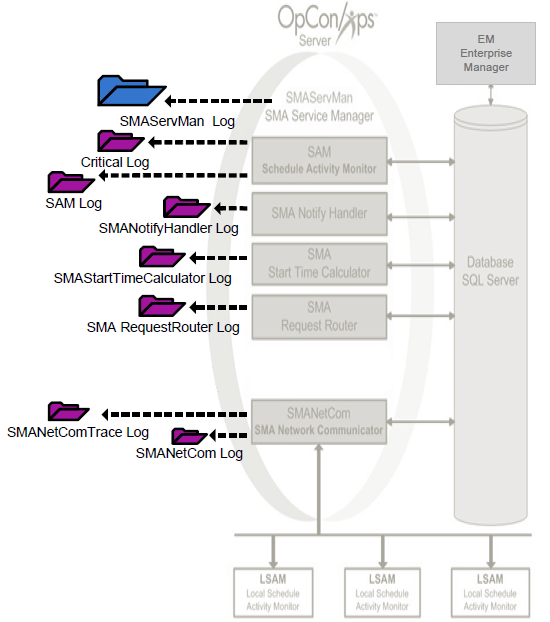
The log files have the names:
- Sam.log
- Critical.log
- SMANetCom.log
- SMANetComTrace.log
- SMAServMan.log
- SMANotifyHandler.log
- SMAStartTimeCalculator.log
- SMARequestRouter.log
The Output Directory was configured during installation. For more information, refer to File Locations in the Concepts online help.
View a Log File
To view a Log File, complete the following steps:
- Use menu path: Start > Programs > Log Monitors > <Log Name>
- View the log information with FileMon
- Close FileMon by using menu path: File > Exit
Log Archiving
Each component archives log files at the end of the day or when they reach the maximum log file size configured in the component's .ini file. All archived log files reside in the <Output Directory>\SAM\Log\Archive folder.
The Output Directory was configured during installation. For more information, refer to File Locations in the Concepts online help.
If an archive folder for the day does not already exist, the component creates one. The folder names use the following naming convention: yyyy_mm_dd (Weekday). The logging mechanism generates the weekday name according to the Regional Settings of the user running the component.
If the Regional Settings are set to English, an archive folder would have the following name: 2008_01_11 (Friday).
If the Regional Settings are set to French, an archive folder would have the following name: 2008_01_11 (Vendredi).
As a log file fills up, each component moves it to the current archive folder and renames it using the following naming convention: Log StartTime - StopTime.log.
An SMANetCom archive file for the time range of 12:58:16 to 13:58:00 would be named SMANetCom 125816 - 135800.log.
Once per day the SAM deletes old archive folders. The SAM retains 10 days of archived logs by default. For additional information, refer to the "Maximum number of days archived SAM logs should be kept" logging setting. Refer to Logging in the Concepts online help.
SAM Logging
The SAM writes two logs to the <Output Directory>\SAM\Log\ directory. The log files have the names:
In both log files, the SAM writes the complete job name to identify the jobs.
The Output Directory was configured during installation. For more information, refer to File Locations in the Concepts online help.
SAM.log
The SAM writes all successful processing information (i.e., Schedule/Job starts, Schedule/Job completions, Event processing, etc.) to the SAM.log file. Additionally, the SAM writes all configuration information to the log when it starts or when it regenerates.
- If the SAM encounters a corrupt SAM.log file at startup, the SAM archives the bad log file. The naming convention for such a log file is SAM hhmmss - Bad File.log where hhmmss is the SAM's start time. For example, if the SAM tries to read a bad SAM.log file at 09:00:00, the SAM archives the corrupt log file as SAM 090000 - Bad File.log.
- If the SAM log is locked when SAM starts up, it will write to the critical and Application Event log, and will also terminate immediately.
- If the SAM log is locked while SAM is running, it still writes to the critical log but not to the Application Event log and it will continue to run.
Critical.log
The SAM writes all processing errors to the Critical.log file. Examples of errors logged are machine communication failure, database connection problems, event processing failures, license expiration notifications, and so forth.
SMANetCom.log
SMANetCom writes its configuration parameters, basic communication information and the configuration for each agent machine to the SMANetCom.log. In the configuration information, the default value is listed in parentheses next to the relevant parameter if a configuration default is modified.
SMANetComTrace.log
SMANetCom writes all processing information to the SMANetComTrace.log. The trace records detailed TCP/IP messages, including socket connection errors, to help with debugging.
Log Messages
In the SMANetComTrace.log, every "To" (>>>) message is an SMANetCom message. Each SMANetCom message has the following syntax: TE/TI/TX#MachineName Message.
Message Numbers
The next table contains the definitions of the TE/TI/TX messages with the associated SMA protocol types.
| TX Number | Legacy/Contemporary Protocol | Definition |
|---|---|---|
| TE1 | Both | Tracked or Queued Job Error |
| TI1 | Both | Tracked or Queued Job Information |
| TX1 | Both | Job Start |
| TX2 | Both | Job Status |
| TX3 | Legacy | Confirmation of Job Completion |
| TX4 | Both | Machine Status |
| TX9 | Legacy | Retrieve Pending Messages |
agent Response Breakdown
In the SMANetComTrace.log, every "From" (<<<) message is an agent response to an SMANetCom request. Embedded in a 48-character string, the message follows the machine name and job name in an agent response. Break down the string in the following manner:
- The first 10 characters are the OpCon job number
- The 11th character is the agent response
- 0 - Job Not Found
- 1 - Job Initialization Error
- 2 - Job to be Requeued
- 3 - Prerun Active
- 4 - Prerun Failed
- 5 - Job Running
- 6 - Job Finished OK, Completion Notice Pending
- 7 - Job Erred, Completion Notice Pending
- 8 - Job Finished OK, Deleted from Tracking File
- 9 - Job Erred, Deleted from Tracking File
- The 12th through 23rd characters are the start and stop time of the job
- The 24th through 28th characters are the maximum number of jobs the agent is allowed to process concurrently
- The last 20 characters are the exit condition and the status description of the job. For more on agent exit conditions, refer to the individual agent's online help
For most agents, the status description will not be shown.
SMAServMan.log
SMAServMan writes all information to the SMAServMan.log regarding the management of all listed applications. For more on SMA Service Manager's listed applications, refer to the Application List table in the SMA Service Manager topic.
SMANotifyHandler.log
The SMANotifyHandler writes all notification processing information to SMANotifyHandler.log.
SMAStartTimeCalculator.log
The SMAStartTime Calculator writes all job start time calculation processing information to SMAStartTimeCalculator.log.
SMARequestRouter.log
The SMARequestRouter writes all request routing processing information to SMARequestRouter.log.
Operations
Monitoring
- All SAM-SS log files reside in
<Output Directory>\SAM\Log\. Monitor this directory for the following active log files:Sam.log,Critical.log,SMANetCom.log,SMANetComTrace.log,SMAServMan.log,SMANotifyHandler.log,SMAStartTimeCalculator.log, andSMARequestRouter.log. - The
Critical.logrecords all SAM processing errors including machine communication failures, database connection problems, event processing failures, and license expiration notifications. Review it first when investigating issues. - The
SMANetComTrace.logrecords all TCP/IP messages between SMANetCom and agents, including socket connection errors and agent response codes;TraceSAMMessages=ONis required to generate this file.
Common Tasks
- View any log file via Start > Programs > Log Monitors > Log Name using FileMon.
- Archived log files are stored in
<Output Directory>\SAM\Log\Archive\in date-named folders (e.g.,2008_01_11 (Friday)). Each component archives when the log reaches its configured maximum size or at end of day. - The SAM retains 10 days of archived logs by default; adjust the "Maximum number of days archived SAM logs should be kept" setting in Server Options to change the retention period.
Alerts and Log Files
- If the
SAM.logis locked at startup, SAM writes toCritical.logand the Windows Application Event Log, then terminates immediately. - A corrupt
SAM.logat startup is archived with the naming conventionSAM hhmmss - Bad File.log(e.g.,SAM 090000 - Bad File.log). - Agent response codes in
SMANetComTrace.logindicate job state:8= Job Finished OK (deleted from tracking),9= Job Erred (deleted from tracking),1= Job Initialization Error,5= Job Running.
FAQs
Q: Where are the SAM-SS log files located?
All SAM-SS log files are located in the <Output Directory>\SAM\Log\ directory. The Output Directory was configured during installation.
Q: When are log files archived?
Each component archives log files at the end of the day or when they reach the maximum log file size configured in the component's .ini file. Archived files are stored in the <Output Directory>\SAM\Log\Archive folder, organized by date (e.g., 2008_01_11 (Friday)).
Q: What is the Critical.log used for?
The Critical.log contains all SAM processing errors, including machine communication failures, database connection problems, event processing failures, and license expiration notifications.
Glossary
SMANetCom (SMA Network Communications Module): Handles TCP/IP communication of platform-specific automation information between SAM and all agents. Uses database tables to maintain reliable communication and data integrity.
SMAServMan (SMA Service Manager): Manages the starting, stopping, and restarting of all OpCon server programs. Monitors configured applications and restarts them automatically if they fail unexpectedly.
SAM-SS (SAM and Supporting Services): The collective term for the OpCon server-side processing programs: SAM, SMANetCom, SMA Notify Handler, SMA Request Router, and SMA Start Time Calculator.
SAM (Schedule Activity Monitor): The logical processor for OpCon workflow automation. SAM monitors schedule and job start times, dependencies, and user commands to determine job execution timing, and processes OpCon events.
Agent: An agent installed on a target platform that runs jobs in the native language of that platform and communicates results back to SAM via SMANetCom over TCP/IP.
TCP/IP: The network communication protocol used for all data exchange between SMANetCom on the OpCon server and agents on target machines.
Notification: A message sent by the SMA Notify Handler when a Machine, Schedule, or Job changes to a specific status. Notifications can be delivered as emails, text messages, Windows Event Log entries, SNMP traps, or other formats.
Resource: A numeric variable in OpCon representing a finite pool. Jobs can be configured to require a set number of resource units to run, limiting concurrent executions and preventing resource contention.