Defining SAP Data Services jobs using Enterprise Manager
What is it?
Enterprise Manager includes job subtype definitions for the SAP Data Services Scheduler. The subtype is available in the job subtype list when the Windows job type is selected. The SAP Data Services Connector does not create job definitions in the SAP Data Services database — it references existing jobs.
Job types at a glance
Pick the job type that matches what you want OpCon to do in SAP Data Services. Each type uses a different set of tabs in the job definition screen.
| Job type | What it does | Tabs available |
|---|---|---|
| CANCEL | Cancels the last running job that matches a job name in the defined repository. | Cancel, Failure Criteria |
| PING | Tests the communications link between the connector and the SAP Data Services environment. No additional parameters. | (none beyond common fields) |
| START | Starts a job in the SAP Data Services environment. | Start, Substitution Parameters, Global Variables, Failure Criteria |
| TRACK | Checks the status of a job that was not started by an OpCon START. | Track, Failure Criteria |
Job definition screen
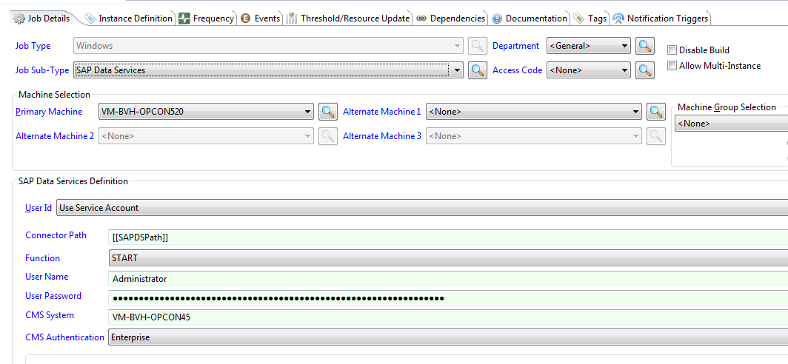
The screen below appears when you select the SAP Data Services subtype on a Windows job. The fields described in Common fields apply to every job type.
Common fields
Every CANCEL, PING, START, and TRACK job uses the following fields.
| Field | Required | Description |
|---|---|---|
| Connector Path | Yes | Installed location of the SAP Data Services Connector. Should not be changed; the location should be defined in the SAPDSPath property. If more than one SAP Data Services Connector is installed on the same system, define a new Global Property and update this field to use it. |
| Function | Yes | The function to run. Select CANCEL, PING, START, or TRACK from the list. The selected value determines which tabs are available. |
| User Name | Yes | Name of a SAP Data Services user that has the required privileges to run the job. |
| User Password | Yes | Password of the defined SAP Data Services user. Use the encrypted global token capability so the value is decrypted by the Windows Agent and passed to the connector. |
| CMS System | Yes | Name of the Central Management Server associated with the SAP BODS installation. |
| CMS Authentication | Yes | Authentication mode associated with the user defined in User Name. Select a value from the list that matches your installation: Enterprise, LDAP, WinAD, or SAPR3. |
Job type details
CANCEL
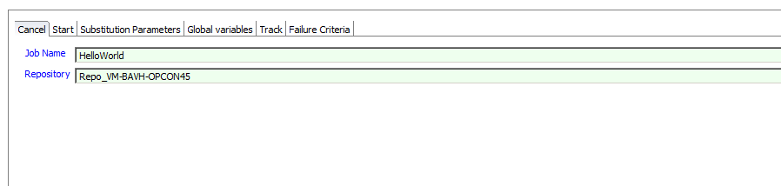
The CANCEL job type cancels the last running job of the defined job name in the defined repository.
| Field | Required | Description |
|---|---|---|
| Job Name | Yes | Name of the job to cancel. The connector searches for the last job ID that matches the defined job name and has a running status. |
| Repository | Yes | Name of the repository within which the job is defined. |
PING
A PING job type has no additional parameters and is used to test the communications link between the SAP Data Services Connector and the SAP Data Services environment. Only the Common fields are required.
START
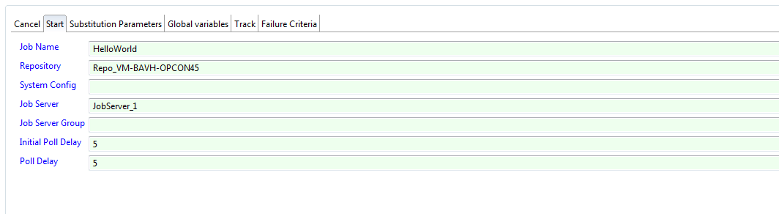
The START job type starts a job in the SAP Data Services environment. The Start, Substitution Parameters, Global Variables, and Failure Criteria tabs are available, with the Start tab displayed.
| Field | Required | Description |
|---|---|---|
| Job Name | Yes | Name of the job to start. |
| Repository | Yes | Name of the repository within which the job is defined. |
| System Config | No | A file that contains configuration information for a specific SAP Data Services installation. Mapped to the job_system_profile field. |
| Job Server | Conditional | Name of a defined server on which the job runs. Mutually exclusive with Job Server Group. Either Job Server or Job Server Group must be present. |
| Job Server Group | Conditional | Name of a defined Job Server Group on which the job runs. Mutually exclusive with Job Server. Either Job Server or Job Server Group must be present. |
| Disable Audit | No | When selected, submits a request to disable auditing for this run. |
| Initial Poll Delay | No | Seconds to wait before the first status check after the job is started. Defaults to 5 if left empty. |
| Poll Delay | No | Seconds between subsequent status checks. Defaults to 5 if left empty. |
Substitution Parameters tab
The Substitution Parameters tab passes substitution parameter values to the job being started. Substitution parameters are defined in SAP Data Services and take their values at run time.
| Button | Purpose |
|---|---|
| Add | Adds a substitution parameter to the list. Enter a value in the name field and the value field, then select Add. |
| Update | Updates a substitution parameter. Select it in the list, modify it, then select Update. |
| Remove | Removes a substitution parameter from the list. Select it in the list, then select Remove. |
Global Variables tab
The Global Variables tab passes global variables to the job to be started. Global variables are usually defined in SAP Data Services with a preceding dollar sign ($) (for example, $Variable).

It is NOT necessary to add the preceding $ when entering the field in the Global Variables Variable List.
| Button | Purpose |
|---|---|
| Add | Adds a Global Variable to the Variable List. Enter a value in the Variable Name field and the Value field, then select Add. |
| Update | Updates a Global Variable. Select the variable in the list, modify it, then select Update. |
| Remove | Removes a Global Variable from the Variable List. Select the variable in the list, then select Remove. |
TRACK
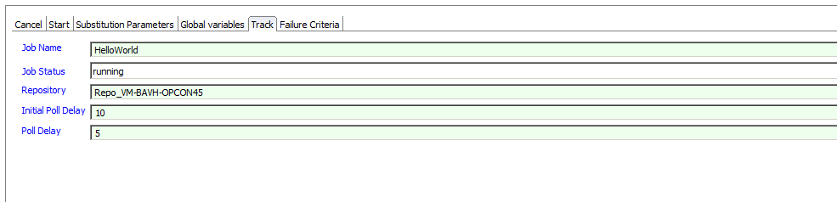
Use TRACK when you need to check the status of a job running in the SAP Data Services environment that was not started by an OpCon START.
| Field | Required | Description |
|---|---|---|
| Job Name | Yes | Name of the job to track. The connector searches for the job ID that matches the job name of the latest job which is in a running state. |
| Job Status | Yes | Status of the job. Select a value from the list. When tracking a job, the running status should be selected. |
| Repository | Yes | Name of the repository within which the job is defined. |
| Initial Poll Delay | No | Seconds to wait before the first status check. Defaults to 5 if left empty. |
| Poll Delay | No | Seconds between subsequent status checks. Defaults to 5 if left empty. |
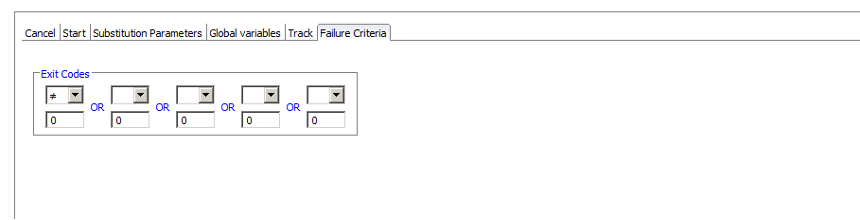
Failure Criteria
The CANCEL, PING, START, and TRACK job types all require a Failure Criteria definition. The connector returns the following codes:
| Return code | Meaning |
|---|---|
0 | FINISHED_OK — the job completed successfully. |
1 | FINISHED_WITH_WARNING — the job completed and SAP Data Services reported a warning. |
2 | ERRORED — SAP Data Services reported an error for the job. |
To fail the job on anything other than a clean completion, set Failure Criteria to NE (Not Equal) to 0. That treats a warning as a failure. If warnings should not fail the job, define criteria that accept both 0 and 1.
Return code 1 is also used when the connector cannot start — for example when a required job definition field is empty, or on an unhandled error. In that case no request reaches SAP Data Services. Check the connector log to tell the two cases apart: a job that ran and warned is logged as finished with warning, and a connector that did not start is not.
FAQs
Which job type should I use to cancel a SAP Data Services job? CANCEL. It cancels the last running job that matches the defined job name in the defined repository.
Why are Job Server and Job Server Group mutually exclusive? A START job runs on either a single Job Server or a Job Server Group, not both. The connector requires one of the two fields to be set.
Should I include the dollar sign when entering global variables?
No. The preceding $ is added by SAP Data Services. Enter the variable name without it on the Global Variables tab.
What Failure Criteria should I use to detect a successful job?
Set Failure Criteria to NE (Not Equal) to 0 if a warning should fail the job. Return code 0 is a clean completion, 1 is a completion with a SAP Data Services warning, and 2 is an error. If warnings should not fail the job, define criteria that accept both 0 and 1.
How do I supply credentials securely? Use the encrypted global token capability for User Password. The Windows Agent decrypts the value and passes it to the connector at runtime.
Glossary
CMS — Central Management Server, the SAP Business Objects component the connector authenticates against.
Repository — The SAP Data Services metadata store where job definitions reside.
Job Server / Job Server Group — The SAP Data Services execution targets where a batch job runs. A job is sent to one or the other, not both.
Substitution Parameters — Job-level parameters in SAP Data Services that can be passed at start time.
Global Variables — Job-level variables in SAP Data Services, defined with a preceding $ in SAP Data Services itself but entered without the $ in the OpCon job definition.