Schedule Dates and Automation
A schedule date is the calendar date for which OpCon builds and runs a set of schedules and jobs. Each schedule date produces an independent snapshot of automation: the schedules that qualify for that date, the jobs on those schedules, all resolved dependencies, and any date-specific property values. Changes made to a schedule or job for one date do not affect other dates or the Master definitions.
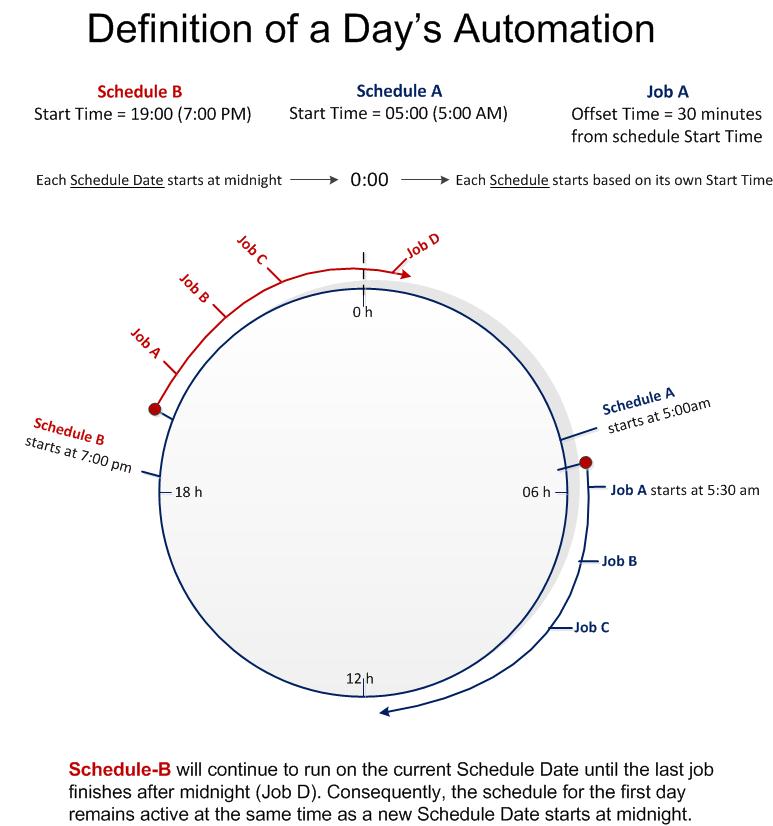
How schedule dates work
When you build a schedule for a date, OpCon copies the qualifying Master schedule and job definitions into the Daily tables for that date. SAM (Schedule Activity Monitor) then monitors those Daily table entries and starts jobs according to resolved dependencies and start times.
The key behaviors of a schedule date are:
- One date, one set of daily records. Each schedule date holds its own copy of every qualifying schedule and job. A schedule built for January 15 is entirely separate from the same schedule built for January 16.
- Frequencies control qualification. A schedule or job only appears in the daily tables for a given date if one of its assigned frequencies qualifies for that date. Frequencies define which days — based on calendars, recurrence patterns, and offset rules — a schedule or job is eligible to run.
- Date-specific changes stay local. Edits you make to a schedule or job in the Daily tables apply only to that date's instance. The Master record and all other built dates remain unchanged.
- Dependencies resolve within the date. Job dependencies (Requires, Conflict, After) are resolved within the context of a single schedule date. Cross-date dependencies use a day-offset value stored with the dependency record.
Schedule dates and the Daily tables
The Daily tables are the active, date-keyed records that SAM works from. Building a schedule for a date writes records to those tables. Deleting a schedule for a date removes those records. SAM does not process Master records directly; it only processes what is in the Daily tables for the current processing date.
OpCon uses an OA date (Microsoft OLE Automation date) numeric representation when storing schedule dates in the database and passing them through events and API requests. The user interfaces display schedule dates using the system's configured short date format.
Identifying a daily schedule instance
In the Operations views, each daily schedule instance is identified by a combination of:
- Date — the schedule date the instance was built for
- Schedule name — the name of the schedule, including any appended suffix for multi-instance or sub-schedule scenarios
This combination uniquely identifies the schedule in the Daily tables for that date. For details on how OpCon forms schedule names for multi-instance schedules and sub-schedules, see OpCon Schedule Names.
Related concepts
| Page | Description |
|---|---|
| Building Daily Schedules | How to build schedule instances into the Daily tables for one or more dates |
| OpCon Schedule Names | Naming rules for daily schedule instances, including multi-instance and sub-schedule suffixes |
| Job Names | How job instance names are formed within a daily schedule |
| Editing Daily Schedules | How to make date-specific changes to jobs and schedules |
Glossary
| Term | Definition |
|---|---|
| Schedule date | The calendar date for which OpCon builds and processes a set of schedules and jobs. Each schedule date produces an independent set of Daily table records. |
| Daily tables | The OpCon database tables that hold the active, date-specific instances of schedules and jobs built for processing. Changes to daily tables affect only that date's automation. |
| SAM (Schedule Activity Monitor) | The logical processor for OpCon workflow automation. SAM monitors schedule and job start times, dependencies, and user commands to determine when jobs run, and processes OpCon events. |
| Frequency | A named rule set assigned to a schedule or job that defines which dates the schedule or job qualifies to run. Frequencies use calendars, recurrence patterns, and offset rules. |
| Master schedule | The standing definition of a schedule and its jobs as configured in the Job Master. The Master is not processed directly; OpCon copies it into the Daily tables when building for a date. |