SMA Resource Monitor Introduction
The SMA Resource Monitor is a Windows utility that monitors files, Windows performance counters, Windows services, and running processes. When a monitored condition is met, it sends OpCon events for processing.
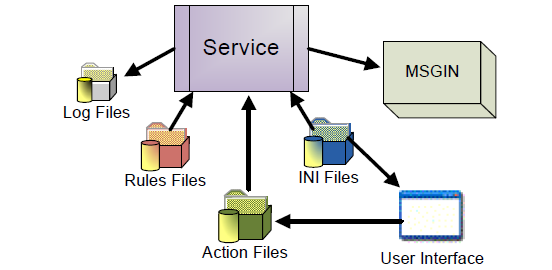
Components
SMA Resource Monitor consists of two components that work together:
SMAResourceMonitorUI.exe — GUI The graphical interface for creating and managing monitors and Action Groups. The GUI reads from and writes to the Rules and Action files stored in the configured rules directory.
SMAResourceMonitor.exe — Service The Windows service that performs the actual monitoring. The service reads the Rules files to determine what to monitor, and reads the Action files to send OpCon events to SAM when a rule condition is met.
Both components share a single configuration file, SMAResourceMonitor.ini, located in the <Configuration Directory>\SMAResourceMonitor\ directory.
How It Works
The SMA Resource Monitor service periodically checks resources defined in the Rules files. When a monitored condition is triggered, the service writes OpCon events to the MSGIN directory, where the Windows Agent picks them up and forwards them to SAM for processing.
The following monitor types are supported:
| Monitor Type | Trigger Condition |
|---|---|
| File Monitor | A file matches defined criteria (for example, file size, existence, or last-modified time) |
| Counter Monitor | A Windows performance counter value meets a defined threshold |
| Service Monitor | A Windows service enters a specified state |
| Process Monitor | A process starts or stops running |
Related Topics
- Summary Information — overview of the UI and monitor management
- SMA Resource Monitor Service — service configuration, log on account, and INI file settings
- Wizards — step-by-step instructions for adding and editing monitors
- Tools — copy, delete, and filter operations