Overview
What is it?
OpCon MFT is a managed file transfer product integrated within the OpCon environment, providing comprehensive file transfer capability across the enterprise and supporting a wide range of protocols and encryption technologies.
- Use this when you need to automate secure, auditable B2B file transfers as part of OpCon scheduling
- Use this when you need a full FTP/SFTP server to receive, route, and share incoming files, combined with OpCon job automation
- Use this when your organization requires restartable file transfer jobs with built-in encryption, compression, and protocol support
- OpCon MFT reduces manual file transfer effort by integrating directly with OpCon job definitions, dependencies, notifications, and the CloudEvents trigger system
OpCon MFT consists of two major components that are integrated with OpCon using Rest-API capabilities:
| Component | Description |
|---|---|
| OpConMFT Agent | The client providing B2B file transfer functionality |
| OpConMFT Server | The full FTP server environment for receiving and routing incoming data and file sharing capabilities |
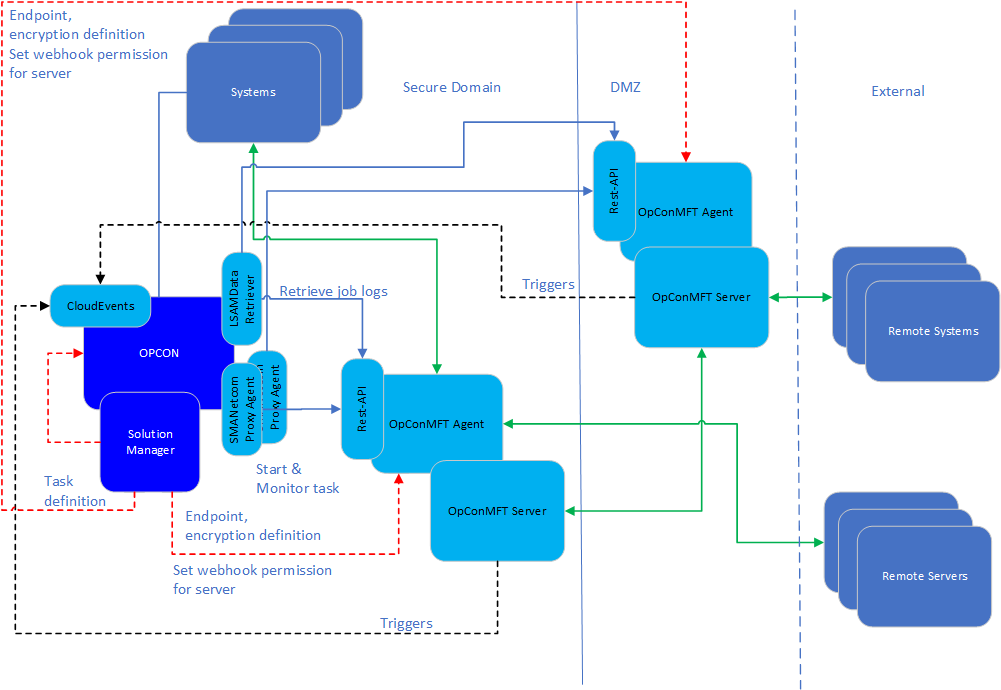
The OpCon MFT environment comprises many components that work together to provide the full managed file transfer solution.
The current version is 3.13.9.
Key capabilities
- Supports FTP, FTPS, SFTP, HTTP, HTTPS, WebDAV, Azure Blob Storage, and Amazon S3 protocols
- Provides PGP, CMS, TLS, SSH, and ZIP encryption and compression
- Integrates with OpCon scheduling through the Rest-API, enabling job dependencies, notifications, and restartable steps
- Supports CloudEvents for trigger-based automation from server-side file events (upload, download, delete, move)
- Persists each completed step during a run, enabling failed jobs to restart from the failed step rather than the beginning
Solution Manager
Solution Manager provides the user interface for the managed file transfer environment. It supports OpCon MFT Agent configuration, OpCon MFT Server activation, OpCon MFT task definition, defining endpoints, encryption information, a dashboard providing file transfer status, and query functions for current and previous runs.
During task definition, endpoint and encryption information is retrieved from the OpCon MFT Agent and provided in lists, allowing you to select the appropriate values. Task definitions are stored within the OpCon environment, while endpoint and encryption information is stored within the OpCon MFT Agent environment.
OpCon MFT ProxyAgent
The OpCon MFT ProxyAgent provides the communications connection between OpCon and the OpCon MFT Agent. The ProxyAgent accepts the traditional OpCon TX messages from SMANetcom and maps them to OpCon MFT Agent Rest-API calls.
At a task start request, the OpCon unique job ID (integer portion) is passed to the OpCon MFT Agent along with the task definition information. The ProxyAgent receives the OpCon MFT unique job ID as part of a successful task start, and this value is saved in the OpCon database for restarting a failed OpCon MFT task.
The ProxyAgent continuously monitors the status of the OpCon MFT Agent, marking the agent as available or unavailable for job starts.
LSAMDataRetriever
The LSAMDataRetriever supports retrieval of job logs from the OpCon MFT Agent through the OpCon MFT Rest-API. The job log provides information about the task and each step run within the task.
CloudEvents
CloudEvents is an OpCon feature that accepts trigger messages through a webhook and allows the mapping of trigger messages to actions. The OpCon MFT Server supports trigger messages such as file upload, file download, file deleted, file moved, directory created, and directory deleted. The OpCon MFT Agent also sends events for its own transfers (upload, download, copy, move, delete file, delete directory, and append) when the server webhook is configured.
Trigger filters are defined on the incoming messages. When a match is found, the associated trigger event (an OpCon event) is passed to the OpCon environment for action.
OpCon MFT Rest-API
The OpCon MFT ProxyAgent communicates with the OpCon MFT Agent through the OpCon MFT Rest-API. The Rest-API provides the following capabilities:
- Start an OpCon MFT Agent task
- Monitor an OpCon MFT task
- Get the current status of an OpCon MFT task
- Retrieve the job log of an OpCon MFT task
- Retrieve a list of configured endpoints and encryption information for task definition
- Register the OpCon MFT Server connection to the OpCon webhook for trigger submission
OpCon MFT Agent
The OpCon MFT Agent provides file transfer capability for B2B interactions. It supports submission and retrieval of data files between systems using a wide range of protocols such as FTP, FTPS, SFTP, SSH, S3, HTTP, and HTTPS, with optional compression and encryption.
File transfers are performed between endpoints, which can be either local or site:
| Type | Description |
|---|---|
| Local | References a file location (either UNC path or Windows path) relative to the server where the OpCon MFT Agent is installed |
| Site | References a remote system and defines the address, port, protocol, and credentials required to access the site |
An OpCon MFT task consists of multiple steps representing the received task definition. These steps include creating the file set for the transfer, optionally compressing or encrypting the file set, and transferring the file set to the destination.
During a task run, the OpCon MFT Agent persists each completed step. If a step fails and the task is restarted, the task restarts from the failed step.
OpCon MFT Server
The OpCon MFT Server is an additional component of the OpCon MFT Agent. It provides full file server functionality and user file-sharing capabilities, and supports forwarding triggers to the OpCon CloudEvents feature, enabling OpCon to perform actions on the forwarded triggers.
Glossary
Agent — In OpCon MFT context, the OpCon MFT Agent software component installed on a Windows server that runs file transfer tasks and communicates with OpCon through the ProxyAgent.
CloudEvents — An OpCon feature that receives trigger messages from a webhook and maps them to OpCon events for automated action.
Endpoint — A defined source or destination for file transfers. Endpoints are either local (a file system path) or site (a remote system with connection settings).
ProxyAgent — The communication bridge between OpCon's SMANetcom module and the OpCon MFT Agent Rest-API.
Rest-API — The HTTP-based interface through which OpCon and Solution Manager communicate with the OpCon MFT Agent to start tasks, monitor status, and retrieve job logs.
Task — In OpCon MFT context, a configured file transfer operation consisting of one or more steps (get, put, compress, decompress, encrypt, decrypt). Defined as an OpCon MFT job type in Solution Manager.
FAQs
What is the difference between the OpCon MFT Agent and the OpCon MFT Server?
The OpCon MFT Agent is the client component that performs B2B file transfers using protocols such as FTP, FTPS, SFTP, and S3. The OpCon MFT Server is an additional component that provides a full FTP/SFTP/HTTP server for receiving and routing incoming files, along with file-sharing capabilities for server users.
How does OpCon MFT integrate with OpCon?
OpCon MFT integrates through the OpCon MFT ProxyAgent, which translates OpCon TX messages into Rest-API calls to the OpCon MFT Agent. Task definitions are stored in OpCon, while endpoint and encryption definitions are stored in the OpCon MFT Agent.
What happens when a task fails partway through?
The OpCon MFT Agent persists each completed step during a run. If a step fails and the task is restarted, it resumes from the failed step rather than starting from the beginning.
Related topics: