Working with Operation
Theme: Configure
Who Is It For? System Administrator, Automation Engineer
What Is It?
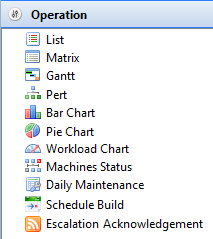
The Operation views display all schedules to which the current user account has access in the Daily tables. Each view provides different ways of looking at schedules and jobs.
Select on any Operation function item in the graphic to learn more about that item.
Operation Toolbar Common Icons
 | The Gantt, PERT, Bar Chart, Pie Chart, and Workload Chart views require the Listen for selection changes in other views setting (located on the toolbar at top-right side of screen) to be activated to view individual dates and schedule information. |
|  | procedure. | | --- | --- | --- |
Operation Right-click Menus
In the Operation views, right-click on a schedule or job to access the Operations right-click menus.
Schedule Right-click Menu
right-clicking on a schedule in the Daily List and Matrix views shows the following menu items:
- Schedule Information: Refer to Schedule Information
- Schedule History: Refer to Schedule History
- Maintenance: Hovering over this menu item shows the following submenu items:
- Edit Daily Schedule:
- Daily List: Refer to Editing Daily Schedules
- Matrix: Refer to Editing Daily Schedules
- Edit Master Schedule:
- Daily List: Refer to Editing Master Schedules
- Matrix: Refer to Editing Master Schedules
- Check Schedule:
- Daily List: Refer to Checking Schedules
- Matrix: Refer to Checking Schedules
- Delete Schedule:
- Daily List: Refer to Deleting Schedules
- Matrix: Refer to Deleting Schedules
- Add Jobs:
- Daily List: Refer to Adding Jobs
- Matrix: Refer to Adding Jobs
- Edit Daily Schedule:
- Schedule Status choices: Dialogs display the schedule date and schedule name. Refer to Schedule Status Change Commands in the Concepts online help
- Update Jobs Statuses: The Update Job statuses dialog displays the schedule date and name and lets you update all jobs or jobs by status within the selected schedule. Refer to Jobs Status Change Commands in the Concepts online help
Job Right-click Menu
right-clicking on a job in the Daily List, Matrix, PERT, or Gantt views shows the following menu items:
- SubSchedule Information: For a Container job, displays the SubSchedule Information screen. Refer to SubSchedule Information
- Job Information: Refer to Job Information
- Job History: Refer to Job History
- Comment: Provides a dialog to enter a quick comment about a completed job to the history record for the most recent job instance
- Daily List: Refer to Adding Job Completion Comments
- Matrix: Refer to Adding Job Completion Comments
- Gantt or PERT: Refer to Adding Job Completion Comments
- View Job Output:
- Daily List: Refer to Viewing Job Output
- Matrix: Refer to Viewing Job Output
- Gantt or PERT: Refer to Viewing Job Output
- Window To Host: Opens a dialog to open the emulator for the selected job's machine. For emulator configuration, refer to Setting Preferences for Window To Host
- Daily List: Refer to Opening Window to Host
- Matrix: Refer to Opening Window to Host
- Gantt or PERT: Refer to Opening Window to Host
- Maintenance: Hovering over this menu item shows the following submenu items:
- Edit Daily Job:
- Daily List: Refer to Editing Daily Jobs
- Matrix: Refer to Editing Daily Jobs
- Gantt or PERT: Refer to Editing Daily Jobs
- Edit Master Job:
- Daily List: Refer to Editing Master Jobs
- Matrix: Refer to Editing Master Jobs
- Gantt or PERT: Refer to Editing Master Jobs
- Delete Job:
- Daily List: Refer to Deleting Jobs
- Matrix: Refer to Deleting Jobs
- Gantt or PERT: Refer to Deleting Jobs
- Edit Daily Job:
- Job Status choices: Dialogs display the schedule date, schedule name, and job name. Refer to Jobs Status Change Commands in the Concepts online help
- SAP Child Processes: For SAP R/3 and CRM jobs, opens a dialog to monitor and/or restart child processes. The dialog can remain open while working in the primary EM screen. Refer to SAP Child Processes in the Concepts online help
- Daily List: Refer to Monitoring SAP Child Processes and Restarting SAP Child Processes
- Matrix: Refer to Monitoring SAP Child Processes and Restarting SAP Child Processes
- Gantt or PERT: Refer to Monitoring SAP Child Processes and Restarting SAP Child Processes
- SAP Job Spools: For SAP R/3 and CRM jobs, opens a dialog to retrieve individual spool files generated by a job. Refer to SAP Job Spools in the Concepts online help
- Daily List: Refer to Viewing SAP Job Spools
- Matrix: Refer to Viewing SAP Job Spools
- Gantt or PERT: Refer to Viewing SAP Job Spools
Configuration Options
| Setting | What It Does | Default | Notes |
|---|---|---|---|
| Schedule Information | Refer to Schedule Information | — | — |
| Schedule History | Refer to Schedule History | — | — |
| Maintenance | Hovering over this menu item shows the following submenu items: | — | — |
| Schedule Status choices | Dialogs display the schedule date and schedule name. | — | — |
| Update Jobs Statuses | The Update Job statuses dialog displays the schedule date and name and lets you update all jobs or jobs by status within the selected schedule. | — | — |
| SubSchedule Information | For a Container job, displays the SubSchedule Information screen. | — | — |
| Job Information | Refer to Job Information | — | — |
| Job History | Refer to Job History | — | — |
| Comment | Provides a dialog to enter a quick comment about a completed job to the history record for the most recent job instance | — | — |
| Window To Host | Opens a dialog to open the emulator for the selected job's machine. | — | — |
| Job Status choices | Dialogs display the schedule date, schedule name, and job name. | — | — |
| SAP Child Processes | For SAP R/3 and CRM jobs, opens a dialog to monitor and/or restart child processes. | — | — |
| SAP Job Spools | For SAP R/3 and CRM jobs, opens a dialog to retrieve individual spool files generated by a job. | — | — |
FAQs
Q: What does Working with Operation cover?
This page covers Operation Toolbar Common Icons, Operation Right-click Menus.
Glossary
Container Job: A job type that runs a subschedule. Container jobs enable hierarchical schedule structures and support properties and events just like standard jobs.
Daily Tables: The OpCon database tables that hold the active, date-specific instances of schedules and jobs built for execution. Changes to daily tables affect only the current day's automation.
Resource: A numeric variable in OpCon representing a finite pool. Jobs can be configured to require a set number of resource units to run, limiting concurrent executions and preventing resource contention.
Machine: A platform defined in the OpCon database that has an agent installed. OpCon routes job execution requests to machines via SMANetCom, and machines report job completion status back to SAM.
Schedule: A named container for jobs in OpCon, built for a specific date to create that day's automation. Schedules define build settings, frequencies, and the jobs that run within them.
Job: The fundamental unit of work in OpCon. A job defines what to run, on which machine, when to start, and what conditions must be met. Job results are tracked and can trigger events and notifications.