Viewing and Updating Frequencies
Theme: Configure
Who Is It For? System Administrator, Automation Engineer
What Is It?
The Frequencies panel in Master Job Definition displays the frequencies relating to the job.
- Select the full-screen icon (
 ) on the far-right of the panel bar to enter or exit Full Screen mode
 - A blue circular indicator (
 ) appears to the right of the panel name showing the count of defined properties
Adding or Updating Frequencies
In Admin mode, frequencies can be updated. For conceptual information, refer to Frrequency in the Concepts online help.
Only those with the appropriate permissions will have access to the Lock button and can update job properties. For details about privileges, refer to Required Privileges in the Accessing Master Job Definition topic.
To perform this procedure, complete the following steps:
- See Accessing Master Jobs to Go to the master job definition page
- Expand the Frequency panel to expose its content
- Select a frequency from the Active left side list (Note: More than one frequency can be selected for Multi-Forecasting)
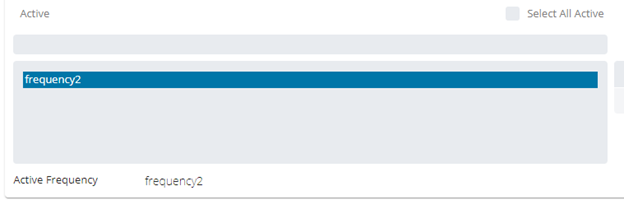
- Select one of the available buttons (
 ), or edit the job-specific settings
 - To remove a frequency, select it from the Active list and select the right arrow button (
 )
) - To add a frequency, select it from the Inactive right side list and select the left arrow button (
 )
)
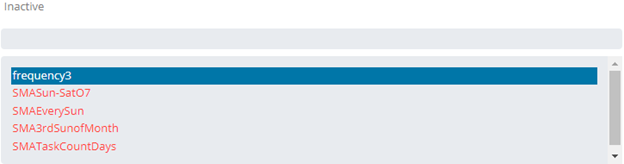
- Select the Save button
FAQs
Q: How many steps does the Viewing and Updating Frequencies procedure involve?
The Viewing and Updating Frequencies procedure involves 7 steps. Complete all steps in order and save your changes.
Q: What does Viewing and Updating Frequencies cover?
This page covers Adding or Updating Frequencies.
Glossary
Frequency: A set of rules that defines when a job or schedule is eligible to run, based on calendar rules, day-of-week settings, period offsets, and other timing criteria.
Resource: A numeric variable in OpCon representing a finite pool. Jobs can be configured to require a set number of resource units to run, limiting concurrent executions and preventing resource contention.
Privilege: A specific permission granted through an OpCon role that controls access to a feature, function, or object type. Privileges are organized into categories such as Function Privileges, Machine Privileges, Schedule Privileges, and Access Codes.
Job: The fundamental unit of work in OpCon. A job defines what to run, on which machine, when to start, and what conditions must be met. Job results are tracked and can trigger events and notifications.