Copying Master Schedules
Theme: Configure
Who Is It For? System Administrator, Automation Engineer
What Is It?
Use this procedure to copy Master Schedules in Solution Manager.
Administration
Required Privileges
To copy a master schedule, the user must be in a role with at least one of the following privileges:
- All Function Privileges
- Maintain Schedules
Copying a Schedule
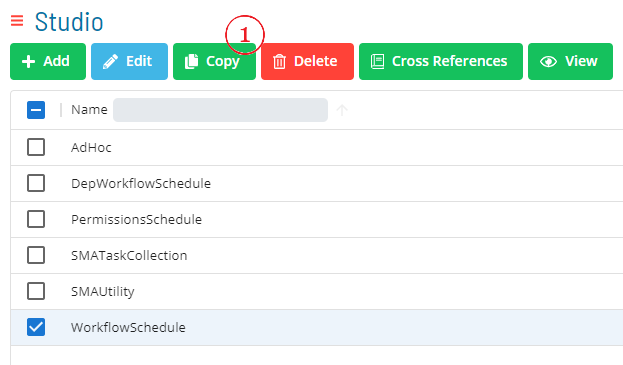
To copy a schedule, go to Studio.
Select a schedule and select Copy.
A dialog opens to define a new Schedule Name with options to Copy Master Jobs and Copy Schedule Privileges.
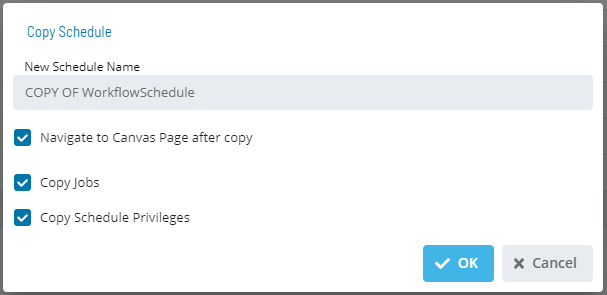
- Enter a new Schedule Name
- To include all jobs from the source schedule, set Copy Master Jobs to True
- To carry forward role-based access privileges from the source schedule, set Copy Schedule Privileges to True
- Select Save to copy the schedule or Cancel to cancel
Copy Dialog Fields
| Field | Type | Default | Description |
|---|---|---|---|
| Schedule Name | String | (required) | The name for the new copied schedule. The name must be unique across all master schedules. |
| Copy Master Jobs | Boolean | False | When set to True, all jobs defined in the source schedule are included in the copy. When set to False, the new schedule is created with no jobs. |
| Copy Schedule Privileges | Boolean | False | When set to True, the role-based access privileges from the source schedule are copied to the new schedule. When set to False, only users with OCADM or the All Function Privileges role privilege are granted access to the new schedule. |
Privilege Inheritance Behavior
When Copy Schedule Privileges is set to False, OpCon does not carry forward the access control list from the source schedule. After the copy completes, only the following users can access the new schedule:
- Users assigned to a role with the OCADM privilege
- Users assigned to a role with the All Function Privileges privilege
All other role-based schedule privileges must be added manually after the copy is complete if broader access is required.
The Copy dialog creates an in-place duplicate of a master schedule directly in the database — no export file is produced. This is distinct from the full ImpEx export/import workflow, which generates a portable file for moving schedules between OpCon environments.
FAQs
Q: Why would you copy master schedules instead of creating a new one?
Copying master schedules is useful when you want to reuse an existing configuration as a starting point. All settings from the original are duplicated, and you can then modify the copy as needed.
Q: Does copying master schedules require a new unique name?
Yes. The copy must be saved with a new unique name to distinguish it from the original master schedules record.
Glossary
Resource: A numeric variable in OpCon representing a finite pool. Jobs can be configured to require a set number of resource units to run, limiting concurrent executions and preventing resource contention.
Role: A named security profile in OpCon that groups privileges together. Roles are assigned to user accounts to control which features, schedules, jobs, machines, and administrative functions a user can access.
Privilege: A specific permission granted through an OpCon role that controls access to a feature, function, or object type. Privileges are organized into categories such as Function Privileges, Machine Privileges, Schedule Privileges, and Access Codes.
Schedule: A named container for jobs in OpCon, built for a specific date to create that day's automation. Schedules define build settings, frequencies, and the jobs that run within them.
Job: The fundamental unit of work in OpCon. A job defines what to run, on which machine, when to start, and what conditions must be met. Job results are tracked and can trigger events and notifications.