Security Settings
What is it?
This page describes two Windows local security policies required for OpCon RPA to interact with the Windows Credential Provider. These settings allow OpCon RPA to unlock and switch desktop sessions for a Robot Task on any supported version of Windows.
Security settings for the Credential Provider
Two security settings are required for desktop session unlocking. These settings allow OpCon RPA to interact with the Windows Credential Provider, which is necessary for session management when a task runs.
The RPA Agent installer registers its own credential provider for this purpose: it installs InteractiveLogonCPx64.dll to C:\Windows\System32 and registers it under HKEY_LOCAL_MACHINE as a COM server and as a Windows credential provider, so the Windows sign-in interface loads it. The RPA Agent service, running as Local System, uses it to unlock and switch desktop sessions when no one is at the machine. The two policies below are what allow that exchange to complete. See Service Accounts and Permissions.
Applying these policies requires local administrator rights on the RPA host. This is a one-time setup step. The accounts that run robot tasks do not need local administrator rights. See Service Accounts and Permissions.
On a stand-alone host running a supported version of Windows, both policies are usually already at the value OpCon RPA needs, so there may be nothing to change and no reboot to take. What most often moves them is domain Group Policy, which can set either one the other way and reapply it later.
Check both values first. If they are already correct, record that in your setup notes and move on. If a policy is set by Group Policy, the change has to be made there rather than locally, or it will be reverted at the next refresh.
The Agent also reports the CTRL+ALT+DEL condition itself: if that policy is not set as OpCon RPA needs it, the Agent's log asks for it by name when it tries to unlock a session. See Permissions Troubleshooting.
1. Do not require CTRL+ALT+DEL
To make interactive logon work, you must disable SAS (Secure Attention Sequence).
Steps
To disable SAS, complete the following steps:
-
Open Administrative Tools > Local Security Policy.
-
Go to Local Policies > Security Options.
-
Find the policy Interactive logon: Do not require CTRL+ALT+DEL.
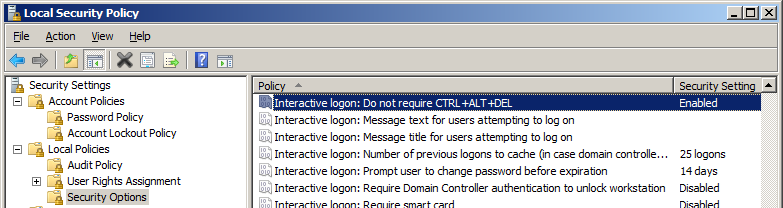
-
Set it to Enabled.
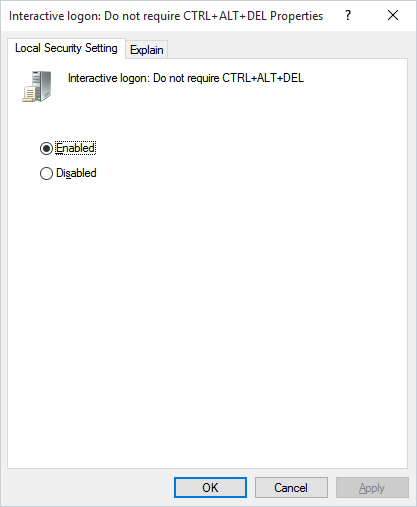
Details
This security setting determines whether pressing CTRL+ALT+DEL is required before a user can log on.
- Enabled: A user is not required to press CTRL+ALT+DEL to log on. Not having to press CTRL+ALT+DEL leaves users susceptible to attacks that attempt to intercept users' passwords. Requiring CTRL+ALT+DEL before users log on ensures that users are communicating by means of a trusted path when entering their passwords.
- Disabled: The user is required to press CTRL+ALT+DEL before logging on to Windows.
Defaults:
| Environment | Default |
|---|---|
| Domain-joined computers | Enabled, unless Group Policy sets it otherwise |
| Stand-alone computers | Enabled |
2. User Account Control: Admin Approval Mode for the Built-in Administrator Account
To communicate with the Credential Provider, disable this setting.
After applying this setting, the computer must be rebooted.
Steps
To disable Admin Approval Mode for the built-in Administrator account, complete the following steps:
- Open Administrative Tools > Local Security Policy.
- Go to Local Policies > Security Options.
- Find the policy User Account Control: Use Admin Approval Mode for the built-in Administrator account.
- Set it to Disabled.
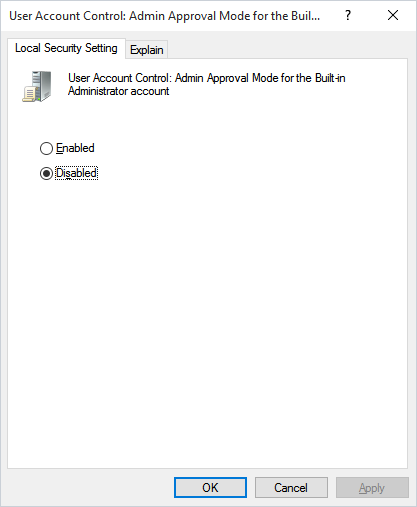
Details
This policy setting controls the behavior of Admin Approval Mode for the built-in Administrator account.
- Enabled: The built-in Administrator account uses Admin Approval Mode. By default, any operation that requires elevation of privilege prompts the user to approve the operation.
- Disabled (Default): The built-in Administrator account runs all applications with full administrative privilege.
FAQs
Why does OpCon RPA need these security settings? The settings allow OpCon RPA to interact with the Windows Credential Provider for session management when it unlocks or switches a desktop session for a Robot Task.
Do I need these settings if all my Robot Tasks use an unattended session? No. In an unattended session OpCon signs the account in over Remote Desktop, so there is no locked session for the Agent to unlock and neither policy comes into play. The credential provider is installed either way — it is installed on every host. See Unattended Session.
Do I need to reboot after changing the Admin Approval Mode setting? Yes. After applying the Admin Approval Mode change, the computer must be rebooted.
Which Windows versions do these settings apply to?
Every supported version of Windows. Session management requires Windows 10 or higher; on anything older the Agent reports Windows 10 or higher is required. For the versions OpCon RPA supports, see System Requirements.
Do I need to keep local administrator rights after applying these settings? No. Applying the policies is a one-time administrator task. Ongoing operation does not require local administrator rights. See Service Accounts and Permissions.
Which OpCon RPA component uses the Credential Provider? The RPA Agent service, which runs as Local System. The Tray Client that runs the automation does not interact with the Credential Provider.
Does OpCon RPA install its own credential provider?
Yes, on every host. The installer installs InteractiveLogonCPx64.dll to C:\Windows\System32 and registers it as a Windows credential provider, so the sign-in interface loads it, and the RPA Agent service passes credentials to it over a named pipe on the local machine. There is no install option that omits it. See Service Accounts and Permissions.
Related topics
Glossary
| Term | Definition |
|---|---|
| Credential Provider | The Windows component that handles user credentials at logon. |
| SAS (Secure Attention Sequence) | The CTRL+ALT+DEL key combination Windows uses to start a trusted path for user authentication. |
| Admin Approval Mode | A User Account Control mode that requires the built-in Administrator account to approve elevated operations. |