SNMP Trap
Theme: Configure
Who Is It For? System Administrator, Automation Engineer
What Is It?
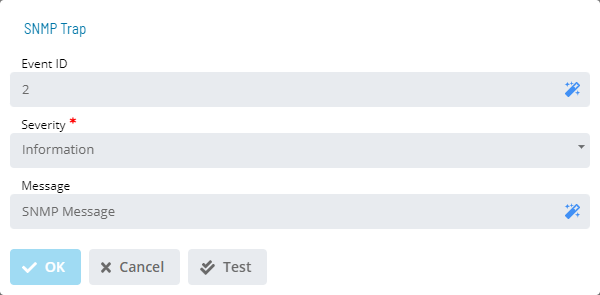
The SNMP Trap dialog provides the following fields for defining an SNMP trap notification:
- Event ID (Optional): Defines a user-defined ID usable as search criteria in a third-party notification filter. The maximum for this field is 64 characters
- The SMA Notify Handler places this ID in the message as:
EventID= XXXXXX - The following characters are not allowed: ~ # % ! @ $ ^
- The SMA Notify Handler places this ID in the message as:
- Severity: Defines the message's severity level. Choices are: Information, Warning, or Error
- Message: Defines a user-defined message up to 3,000 characters. The message also includes default trigger information: Event ID, trigger type, and triggering status change event
Configuration Options
| Setting | What It Does | Default | Notes |
|---|---|---|---|
| Severity | Defines the message's severity level. | trigger information: Event ID | up to 3,000 characters. The message also includes default |
| Message | Defines a user-defined message up to 3,000 characters. | trigger information: Event ID | up to 3,000 characters. The message also includes default |
FAQs
Q: What does SNMP Trap do?
The SNMP Trap dialog provides the following fields for defining an SNMP trap notification:
Q: Where can you find SNMP Trap in OpCon?
Access SNMP Trap through the appropriate section in the Enterprise Manager or Solution Manager navigation.
Glossary
SMA Notify Handler: Processes notifications triggered by Machine, Schedule, and Job status changes. Can send emails, text messages, Windows Event Log entries, SNMP traps, and SPO notifications.
Enterprise Manager (EM): OpCon's rich client graphical user interface for Windows and Linux, used to define schedules and jobs, manage automation data, and perform operational tasks.
Solution Manager: OpCon's browser-based graphical user interface for managing automation data, performing operational actions, and administering the system.
Notification: A message sent by the SMA Notify Handler when a Machine, Schedule, or Job changes to a specific status. Notifications can be delivered as emails, text messages, Windows Event Log entries, SNMP traps, or other formats.
Resource: A numeric variable in OpCon representing a finite pool. Jobs can be configured to require a set number of resource units to run, limiting concurrent executions and preventing resource contention.
OpCon: Continuous' workflow automation platform. The OpCon server includes the database, SAM and Supporting Services (SAM-SS), and graphical user interfaces. agents installed on target platforms run jobs and report results.