OpCon Events
Theme: Configure
Who Is It For? System Administrator, Automation Engineer
What Is It?
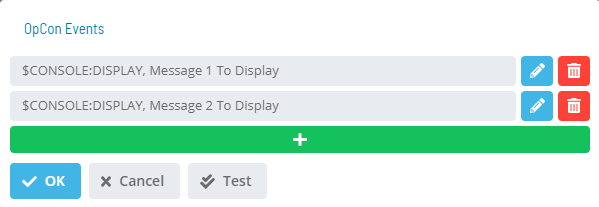
The OpCon Events dialog lists existing events and provides options to add, edit, or delete them.
- Test: Sends a test for the activated notification of the trigger
The OpCon Event dialog provides fields for defining an event. Select an Event Template from the list to begin.
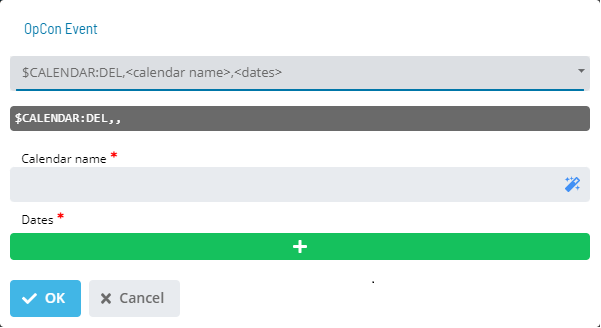
Once you choose a template, the screen dynamically updates to assist with filling out event details.
Insert variables into any part of the Event using the notation ${variable}. The same variable can be used multiple times in the same Event or across Events for the same Service Request; it appears as a single User Input, and the value supplied applies to every instance.
The following system variables are available in Solution Manager:
- ${SM.USER.LOGIN} - Name of the OpCon user who selected the Service Request button
- ${SM.USER.NAME} - Full User Name of the OpCon user who selected the Service Request button
- ${SM.USER.EMAIL} - Email Address of the OpCon user who selected the Service Request button
- ${SM.USER.COMMENTS} - Comments of the OpCon user who selected the Service Request button
Variables are resolved before the Event is sent to OpCon. A preview of the defined Event displays below the Event Template list.
Complete the Event definition, then select OK to apply changes and return to the OpCon Events page, or select Cancel to discard changes.
Configuration Options
| Setting | What It Does | Default | Notes |
|---|
FAQs
Q: What does OpCon Events do?
The OpCon Events dialog lists existing events and provides options to add, edit, or delete them.
Q: Where can you find OpCon Events in OpCon?
Access OpCon Events through the appropriate section in the Enterprise Manager or Solution Manager navigation.
Glossary
Enterprise Manager (EM): OpCon's rich client graphical user interface for Windows and Linux, used to define schedules and jobs, manage automation data, and perform operational tasks.
Solution Manager: OpCon's browser-based graphical user interface for managing automation data, performing operational actions, and administering the system.
OpCon Event: A command sent to OpCon that triggers an automated action, such as adding a job to a schedule, updating a property value, sending a notification, or changing a job or schedule status.
Notification: A message sent by the SMA Notify Handler when a Machine, Schedule, or Job changes to a specific status. Notifications can be delivered as emails, text messages, Windows Event Log entries, SNMP traps, or other formats.
Service Request: A Solution Manager feature that lets operators trigger predefined automation workflows using a simple form. Service Requests encapsulate schedule builds, job submissions, or events without requiring direct access to schedule definitions.
Resource: A numeric variable in OpCon representing a finite pool. Jobs can be configured to require a set number of resource units to run, limiting concurrent executions and preventing resource contention.
OpCon: Continuous' workflow automation platform. The OpCon server includes the database, SAM and Supporting Services (SAM-SS), and graphical user interfaces. agents installed on target platforms run jobs and report results.