Adding Master Jobs
Required Privileges
In order to add a master job, you must have at least all of the following privileges:
- Departmental Function Privilege: User must be at least in a role that has All Function Privileges, Add Jobs To Master Schedules or All Job Master Functions.
Adding a Job
To add a Master Job, go to Library > Master Jobs.
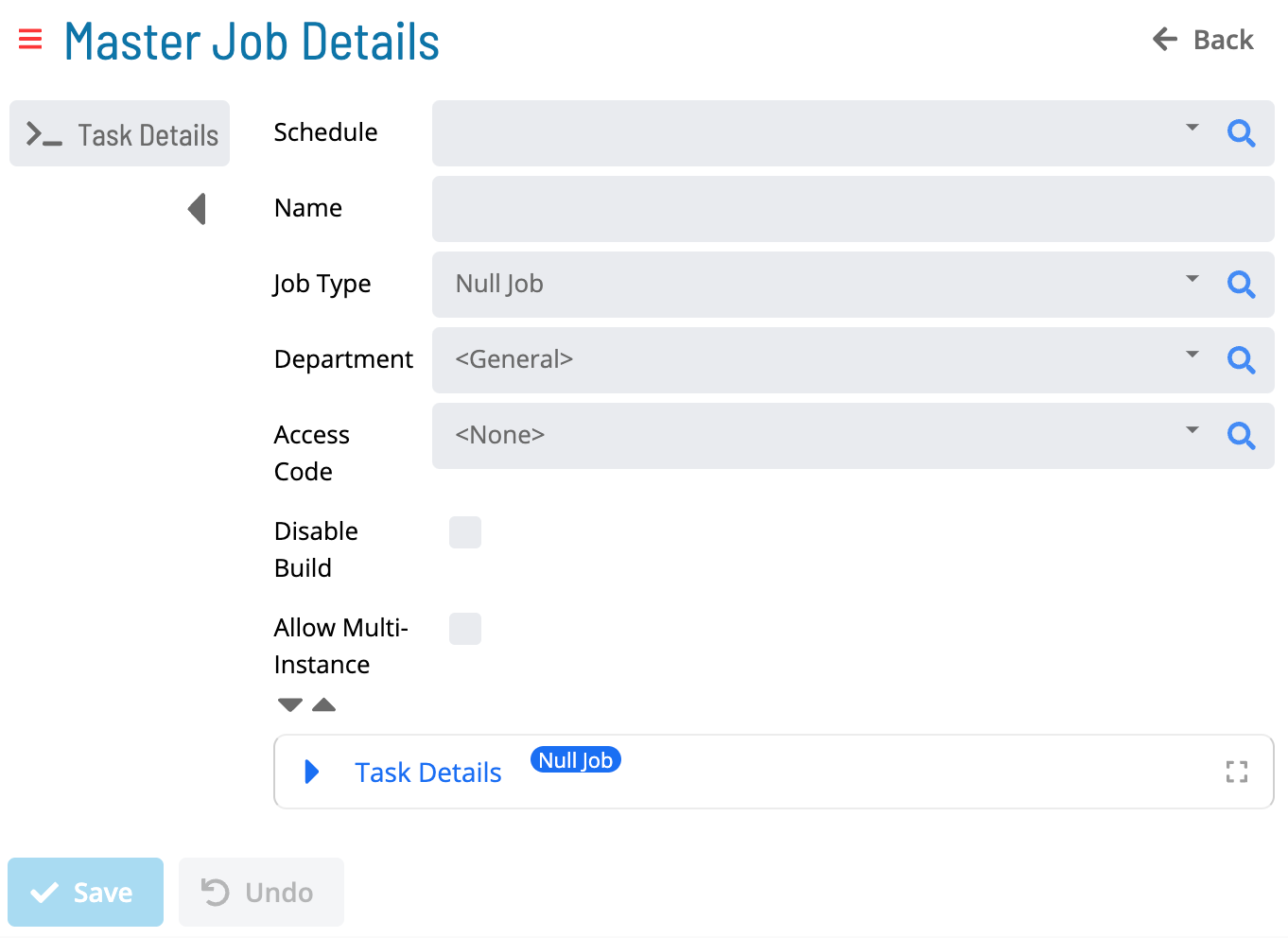
Select Add. The Master Job Details page is displayed:
-
Select a Schedule.
-
Enter a Name.
-
Select a Job Type.
-
Select a Department.
-
Select an Access Code.
-
(Optional) Select the Disable Build checkbox. For more information, refer to Jobs in the Concepts online help.
-
(Optional) Select the Allow Multi-Instance checkbox. For more information, refer to Multi-Instance Jobs in the Concepts online help.
-
Expand the Task Details section and enter the Task Details according to the Job Type.
-
Select Save.
Job Types
Select any of the following links to access instructions for defining platform-specific job information:
- Container Jobs
- File Transfer Jobs
- Null Jobs
- SAP BW Jobs
- SAP R/3 and CRM Jobs
- SQL Jobs
- Unix Jobs
- Windows Jobs
Additional Job Information
Select any of the following links to access instructions for defining additional job information: