Working with Administration
The Administration topic in Enterprise Manager's Navigation Panel gives you access to editors for defining and maintaining the core configuration objects that OpCon uses to run automation: schedules, jobs, machines, machine groups, resources, thresholds, global properties, calendars, and server options.
note
Each editor is visible only when your OpCon role grants the corresponding function privilege. For details, refer to Departmental Function Privileges in the Concepts online help.
Select any Administration item in the following graphic to learn more.
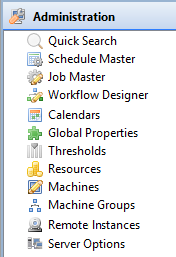
Editors in the Administration topic
The Administration topic provides the following editors. Each item opens a Navigation Editor in the workspace.
| Editor | Purpose | Required privilege |
|---|---|---|
| Schedule Master | Define master schedule properties, frequencies, and build settings | Maintain Schedules |
| Job Master | Define jobs within master schedules, including platform details, frequencies, and dependencies | View Jobs in Master Schedules (departmental) |
| Calendars | Create and maintain named date collections used by schedules and frequencies | Maintain Calendars |
| Global Properties | Define global tokens (name/value pairs) referenced across jobs and events | Maintain Global Properties |
| Thresholds | Define numeric threshold variables used for job dependency and event conditions | Maintain Thresholds/Resources |
| Resources | Define resource pools that limit concurrent job execution | Maintain Thresholds/Resources |
| Machines | Define and configure agent connections for job execution | Maintain Machines |
| Machine Groups | Group agents for use in schedule and job assignments | Maintain Machine Groups |
| Remote Instances | Configure connections to remote OpCon environments | OCADM role only |
| Server Options | Configure OpCon server-wide settings | OCADM role only |
Related topics
- Navigation Editors — how to open, arrange, and manage editor tabs
- Navigation Views — read-only operational views available from the Navigation Panel
- Navigation Panel — overview of all Navigation Panel topics