Managing Solution Manager
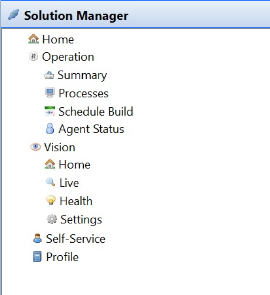
The Solution Manager topic in the Navigation Panel provides links to open Solution Manager modules and pages from within Enterprise Manager. Selecting any item opens Solution Manager in an embedded browser panel.
The Solution Manager topic appears in the Navigation Panel only when the Solution Manager URL General Server Option is defined. After you define a URL and save the value, you must log out of Enterprise Manager and log back in for the Solution Manager option to appear. For more information, refer to Solution Manager URL in the Concepts online help.
To view licensed modules or features, you must have the appropriate privileges. For additional information, refer to Managing Self Service and Working with Vision in the Solution Manager online help.
Solution Manager Navigation Items
The following items are available under the Solution Manager topic in the Navigation Panel.
| Navigation Item | Description |
|---|---|
| Home | Opens the Solution Manager login page. |
| Operation | Parent item for operational views. |
| Operation > Summary | Opens the Operations Summary page. |
| Operation > Processes | Opens the Operations Processes page. |
| Operation > Schedule Build | Opens the Schedule Build page. |
| Operation > Agent Status | Opens the Agent Status page. |
| Vision | Parent item for Vision views. |
| Vision > Home | Opens the Vision home page. |
| Vision > Live | Opens the Vision Live page. |
| Vision > Settings | Opens the Vision Settings page. |
| Profile | Opens your Solution Manager user profile page. |
Open a Solution Manager Page from Enterprise Manager
To open a Solution Manager page from within Enterprise Manager, complete the following steps:
- In the Navigation Panel, expand the Solution Manager topic.
- Select the item you want to open.
Result: Solution Manager opens in an embedded browser panel inside Enterprise Manager, displaying the page associated with the item you selected.