Otto Skills Overview
Skills are the operational actions that Otto can perform in OpCon on your behalf. When you ask Otto to complete a task, it maps your request to the appropriate skill, confirms the action, and runs it using the OpCon REST API.
Otto is available exclusively to cloud customers. On-premises customers do not have access to Otto or its skills.
How Skills Work
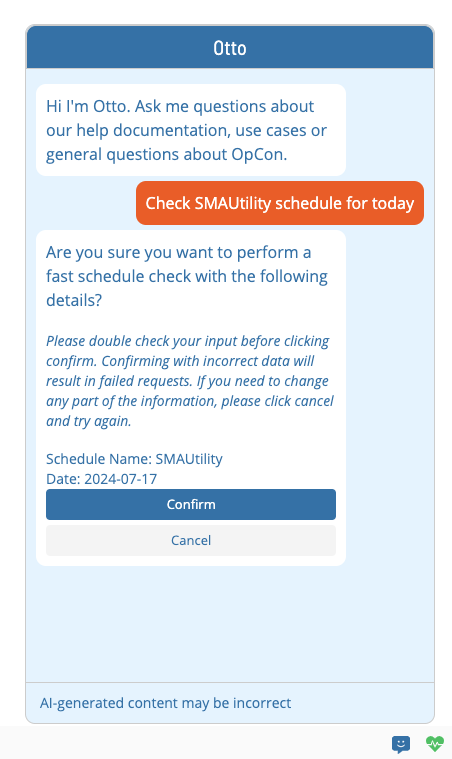
Otto interprets your natural language request and determines whether a matching skill is available and enabled. Before running any action, Otto responds with a confirmation message. If the skill is unavailable or the request fails, Otto responds with an error message.
Skills require the Chatbot Privileges function privilege. Users who are system administrators, who have All Admin Privileges, or who have All Function Privileges also have access. If Otto is disabled at the server level, no skills are returned regardless of user privileges.
Available Skills
The following skills are available in Otto:
| Skill | Description |
|---|---|
| Add Daily Job | Add a job to a schedule in the daily queue |
| Build Schedule | Trigger a schedule build for a specified date |
| Delete Daily Job | Remove a job from the daily queue |
| Get Failed Jobs | Retrieve a list of failed jobs for a specified date |
| Get Failed Schedules | Retrieve a list of schedules with failed jobs |
| Perform a Fast Schedule Check | Run a fast integrity check on a schedule |
| Restart Failed Jobs | Restart all failed jobs in a schedule |
| Retrieve Application Log | Fetch an OpCon application log file |
| Retrieve Job Output | Fetch the output from a completed job |
| Summarize Schedule Build | Get a summary of a recent schedule build |
| Update Job Status | Change the status of a specific job |
| Update Machine Status | Change the communication status of an Agent |
| Update Schedule Status | Change the status of a schedule |