Otto Chatbot Overview
Otto is the AI-powered chatbot in Solution Manager. It understands natural language questions about OpCon, answers questions using the OpCon help documentation, and performs operational actions through built-in skills. Otto is available at the bottom-right corner of every Solution Manager screen via the chat button.
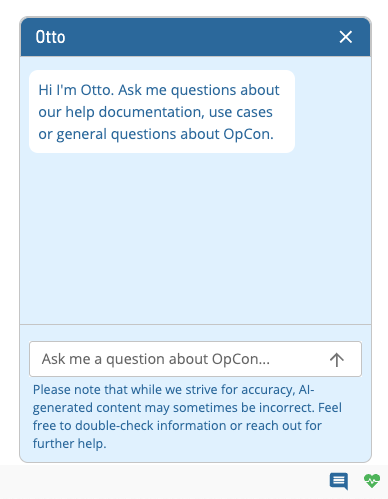
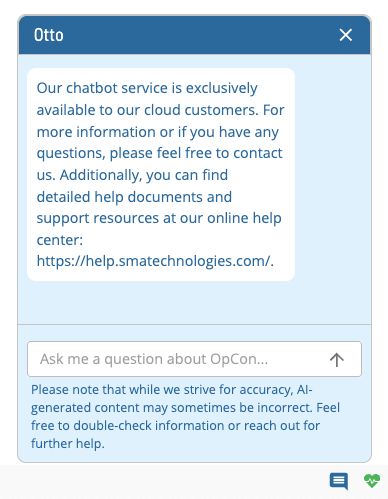
Otto is available exclusively to cloud customers. On-premises customers see a different interface that does not include Otto capabilities.
Access Requirements
To use Otto skills, your user account must have the Chatbot Privileges function privilege. Users who are system administrators, who have All Admin Privileges, or who have All Function Privileges also have access. If Otto is disabled at the server level, no skills are returned regardless of user privileges.
Data and Privacy
Otto uses Azure OpenAI Services, which uses OpenAI's GPT-4o model to generate responses. The service is fully controlled by Microsoft and provides a secure, private environment for processing prompts.
Your prompts (inputs) and completions (outputs):
- are NOT available to other customers
- are NOT available to OpenAI
- are NOT used to improve OpenAI models
- are NOT used to improve any Microsoft or third-party products or services
- are NOT used for automatically improving Azure OpenAI models for your use in your resource
- are NOT used to fine-tune any models
Microsoft hosts the OpenAI models in its Azure environment. The service does not interact with any services operated by OpenAI (for example, ChatGPT or the OpenAI API). Azure OpenAI Service includes content filtering and abuse monitoring to reduce the risk of harmful use.
Data Flow
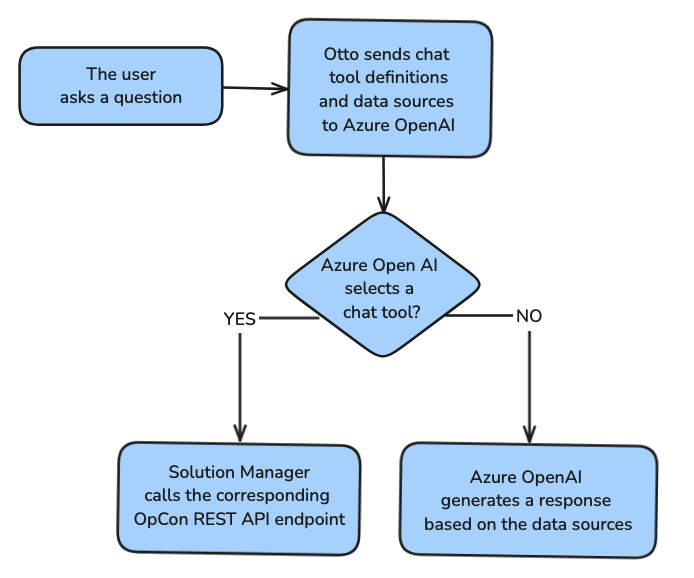
The following diagram illustrates how your data is processed.
Chat Tool Definitions
Chat tool definitions are provided by the OpCon REST API. They give Otto context to determine whether a user is asking a question about OpCon or requesting a skill.
Data Sources
Otto uses OpCon help documentation to answer questions about OpCon.
Features
Otto provides the following capabilities:
- Search: Otto searches the OpCon documentation to answer your questions.
- Skills: Otto performs operational tasks in OpCon on your behalf. Before running any action, Otto responds with a confirmation message. If the skill is unavailable or the request fails, Otto responds with an error message.
Available Skills
| Skill | Description |
|---|---|
| Add Daily Job | Add a job to a schedule in the daily queue |
| Build Schedule | Trigger a schedule build for a specified date |
| Delete Daily Job | Remove a job from the daily queue |
| Get Failed Jobs | Retrieve a list of failed jobs for a specified date |
| Get Failed Schedules | Retrieve a list of schedules with failed jobs |
| Perform a Fast Schedule Check | Run a fast integrity check on a schedule |
| Restart Failed Jobs | Restart all failed jobs in a schedule |
| Retrieve Application Log | Fetch an OpCon application log file |
| Retrieve Job Output | Fetch the output from a completed job |
| Summarize Schedule Build | Get a summary of a recent schedule build |
| Update Job Status | Change the status of a specific job |
| Update Machine Status | Change the communication status of an Agent |
| Update Schedule Status | Change the status of a schedule |
For details on each skill, see Otto Skills Overview.