Working in User Mode
Theme: Configure
Who Is It For? System Administrator, Automation Engineer
What Is It?
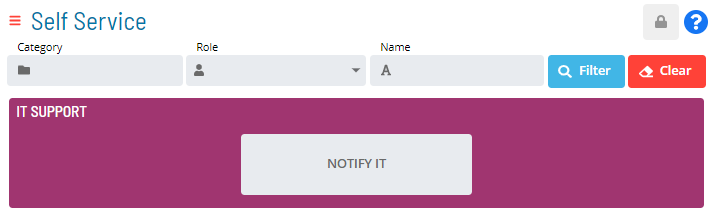
Users not in the «ocadm» role or a role with the «Maintain Service Request» privilege see a Self Service page showing only the Service Request buttons their roles permit.
User Mode Self Service Page Display
 Related Topics
FAQs
Q: What can you do in User Mode?
User Mode provides access to related configuration and management tasks. Use the navigation options to add, edit, or delete records as needed.
Q: Who can access user mode in OpCon?
Access is controlled by the privileges assigned to your OpCon role. Contact your system administrator if you need access to user mode.
Glossary
Service Request: A Solution Manager feature that lets operators trigger predefined automation workflows using a simple form. Service Requests encapsulate schedule builds, job submissions, or events without requiring direct access to schedule definitions.
Resource: A numeric variable in OpCon representing a finite pool. Jobs can be configured to require a set number of resource units to run, limiting concurrent executions and preventing resource contention.
Role: A named security profile in OpCon that groups privileges together. Roles are assigned to user accounts to control which features, schedules, jobs, machines, and administrative functions a user can access.
Privilege: A specific permission granted through an OpCon role that controls access to a feature, function, or object type. Privileges are organized into categories such as Function Privileges, Machine Privileges, Schedule Privileges, and Access Codes.
OpCon: Continuous' workflow automation platform. The OpCon server includes the database, SAM and Supporting Services (SAM-SS), and graphical user interfaces. agents installed on target platforms run jobs and report results.