Creating Service Requests
Theme: Configure
Who Is It For? System Administrator, Automation Engineer
What Is It?
Use this procedure to create Service Requests in Solution Manager.
To create a new service request, complete the following steps:
- Select the Create button

- Define the parameters (see below)
- Select Save to display the button
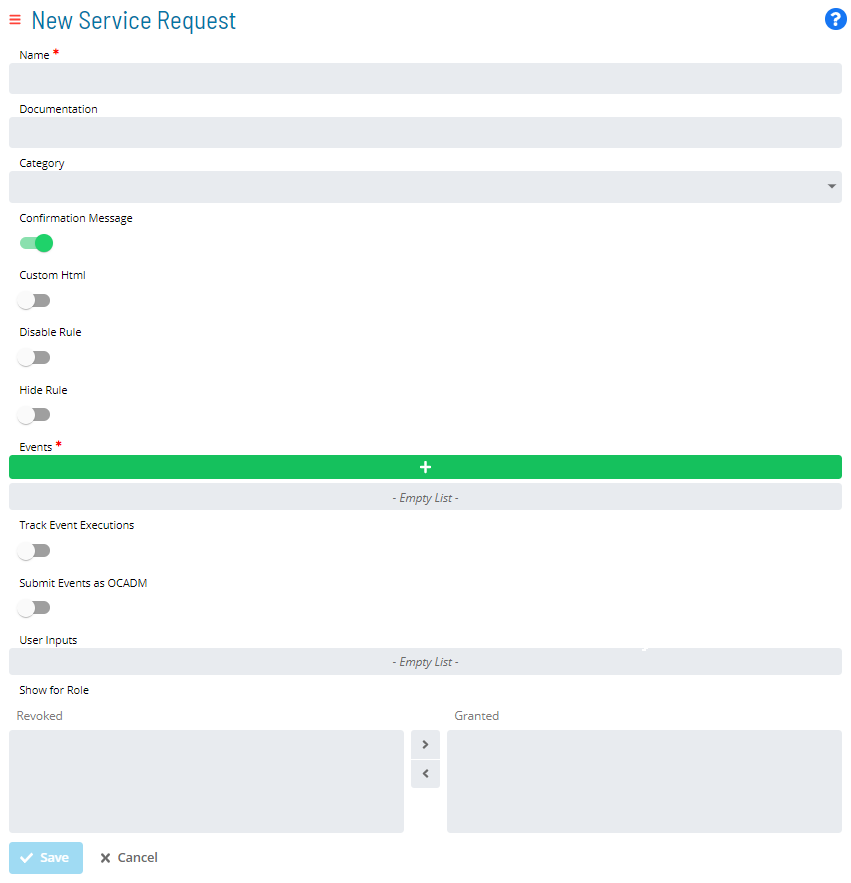
- Name
(Required)- The name displayed on the Service Request button
- Documentation
(Optional)- Instructions shown to users about what the Service Request does
- Category
(Optional)- Associates the Service Request with a pre-defined category
Refer to Creating Categories for instructions.
- Confirmation Message
(Optional)- When toggled on, shows the Documentation on the confirmation page when the button is selected
- Must be set to
Truewhen a User Input (Environmental Variable) is defined
- Custom HTML
(Optional)- Customizes the HTML for the Service Request button display
Refer to Stylizing Service Request Buttons for more detail.
- Disable Rule
(Optional)- Defines a rule to disable the button after it is selected
Refer to Disabling or Hiding Service Request Buttons for instructions.
- Hide Rule
(Optional)- Defines a rule to hide the button after it is selected
Refer to Disabling or Hiding Service Request Buttons for instructions.
- Events
(Required)- Defines the OpCon Events initiated by the button
Refer to Setting up OpCon Events for more detail.
- Track Event Executions
(Optional)- Monitors jobs dynamically added by the Service Request
- Tracks $JOB:ADD jobs so users can verify successful completion
- The Service Request completes only when all added jobs finish; if a job fails, the Service Request fails
- Submit Events as OCADM
(Optional)- Sends OpCon Events as ocadm (requires ocadm role)
- Events proceed without privilege checks when enabled
- When disabled, SAM checks the clicking user's privileges before processing events
- User Inputs
(Optional)- Variables defined in OpCon Events are automatically used as User Inputs
- Displayed when the button is selected, allowing users to supply values for event variables
Refer to Setting up User Inputs for more detail.
- Show For Role
- Assigns the Service Request to one or more OpCon Roles
- Only users in the granted roles can view and initiate the Service Request
Refer to Setting up Privileges for more detail.
Exception Handling
Track Event Executions job fails and the Service Request fails — When the Track Event Executions option is enabled, a Service Request completes only when all added jobs finish; if any tracked job fails, the Service Request itself is marked as failed — Review the failed job's output and logs to determine the root cause, correct the job definition or data, and resubmit the Service Request.
Confirmation Message is not set to True when a User Input is defined — When a Service Request includes User Input fields (such as Environmental Variable inputs), the Confirmation Message setting must be True; if it is not set, the Service Request cannot be submitted correctly — Set the Confirmation Message option to True whenever one or more User Input definitions are present on the Service Request.
FAQs
Q: How many steps does the Creating Service Requests procedure involve?
The Creating Service Requests procedure involves 3 steps. Complete all steps in order and save your changes.
Glossary
SAM (Schedule Activity Monitor): The logical processor for OpCon workflow automation. SAM monitors schedule and job start times, dependencies, and user commands to determine job execution timing, and processes OpCon events.
OpCon Event: A command sent to OpCon that triggers an automated action, such as adding a job to a schedule, updating a property value, sending a notification, or changing a job or schedule status.
Service Request: A Solution Manager feature that lets operators trigger predefined automation workflows using a simple form. Service Requests encapsulate schedule builds, job submissions, or events without requiring direct access to schedule definitions.
Resource: A numeric variable in OpCon representing a finite pool. Jobs can be configured to require a set number of resource units to run, limiting concurrent executions and preventing resource contention.
Role: A named security profile in OpCon that groups privileges together. Roles are assigned to user accounts to control which features, schedules, jobs, machines, and administrative functions a user can access.
Privilege: A specific permission granted through an OpCon role that controls access to a feature, function, or object type. Privileges are organized into categories such as Function Privileges, Machine Privileges, Schedule Privileges, and Access Codes.
Job: The fundamental unit of work in OpCon. A job defines what to run, on which machine, when to start, and what conditions must be met. Job results are tracked and can trigger events and notifications.
OpCon: Continuous' workflow automation platform. The OpCon server includes the database, SAM and Supporting Services (SAM-SS), and graphical user interfaces. agents installed on target platforms run jobs and report results.