Working in Admin Mode
Theme: Configure
Who Is It For? System Administrator, Automation Engineer
What Is It?
Users in the ocadm role or a role with the Maintain Service Request privilege will see a Self Service page that is similar to the example graphic here.
Admin Mode Self Service Page Display
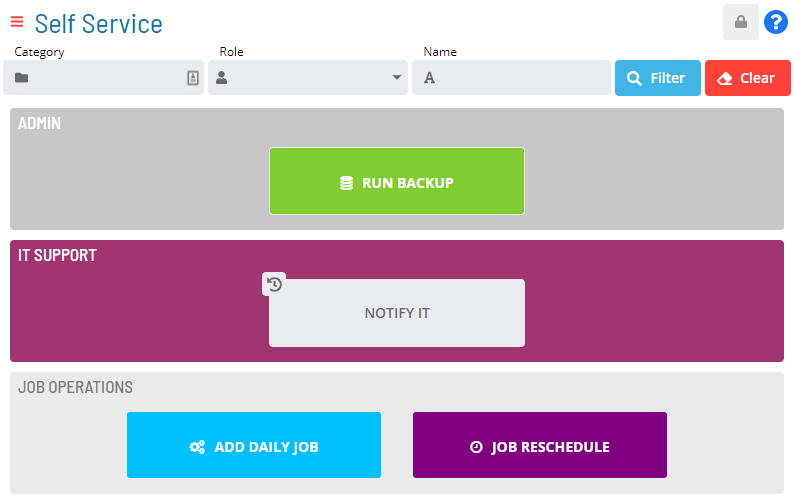
For more on Function Privileges including those pertaining to the Maintaining Service Requests, refer to Function Privileges in the Concepts online help.
 Related Topics
- Filter Service Requests
- Create Service Requests
- Manage Service Requests
- Stylize Service Requests
- Set up OpCon Events
- Set up Privileges
- Set up User Inputs
- View Service Request Processes
FAQs
Q: What can you do in Admin Mode?
Admin Mode provides access to related configuration and management tasks. Use the navigation options to add, edit, or delete records as needed.
Q: Who can access admin mode in OpCon?
Access is controlled by the privileges assigned to your OpCon role. Contact your system administrator if you need access to admin mode.
Glossary
OpCon Event: A command sent to OpCon that triggers an automated action, such as adding a job to a schedule, updating a property value, sending a notification, or changing a job or schedule status.
Service Request: A Solution Manager feature that lets operators trigger predefined automation workflows using a simple form. Service Requests encapsulate schedule builds, job submissions, or events without requiring direct access to schedule definitions.
Resource: A numeric variable in OpCon representing a finite pool. Jobs can be configured to require a set number of resource units to run, limiting concurrent executions and preventing resource contention.
Role: A named security profile in OpCon that groups privileges together. Roles are assigned to user accounts to control which features, schedules, jobs, machines, and administrative functions a user can access.
Privilege: A specific permission granted through an OpCon role that controls access to a feature, function, or object type. Privileges are organized into categories such as Function Privileges, Machine Privileges, Schedule Privileges, and Access Codes.
OpCon: Continuous' workflow automation platform. The OpCon server includes the database, SAM and Supporting Services (SAM-SS), and graphical user interfaces. agents installed on target platforms run jobs and report results.