Viewing Service Request Process Indicators
Theme: Configure
Who Is It For? System Administrator, Automation Engineer
What Is It?
When you submit a Service Request and form validation succeeds, a page displays the execution status via a progress bar. Select the OK button to exit the page.
Service Request Execution Status Pages
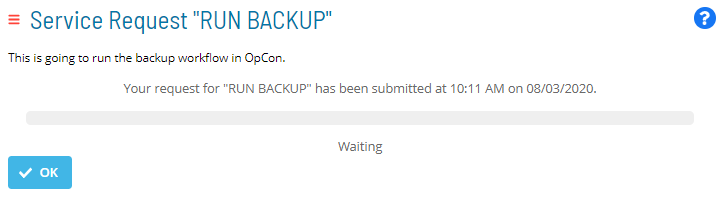
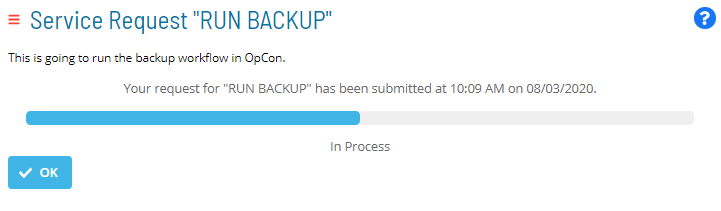
Once a Service Request is run, an Execution indicator appears at the top-left corner of the Service Request button.
Execution Indicator on Service Request Button
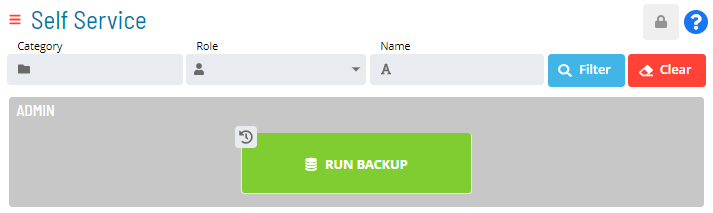
- The Execution indicator displayed as
 indicates the number of concurrent Service Request executions still in process
 - The Execution indicator displayed as
 indicates that the Service Request has a previous execution history record
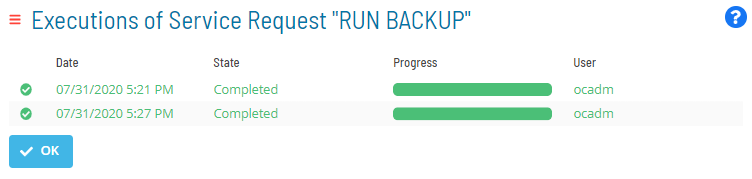
Select the Execution indicator to access the history record of any processing or processed instances. This history is a sortable table that displays:
- The date on which the Service Request was triggered
- The current state and progress of the Service Request
- The user who triggered the Service Request
Service Request Execution History Record
 :::
:::
FAQs
Q: What information does the Service Request Process Indicators view display?
The Service Request Process Indicators view displays the current state and details for the selected item. Use this view to monitor status and take action as needed.
Glossary
Service Request: A Solution Manager feature that lets operators trigger predefined automation workflows using a simple form. Service Requests encapsulate schedule builds, job submissions, or events without requiring direct access to schedule definitions.
Resource: A numeric variable in OpCon representing a finite pool. Jobs can be configured to require a set number of resource units to run, limiting concurrent executions and preventing resource contention.