Unique Task Count Report
Theme: Configure
Who Is It For? System Administrator, Automation Engineer
What Is It?
The Unique Task Count Report shows unique task counts by date, agent type, and department.
By default this report displays records for the current month. Use the column filters to customize results.
This report has a maximum return limit of 100,000 records.
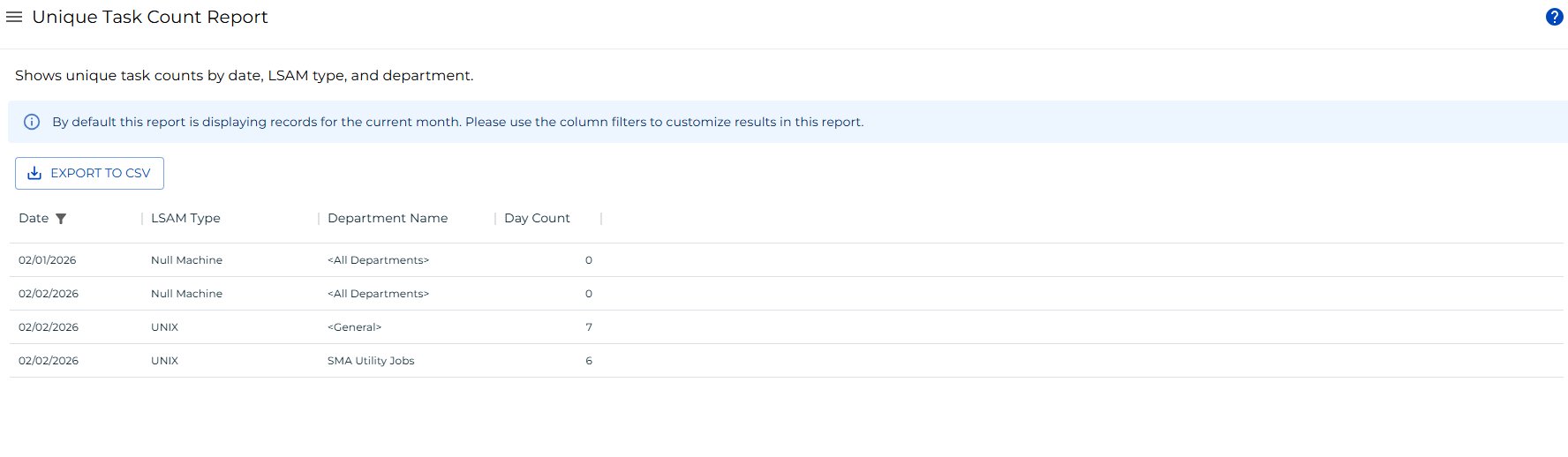
Filtering and Sorting
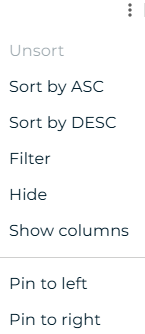
This report provides filters for date, agent type, department name, and day count. Open the filters panel by selecting the menu (three dots) in any column header and choosing Filter.
Exporting to CSV
Select the export  button to download the report as a CSV. Any active filters are applied to the export.
FAQs
Q: What does the Unique Task Count Report show?
The Unique Task Count Report shows unique task counts grouped by date, agent type, and department. It defaults to the current month and has a maximum return limit of 100,000 records.
Q: Where can you find the Unique Task Count Report in OpCon?
Go to Library > Reporting in Solution Manager and select Unique Task Count Report from the REPORTS tab.
Glossary
Agent: An application installed on a target platform that runs jobs in the native language of that platform and reports results back to OpCon. Agents are defined as Machines in OpCon.
Solution Manager: OpCon's browser-based graphical user interface for managing automation data, performing operational actions, and administering the system.
Department: An organizational grouping in OpCon used to assign jobs to logical divisions. User roles can be scoped to specific departments, controlling which jobs a user can manage.
OpCon: Continuous' workflow automation platform. The OpCon server includes the database, SAM and Supporting Services (SAM-SS), and graphical user interfaces. Agents installed on target platforms run jobs and report results.